Choosing an Open Source Content Management System
Discover how an open source content management system can empower your website. Explore top platforms and learn how to choose the right CMS for your project.

An open source content management system is a unique kind of software where the source code—the very blueprint of the platform—is made public. This means anyone can look at it, change it, and share it for their own projects. It’s a fundamentally collaborative way of building software, standing in sharp contrast to proprietary systems where the code is kept under lock and key.
What Is an Open Source CMS
Let’s think about it like building a kitchen. A proprietary (or closed-source) CMS is a bit like buying a pre-fabricated kitchen from a big-box store. It looks great and it works, but you're stuck with their designs, their appliances, and their pricing. If you want a custom feature or a repair, you have to go through them.
An open source CMS, on the other hand, is like getting the blueprints to a professional kitchen for free. You and a whole community of expert builders have access to the same plans. You can build it as-is, or you can modify it to your heart's content, adding exactly the features you need with help from a global network of peers.
The Power of Shared Blueprints
This "shared blueprints" idea is what makes open source so powerful. Instead of a single company dictating the software’s direction, a worldwide community of developers works together to improve it. This collaborative environment cultivates a few key benefits:
- No Licensing Fees: The core software is almost always free. You can download and use it without paying hefty upfront costs.
- Complete Customization: Full access to the source code gives you the freedom to tweak, extend, and rebuild any part of the platform to match your specific goals.
- Community-Driven Support: When you run into a problem, you’re not alone. Solutions are often found quickly through public forums and shared knowledge from thousands of active users.
- Freedom from Vendor Lock-In: You own your site and its code, period. You're never trapped with one company for hosting, support, or essential updates.
This infographic lays out the core pillars that make an open source CMS such a compelling choice for so many.
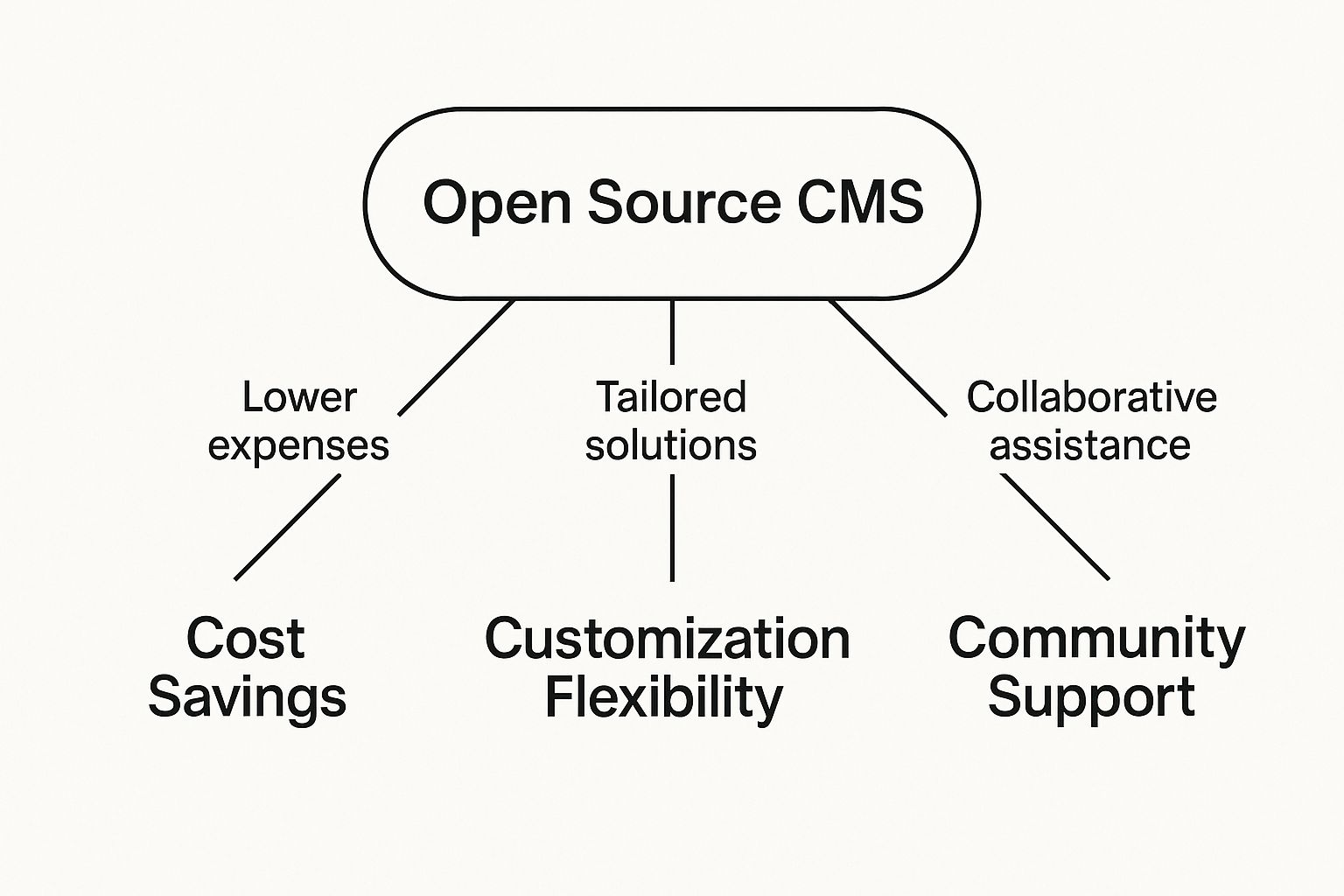
As the visual shows, the pillars of cost, flexibility, and community aren't separate—they all support and reinforce one another.
The real power of an open source CMS lies in its transparency and collective ownership. When thousands of developers can inspect and contribute to the code, security vulnerabilities are found and fixed quickly, and innovation happens at a much faster pace.
You can see the impact of this model everywhere. Today, a staggering 64% to 68.7% of all websites are built on a CMS, and the vast majority of those run on open source platforms like WordPress, Drupal, and Joomla. This market dominance, across a field of over 800 different platforms, speaks volumes about the real-world advantages of flexibility and community power.
Open Source vs Proprietary CMS at a Glance
To put it simply, the choice between open source and proprietary comes down to a trade-off between control and convenience. Here’s a quick breakdown of the core differences.
| Feature | Open Source CMS | Proprietary CMS |
|---|---|---|
| Cost | No license fees; costs are for hosting/customization | Subscription or license fees; often all-inclusive |
| Flexibility | Highly customizable; modify code directly | Limited to vendor's features and integrations |
| Support | Community-based (forums, docs); paid experts | Dedicated support team from the vendor |
| Ownership | You own and control your code and data | You're licensing the software; vendor has control |
| Ease of Use | Varies; can be more technical to set up | Often very user-friendly out of the box |
| Security | Transparent code, community-vetted | "Security through obscurity"; trust the vendor |
Ultimately, neither path is inherently better—it all depends on your team's technical skills, budget, and long-term goals.
If you're ready to see what's out there, you might be interested in browsing through our curated collection of open source CMS platforms.
The Strategic Advantages of Going Open Source
Choosing an open source content management system isn't just a technical decision—it's a strategic one that can give your business a serious competitive edge. The most obvious win is the cost. You can forget about steep licensing fees. Proprietary software often comes with hefty, recurring subscriptions, but the core of an open source CMS is completely free. This frees up your budget to focus on what really matters: custom development and creating great content.
This financial flexibility is a game-changer for businesses of all sizes. A startup can get a powerful, professional website off the ground without breaking the bank. Meanwhile, a larger company can shift money that would have gone to licensing fees toward building out unique features that directly serve their customers. It's about taking back control and owning your digital presence, free from restrictive vendor contracts.
Escaping Vendor Lock-In
When you sign on with a proprietary CMS, you're essentially tethered to one company for everything—updates, support, and often even hosting. Trying to leave can be a technical and financial nightmare. This is a classic case of vendor lock-in, and it can seriously stifle your growth.
Open source software smashes those chains. You own your code and your data, period. That means you have the complete freedom to pick your hosting provider, hire any developer you want, and find the support that works for you. This autonomy is crucial for future-proofing your website. If your hosting company starts to underperform or you outgrow your development agency, you can just switch. No need to rebuild everything from the ground up.
Unmatched Flexibility and Community Power
The real magic of open source CMS lies in its incredible flexibility. With full access to the source code, there are virtually no limits to what you can build. Your development team can tweak, extend, and integrate the platform with just about any other tool in your tech stack. Imagine connecting your CMS directly to a custom, in-house inventory system—a task that would be difficult, if not impossible, with a closed-source solution.
This power is supercharged by a vibrant, global community of developers who are constantly working on the software.
- Rapid Innovation: With thousands of minds contributing, new features and creative solutions pop up far faster than a single company's dev team could ever manage.
- Stronger Security: Think of it as having thousands of expert eyes on the lookout. Security flaws are usually found and fixed with incredible speed, making the whole system more resilient.
- A Massive Knowledge Base: Stuck on a problem? Chances are, someone in the community has already solved it. You have access to a wealth of documentation, forums, and shared wisdom to help you out.
An open source platform is a living ecosystem. Its value grows not just from what the original creators built, but from the continuous contributions and collective intelligence of its worldwide user base.
This collaborative spirit ensures the software keeps pace with evolving web standards and user demands. To make the most of it, it's vital to follow smart guidelines. For a deeper dive, take a look at our guide to content management best practices. When you choose an open source CMS, you’re not just picking a piece of software; you're investing in control, scalability, and the power of a global community.
A Look at the Top Open Source CMS Platforms
Diving into the world of open source CMS options can feel a lot like picking out a new car. You’ve got your all-terrain trucks, your zippy city cars, and your versatile SUVs. Each one offers a different blend of power, ease of use, and customization—the right choice really depends on where you're going and who's behind the wheel.
Let’s take a look at the three titans of the open source world: WordPress, Drupal, and Joomla. Each has carved out a unique space by catering to different needs, from a straightforward personal blog to a sprawling enterprise application.
WordPress: The Undisputed Market Leader
There's a good reason WordPress is the first name that comes to mind when you think of a CMS. It's the ultimate all-purpose vehicle—astonishingly user-friendly, endlessly customizable, and backed by a massive global community. Its dashboard is so intuitive that even complete beginners can start publishing content right away, and its colossal library of plugins and themes means you can add just about any feature you can imagine.
This accessibility has led to staggering market dominance. First launched back in 2003, WordPress has stayed at the top of the pack for two decades. Recent data shows it powers a mind-boggling 43.5% of all surveyed websites. That translates to over 61% of the market for sites using a known CMS. While that number has dipped slightly from its all-time high, its influence is undeniable. You can find more details in the latest CMS market share trends on searchenginejournal.com.
This screenshot from the WordPress.org homepage really gets to the heart of its mission: making web publishing accessible to everyone.
The welcoming language and focus on community perfectly illustrate why it’s the default open source content management system for bloggers, small businesses, and creators. If this platform sounds like a good fit, you can get a better sense of its capabilities in our overview of WordPress tools.
Drupal: The Enterprise Powerhouse
If WordPress is the do-it-all SUV, then Drupal is the armored truck. It’s engineered for security, scalability, and managing complex data with military-grade precision. This makes it a favorite among government agencies, major universities, and large corporations—organizations that can’t afford to compromise on security and need to manage intricate user permissions.
All that power comes with a steeper learning curve. Drupal’s backend is geared more toward developers, but this complexity unlocks some serious advantages:
- Granular Control: You get incredibly sophisticated systems for user roles and access permissions right out of the box.
- Taxonomy System: Its ability to classify, organize, and connect complex types of content is simply unmatched.
- Security: Drupal is famous for its dedicated security team and has a rock-solid reputation as one of the most secure platforms available.
Choosing Drupal is an investment in industrial-strength architecture. It's designed for projects where security, performance under load, and complex content modeling are non-negotiable requirements from day one.
Joomla: The Versatile Middle Ground
Joomla carves out a nice spot right between the user-friendliness of WordPress and the robust architecture of Drupal. It comes with more advanced features built-in than WordPress—like out-of-the-box multilingual support and better user management—but doesn't demand the deep developer expertise that Drupal often does.
This makes Joomla a great contender for community-driven websites, e-commerce stores, and online directories that need a bit more structural integrity than a typical blog. Its community and library of extensions may not be as vast as what WordPress offers, but it provides a structured and highly capable framework for developers who find WordPress a little too simple and Drupal a bit too intimidating.
When you start looking at open source content management systems, it’s easy to get bogged down in a long list of technical specs. But what really separates a decent platform from a great one? It comes down to a handful of core features that make or break your ability to create content, collaborate as a team, and scale your website over time.
At its heart, the system has to work for your content team, not against them. That journey begins with a solid What You See Is What You Get (WYSIWYG) editor. This tool lets non-technical users build and format pages visually, almost like using a word processor. Another absolute must-have is a reliable version history. Think of it as a safety net that tracks every change, letting you roll back to a previous version of a page in a click. No more panic over an accidental deletion.
Customization and Extensibility
The real beauty of an open source CMS is its adaptability. This flexibility generally comes from two key areas: themes and plugins.
- Themes and Templates: These dictate the look and feel of your website. A good CMS will have a marketplace full of pre-made themes to get you started, but it also won't get in your way when a developer needs to build a completely custom design from the ground up.
- Plugins and Extensions: These are like apps for your website. Need a contact form, an online store, or better analytics? There's probably a plugin for that. The size and quality of a platform’s plugin library is often a pretty good sign of how healthy and active its community is.
A truly modern CMS acts as a foundational framework, not a restrictive box. Its core value comes from providing a stable, secure base upon which you can build a unique digital experience tailored to your specific goals.
Getting a handle on the underlying framework helps you appreciate what the CMS can really do. For a deeper look into how these systems are put together, the concepts in A Technical Guide to Modern Web Application Architecture offer some great context on how all the pieces fit together.
Core Administrative and Security Tools
Beyond just creating content, a serious CMS needs strong administrative tools to manage the site as it grows. Granular user roles and permissions are non-negotiable. You need the ability to control exactly who can create, edit, publish, or delete content. This is crucial for keeping your content quality high and your site secure as more people join the team.
And speaking of security, it can't be an afterthought. The best platforms have dedicated security teams, a transparent process for reporting issues, and a track record of releasing patches quickly. The open-source model actually helps here—with so many eyes on the code, vulnerabilities are often found and fixed faster than with closed-source software.
Finally, you need built-in SEO tools. A good CMS gives you direct control over the fundamentals, like custom URL structures, meta titles, descriptions, and image alt text. If the system makes SEO a chore, it’s actively working against your site’s ability to get found. To see the full picture, you can learn more about essential content management system features in our detailed guide.
Essential Feature Checklist for CMS Evaluation
To help you sort through the options, I’ve put together a quick checklist. Use this table as a scorecard when you’re comparing different open source CMS platforms to make sure you’re not overlooking any critical functionality.
| Feature Category | Core Functionality | Why It Matters |
|---|---|---|
| Content Creation | Intuitive WYSIWYG editor, version history, media library | Empowers non-technical users to create and manage content without developer help. Prevents costly mistakes. |
| Customization | Access to themes/templates, robust plugin ecosystem | Allows you to control the site's appearance and add new features without custom coding everything from scratch. |
| User Management | Granular roles and permissions, user-friendly dashboard | Ensures content quality and security by giving team members access only to the functions they need. |
| SEO | Customizable URLs, meta tags, sitemaps, redirects | Provides the foundational tools needed to optimize your site for search engines and drive organic traffic. |
| Security | Regular security patches, dedicated security team, community support | Protects your website and user data from threats. An active community helps identify and fix vulnerabilities faster. |
| Performance | Built-in caching, image optimization, clean code output | A fast website improves user experience and is a key ranking factor for search engines like Google. |
This checklist isn't exhaustive, but it covers the non-negotiables. If a CMS you're considering falls short in any of these key areas, it’s worth thinking twice about whether it’s the right foundation for your long-term goals.
How to Select the Right Open Source CMS
When it comes to picking an open-source CMS, there's no single "best" answer. The real goal is to find the platform that’s the best fit for your unique situation. This means taking a hard, honest look at what you’re trying to build, who’s going to build it, and what you’re willing to spend.
Getting this part right from the start saves you from a world of headaches later. You'll avoid picking a system that’s too basic for your vision or, just as bad, one that’s so complicated your team can’t actually use it.
First things first, you need to define your project's core purpose. Are you launching a high-volume e-commerce shop where security and transaction speed are everything? Or is it a media site that needs a slick, intuitive workflow for writers and editors? The answer will immediately point you toward certain systems and away from others.
Assess Your Technical and Financial Resources
Let's talk about your team. Do you have developers on staff who live and breathe back-end code? If so, a highly customizable, developer-centric platform could be perfect. If not, you’ll want to lean toward a CMS known for its user-friendly interface and massive library of off-the-shelf plugins.
And then there's the money. The software may be free, but running a website isn't. You need to budget for hosting, potential custom development work, and the ongoing maintenance that keeps everything secure and up-to-date. As you plan, don't forget the foundational step of choosing a domain name registrar to secure your spot on the web.
The ideal open source CMS aligns perfectly with three key pillars: your team’s technical proficiency, your project’s primary objective, and your long-term budget for maintenance and growth. A mismatch in any of these areas can lead to significant friction down the road.
Plan for Scalability and Future Growth
Finally, think about the future. Where do you see this website in five years? You need a platform that can grow with you, whether that means handling a massive spike in traffic or adding complex new features.
The global CMS market is on track to hit $54 billion for a reason—businesses need tools that can scale. The e-commerce space alone is projected to expand at a CAGR of 10.8%, which shows just how critical adaptable platforms are. You can discover more insights about these CMS statistics on magecomp.com.
A system that’s perfect for a small launch might crumble under pressure later. Look for a CMS with a robust API and a reputation for smooth, predictable upgrades. If you think you might eventually want to push content to a mobile app or other devices, you should start thinking about a headless setup now. For more on that, take a look at our guide comparing different headless CMS solutions. Answering these questions today makes your choice a solid investment for tomorrow.
The Future of Open Source Content Management
The world of open source content management isn’t standing still. The pressure is on to deliver digital experiences that are faster, more intelligent, and far more adaptable than ever before. The single biggest change driving this evolution is the industry-wide pivot toward headless and composable architectures.
Imagine a traditional CMS as a complete, pre-built store. The building, the shelves, and the products are all one unit. A headless CMS, on the other hand, just manages the inventory (your content). You can then build any kind of storefront you want—a website, a mobile app, a kiosk—and pull from that same inventory. This separation is what enables genuine omnichannel strategies, where your content appears flawlessly everywhere.
Emerging Trends to Watch
This fundamental architectural shift is opening the door to some powerful new capabilities that are shaping the next wave of content management. These aren't just buzzwords; they're practical innovations that are already changing how companies operate.
- AI-Powered Content Tools: Artificial intelligence is weaving its way into the CMS, automating tedious jobs like generating SEO metadata or personalizing content on the fly for each visitor. This frees up your content team to do what they do best: think strategically and create compelling material.
- Prioritizing Digital Accessibility: There's a much-needed and growing focus on making the web usable for everyone, including people with disabilities. The best modern CMS platforms are building accessibility checks and best practices right into their core, making it easier to build inclusive experiences from the ground up.
The core principle of open source—adaptability—makes it uniquely suited to embrace these changes. A flexible, community-driven platform is not just a tool for today but an investment in navigating the technological advancements of tomorrow.
By choosing a modern open source system, you’re not just picking a tool for today. You’re building a foundation that’s ready for a future where content has to be dynamic, personalized, and accessible to all.
Frequently Asked Questions
When you're exploring the world of open source content management systems, a few questions almost always pop up. These platforms are incredibly powerful, but getting a handle on the real-world details of cost, security, and future-proofing is crucial before you dive in.
Is an Open Source CMS Really Free?
This is probably the most common question, and the short answer is: not exactly. While the core software itself has zero licensing fees—which is a huge advantage—thinking of it as completely "free" is a bit of a misnomer. You get the software without paying for a license, but you're still on the hook for all the other components that make a website work.
You should budget for expenses like:
- Web Hosting: The server where your website lives.
- Domain Name: Your site's unique address, like yoursite.com.
- Custom Development: Any specialized features or design work that isn't available out of the box.
- Premium Plugins/Themes: Many advanced tools and professional designs come at a cost.
- Ongoing Maintenance: This includes updates, backups, and security checks.
It helps to think of it like being given a high-performance car engine for free. It's an amazing start, but you still need to build the car around it, buy gas, and pay for regular maintenance to keep it on the road.
How Secure Are These Platforms?
Security is another big one. It seems counterintuitive, doesn't it? If the source code is open for anyone to see, wouldn't that make it an easy target for hackers?
In reality, the opposite is usually true. The open nature of the code means there's a massive global community of developers—thousands of experts—who are constantly reviewing it, hunting for bugs, and flagging potential weaknesses.
Think of it as a neighborhood watch for your website's code. When one person spots something suspicious, the entire community rallies to fix it, releasing a patch that strengthens the system for everyone. This constant, collaborative vigilance often makes open source platforms incredibly resilient.
Can I Migrate to a Different CMS Later?
Yes, but it's never a simple drag-and-drop process. Each CMS has its own unique way of structuring and storing data, from blog posts to user profiles.
Moving from one system to another is a major project. It involves carefully extracting all your content, reformatting it for the new platform, and ensuring all your functionality still works. While it’s absolutely possible, it demands technical expertise and meticulous planning. You'll likely need specialized tools or help from a developer to make sure the transition is smooth and that nothing important gets lost or broken along the way.