Building Your Own Custom CMS Software
Is custom CMS software the right move? This guide covers the strategic benefits, costs, architecture, and development process to help you decide.

A custom CMS is a content management system built from the ground up to solve the specific problems of one organization. Unlike an off-the-shelf system like WordPress, which has to serve millions of different users, a custom-built platform gives you absolute control over every feature, workflow, and security measure. It's less of a tool and more of a central nervous system for your digital operations.
What Is Custom CMS Software Exactly
The easiest way to think about it is with a housing analogy. Off-the-shelf platforms are like well-built prefabricated homes. They’re reliable, get you moved in quickly, and follow a proven design. The catch? You're stuck with someone else's floor plan, and you’ll always be working around its inherent limitations.
A custom CMS, on the other hand, is like commissioning an architect to design your dream home. Every single element is engineered to match your exact specifications. The workflows, integrations, and even the user interface are built for the way your team actually works, not how a software developer thinks they should work.
This difference is everything. A custom solution isn't just about publishing content; it becomes a central hub that connects seamlessly with the other critical tools that run your business.
Beyond a Simple Blogging Tool
Let's be clear: off-the-shelf systems are fantastic for running a standard blog or a simple company website. Where they start to creak and groan is when your business processes don't fit neatly into their pre-built molds.
For example, a generic platform might fall short when you need:
- A complex, multi-stage approval workflow that has to pass through legal, compliance, and marketing.
- A dynamic product catalog where pricing changes based on a customer's location or membership status.
- Deep integration with proprietary, legacy software, like an old-school ERP or a highly specialized CRM.
For many businesses, these aren’t niche requirements; they're daily realities. Trying to bend a generic tool to fit these needs usually ends in a clunky, inefficient mess held together with a fragile web of expensive plugins and custom code.
A custom CMS isn’t about piling on more features. It's about engineering a digital foundation that mirrors and streamlines your unique business logic, creating a competitive advantage that pre-built solutions simply can't match.
A Strategic Infrastructure Investment
Opting to build a custom CMS is a strategic move. You're trading the immediate setup speed of a boxed solution for long-term operational efficiency and scalability. It’s an admission that your digital presence is more than a marketing brochure—it's a core piece of your business infrastructure. You can see this perspective reflected in discussions about website development with a custom Content Management System.
The real aim is to build a system that automates workflows, enforces brand consistency, and delivers a secure, high-performance experience for everyone, from your internal team to your customers. At its heart, the CMS in web development acts as the engine for your entire digital operation. A custom solution ensures that engine is perfectly tuned to your needs and ready to adapt as your business grows.
Strategic Advantages of a Custom Built CMS

Deciding to build a custom CMS isn't just a technical choice; it's a foundational business strategy. While off-the-shelf platforms get you up and running quickly, a system built from the ground up offers real-world advantages that can define your competitive edge and deliver lasting value. You're not just managing content—you're creating a digital engine perfectly tuned to your unique operations.
The justification for the investment becomes crystal clear when you look at the outcomes. From iron-clad security to incredible flexibility, each benefit directly solves a common headache that growing businesses eventually hit when using generic software.
Unmatched Flexibility and Scalability
The biggest draw of a custom CMS is its pure adaptability. Off-the-shelf systems box you into their way of doing things, which can seriously cramp your style as your business grows and changes. A custom solution, on the other hand, is molded around your actual workflows and can be expanded or tweaked whenever you need.
Think of a global e-commerce brand juggling a massive, complex product catalog. Their system has to navigate different pricing, regulations, and languages across dozens of countries. A generic CMS would need a messy patchwork of plugins to even come close, but a custom platform is engineered from the start to handle that complexity without breaking a sweat. This built-in flexibility means the CMS grows with you, not against you.
Fortified and Proactive Security
Security isn't a one-size-fits-all game. Widely used platforms like WordPress are huge targets for hackers for a simple reason: they're everywhere. A single vulnerability can be exploited across millions of sites. In stark contrast, custom CMS software has a much smaller and less obvious attack surface.
Better yet, you can design security protocols around your specific threats and compliance needs.
- Custom User Roles: Move beyond generic "Admin" or "Editor" roles. Create granular permissions that give team members access only to what they absolutely need to do their job.
- Targeted Encryption: Apply specific encryption standards based on data sensitivity, whether you're protecting customer PII or sensitive financial records.
- Compliance-First Architecture: Build the system to meet strict standards like HIPAA or GDPR from the ground up, instead of trying to bolt on compliance features later.
A custom CMS lets you shift from a reactive to a proactive security posture. You’re not just installing plugins and hoping for the best; you're building a digital fortress designed to protect your most valuable assets.
Seamless and Deep Integrations
Today's businesses rely on a whole suite of specialized tools—CRMs, ERPs, marketing automation software, and internal databases. A major weakness of pre-built systems is that their integrations are often shallow, leading to frustrating data silos and manual, error-prone work.
A custom CMS is built to be the central hub of your entire digital operation. Its APIs are designed from scratch to talk flawlessly with your other critical systems, creating a single, unified flow of information. This might mean a customer's website activity appears instantly in their CRM profile, or that inventory numbers from your ERP are updated in real-time on your e-commerce store. This level of deep integration turns a collection of separate tools into a powerful, cohesive machine.
Optimized Performance and User Experience
Off-the-shelf platforms are notoriously bloated. They come loaded with features and code that 90% of users will never touch. All that extra weight slows down your website, which hurts both the user experience and your SEO rankings. We all know that slow load times kill conversions; studies have repeatedly shown that even a one-second delay can cause bounce rates to spike.
A custom-built CMS contains only the code required to run your specific features, making it a much leaner and faster application. Performance is engineered for your content, your features, and your expected traffic, guaranteeing a snappy experience for your internal team and your customers. For any business where speed is a weapon, this optimization is priceless.
While this guide focuses on custom solutions, you can explore a broader comparison by checking out our guide on the best CMS system options available today.
Total Ownership and Freedom
At the end of the day, investing in custom CMS software means you own it. Period. You’re free from vendor lock-in, sudden price hikes, or the nightmare scenario where a provider discontinues a key feature—or their entire platform. This ownership gives you complete control over your digital future, empowering you to pivot, adapt, and innovate on your own terms.
When to Choose a Custom CMS for Your Business
Making the call to build custom CMS software is a major strategic step. It’s the point where you stop borrowing someone else’s tools and start forging your own digital asset. While off-the-shelf platforms are more powerful than ever, there are clear tipping points where their one-size-fits-all nature starts to actively hold a business back.
Knowing when to make that leap isn't about hitting a certain revenue number or employee count; it's about complexity. When your internal processes, regulatory requirements, or customer-facing experiences become too specific for a generic framework, the conversation has to change. The question evolves from "Which CMS should we use?" to "Should we build our own?"
Your Workflows Are Highly Specialized
The most frequent catalyst for going custom is workflow complexity. Most standard CMS platforms are built around a simple, linear "draft, edit, publish" model. But what happens when your reality is far more convoluted?
Think about these scenarios:
- A Medical Journal: Content needs to pass through a multi-stage peer review with various external reviewers, editors, and compliance officers. Each role requires specific permissions and the ability to leave annotations.
- A Financial Services Firm: Before a new product page goes live, it must get sequential sign-off from legal, marketing, and regulatory teams, all while maintaining a perfect, unchangeable audit trail of every single edit.
- A Global E-commerce Retailer: A single product requires unique content localized by regional teams, who all manage different descriptions, pricing, and promotional materials from within one unified system.
If your content lifecycle is tangled up with multiple stakeholders, conditional rules, and strict approval chains, you've probably pushed a generic CMS past its breaking point.
Stringent Compliance and Security Mandates
For any business in a regulated field, security and compliance aren't just good ideas—they're legal requirements with steep penalties. An off-the-shelf system, even one loaded with security plugins, might not offer the fine-grained control needed to meet standards like HIPAA in healthcare or GDPR in Europe.
A custom CMS lets you weave compliance directly into its DNA. You can engineer features like precise role-based access to limit who sees what, create custom data retention rules, and implement specialized encryption for sensitive user information. You're not just adding a lock to a pre-built house; you're designing a secure vault from the foundation up.
The infographic below really puts the differences between off-the-shelf and custom platforms into perspective when it comes to these complex needs.
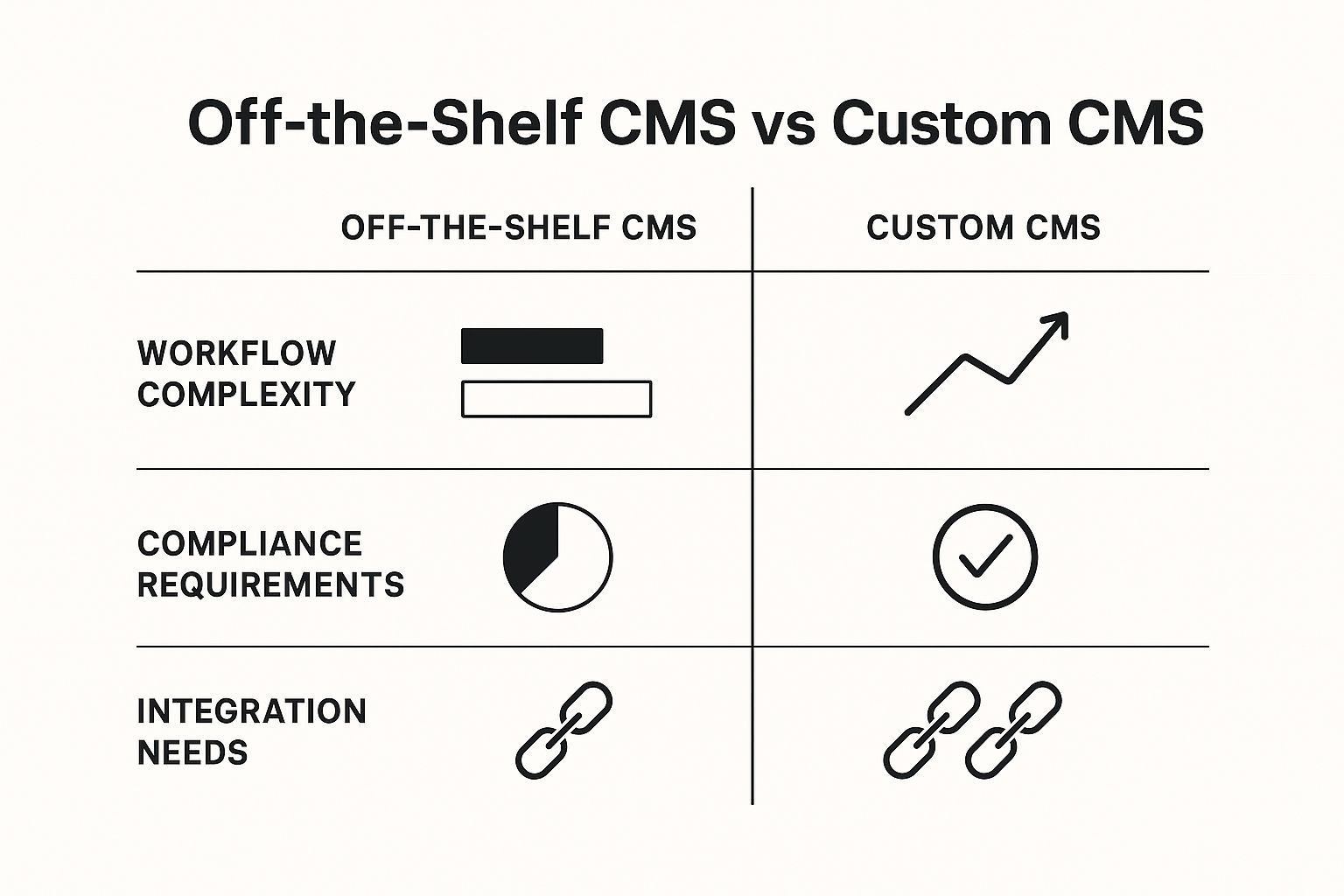
This visual shows how custom solutions are truly purpose-built for the messy, intricate requirements that generic platforms can only ever approximate. This is a big decision, and it’s always smart to weigh the build or buy software question before committing.
Deep Integration with Legacy Systems
Many established companies operate on a complex web of proprietary or aging software, from an old-school ERP to a completely custom-built CRM. While off-the-shelf CMS platforms have marketplaces full of integrations, they’re often surface-level and probably won't talk to your unique, in-house tools.
When your CMS needs to be the central nervous system for your entire tech stack—pulling real-time data from multiple, disconnected systems—a custom build is often the only realistic path forward. It lets developers create powerful, two-way APIs made just for your existing infrastructure. This breaks down data silos and automates critical processes that would otherwise demand clumsy, manual workarounds. For those whose needs aren't quite this complex, you can explore our collection of no-code CMS alternatives.
The decision to build a custom CMS is rarely sudden. It’s the result of accumulating operational friction, where the time and resources spent forcing a generic tool to work exceed the initial investment in a tailored solution.
As of early 2025, content management systems power over 80 million live websites, showing just how fundamental they are. Even with platforms like WordPress dominating the market, there's a growing appetite for custom CMS development, especially in enterprises that need highly specific features and security. With the CMS market expected to reach $23.17 billion by 2025, the demand for systems built to fill the gaps left by generalized platforms is stronger than ever.
Key Features of Modern Custom CMS Architecture
https://www.youtube.com/embed/-Uor3I0n_vQ
Building a custom CMS software solution isn't just about ticking off a feature list. It's about making deliberate architectural choices that dictate the system's power, flexibility, and lifespan. A truly modern CMS isn't one giant, monolithic application; it's a symphony of well-designed components working together. The philosophy behind its construction will define everything from its scalability to the daily experience of your content team.
One of the first and most critical decisions you'll face is choosing between a traditional, monolithic architecture and a modern, headless approach. This one choice has a massive ripple effect, impacting how and where your content can be delivered and setting the foundation for your entire digital strategy.
The Headless vs. Monolithic Decision
A monolithic CMS is what most people picture when they think of a classic, all-in-one system. Imagine an old television set: the screen (the frontend) and all the internal electronics (the backend) are fused together in a single box. It's a self-contained unit built to manage and display content on a specific website. This approach is straightforward, but it can also be incredibly confining.
A headless CMS, on the other hand, intentionally severs that connection. The "body" (the backend) is a pure content repository, while the "head" (the frontend presentation layer) is completely detached. This API-first design treats your content like electricity from a power plant—it can be channeled anywhere it’s needed.
This distinction is absolutely fundamental for today's multi-channel world. A headless architecture lets you:
- Power multiple platforms from one source: Use the same content to fuel your website, a mobile app, an in-store digital kiosk, and even a smartwatch app.
- Future-proof your content: When the next big digital channel arrives, you just build a new "head" to display your content. You don't have to start from scratch.
- Improve performance and security: Separating the content management environment from the public-facing application creates a smaller attack surface and allows for a faster user experience.
Diving into platforms like those covered in our guide to the Strapi CMS can give you a much clearer picture of how this works in practice.
To better understand the trade-offs, let's compare these two architectural models side-by-side.
Custom CMS Architecture Comparison
This table breaks down the key differences between the traditional monolithic approach and the modern API-first headless model.
| Feature | Monolithic (Traditional) CMS | Headless (API-First) CMS |
|---|---|---|
| Structure | Tightly coupled backend (content) and frontend (display). | Decoupled backend and frontend. |
| Content Delivery | Primarily delivers content to a single website or template. | Delivers content via API to any channel (web, mobile, IoT). |
| Flexibility | Limited. Frontend changes often require backend adjustments. | Highly flexible. Frontend can be built with any technology. |
| Developer Experience | Often restricted to the CMS's specific language and framework. | Freedom to use modern frameworks (React, Vue, Angular, etc.). |
| Best For | Simple websites, blogs, or projects with a single channel. | Multi-channel strategies, complex applications, future-proofing. |
Each model has its place, but the headless approach is quickly becoming the standard for businesses that need to deliver content beyond a single website.
Modular and Component-Based Design
Looking past the headless debate, the internal structure of your custom CMS software is just as important. A modular, component-based design is the key to long-term agility. Instead of creating rigid, full-page templates, this approach focuses on building reusable "blocks"—things like a hero banner, a product feature grid, or a customer testimonial.
Your content team can then assemble pages dynamically, mixing and matching these components to create new layouts on the fly. This not only gives them incredible creative freedom but also locks in brand consistency, since each block is pre-designed and styled. For developers, it means updating a single component automatically updates it everywhere it's used, which is a massive time-saver.
The goal of a modern custom CMS is not to create rigid templates but to provide a flexible set of brand-approved building blocks. This empowers non-technical teams to build rich, dynamic experiences without needing a developer for every small change.
An Intuitive Authoring Experience
Even the most powerful backend is worthless if your content team finds it clunky or confusing. A critical feature of any successful custom CMS is a thoughtfully designed authoring experience. This is about so much more than a simple text editor.
It means creating an interface that mirrors your team's actual workflows. You need custom fields, clear labeling, and logical content structures. If your team publishes in-depth case studies, the CMS should have a dedicated content model with fields for "Challenge," "Solution," and "Results"—not a generic "blog post" template they have to bend to their will. This focus on usability is what drives adoption and makes your team more efficient.
While major platforms like WordPress are popular, a surprising number of businesses go their own way. In fact, nearly 29.6% of websites don't use a recognizable CMS at all; many of these run on custom-built systems designed for very specific needs. You see this often in industries like finance or healthcare, where a purpose-built system is the only way to handle complex integrations and strict regulations. With the global CMS market projected to grow at 4.91% annually through 2029, much of that investment is flowing into custom development as businesses look to gain a competitive edge.
The Custom CMS Development Process And Costs
Taking a custom CMS from a great idea to a fully functioning platform is a methodical process. It's not a mad dash to the finish line; it’s a carefully planned project that unfolds in distinct phases to ensure the final product actually solves your business problems. Getting a handle on these phases is the key to understanding your timeline and, more importantly, the budget.
The real work starts long before anyone writes a single line of code. It begins with a deep dive into your organization's specific workflows, pain points, and ambitions. Only then does the process move into design, development, and rigorous testing before the system finally gets into your team's hands.
The Phased Approach To Development
Building a custom system is always a close collaboration between your team and the development partner you choose. While every project is different, the lifecycle typically follows a clear path designed to minimize surprises and maximize your return.
Here's how a typical project breaks down:
- Discovery and Strategy: This is, without a doubt, the most important stage. It involves intensive workshops to map out everything—content workflows, technical requirements, user permissions, and necessary integrations. The deliverable here is a rock-solid project scope, a technical specification document, and a clear roadmap.
- UX and UI Design: With a strategy locked in, designers get to work creating wireframes and then pixel-perfect mockups. They're designing not just what the public sees, but also the backend authoring environment where your team will spend their time. It has to be intuitive.
- Backend and Frontend Development: This is where the blueprint becomes a building. Backend developers construct the database, APIs, and the core logic that makes everything run. At the same time, frontend developers turn the designs into a living, breathing, and responsive user interface.
- Quality Assurance (QA) Testing: Before anything goes live, a dedicated QA team puts the system through its paces. They test every single feature across different browsers and devices, actively hunting for bugs, probing for security holes, and ensuring the platform can handle real-world stress.
- Deployment and Training: Once the system gets the green light from QA, it’s deployed to a live server. The final, critical step is to train your team thoroughly so they feel confident and ready to make the most of their new, purpose-built tool.
Deconstructing The Costs
So, what’s the price tag on a custom CMS? The honest answer is always: "It depends." Unlike an off-the-shelf product with a set fee, the cost of a custom build is a direct reflection of the time and talent needed to create it.
Several factors will determine the final investment:
- Feature Complexity: A basic content editor is one thing. A system with intricate, multi-stage approval workflows or a bespoke personalization engine is a whole different ballgame.
- Integration Needs: Need to connect to a modern CRM with a standard API? That's fairly straightforward. But integrating with several outdated, legacy systems requires a significant amount of custom development.
- Technology Stack: The programming languages, frameworks, and cloud infrastructure you choose will impact both the initial development hours and the ongoing hosting fees.
- Team Experience and Location: The hourly rate for a team of senior developers in a major tech hub will, of course, be different from that of a junior or offshore team.
A key part of the financial analysis is comparing the one-time development cost of a custom CMS against the never-ending subscription fees of enterprise-level SaaS platforms. When you build custom, you are creating an asset your company owns, not just renting a service.
The global market for content management software is on track to hit $47.4 billion in 2025 and is projected to reach $117.5 billion by 2032. That growth isn't just from subscriptions. A huge, often overlooked, part of it is driven by companies investing in their own custom platforms to get a leg up. You can explore more about the growing CMS market on coherentmarketinsights.com.
Planning For The Long Term
The initial build is just the beginning of the financial picture. After launch, you’ll need a budget for ongoing maintenance, support, and future enhancements. The good news is that these costs are typically far more predictable than being at the mercy of a vendor's sudden price hikes.
On top of that, a well-built custom CMS is a security advantage. Because it doesn't use the same code as thousands of other websites, it's a much harder target for attackers. That said, you can't get complacent. You can learn more in our guide to essential website security best practices. In the end, investing in a custom system is a strategic play—a decision to build a scalable, secure digital asset that’s perfectly suited to serve your business for years.
Your Custom CMS Questions, Answered
Alright, we've covered the what and the why. But let's be honest, when it comes to a big project like building a custom CMS, the real questions are usually about time, money, and the nitty-gritty tech decisions. It's a major commitment, so it's only natural to wonder what you're truly getting into.
This is where we get practical. Think of this section as sitting down with an experienced architect before you break ground. We'll tackle the most common—and most critical—questions we hear from organizations weighing a custom build. The goal is to strip away the jargon and give you the straightforward answers you need.
How Long Does It Take To Build a Custom CMS?
This is always the first question, and the honest answer is: it depends entirely on what you're building. For a relatively straightforward CMS—think core content tools, a clean interface, and a simple front-end—you could be looking at a 3 to 6-month timeframe.
But that's just the starting point. The timeline can stretch out quickly once you add layers of complexity. Here are the big factors that move the needle:
- Tricky Integrations: Need to pull data from a single, modern API? That's one thing. Having to sync with a handful of ancient, proprietary systems? That's a whole different ballgame and adds significant time.
- Elaborate Workflows: A simple "draft, review, publish" process is quick to implement. But if you need a system with multi-level approvals that loop in your legal and compliance teams based on specific conditions, you're adding serious development hours.
- The Team Itself: The size, experience, and synergy of the development team are huge variables. A seasoned, well-oiled team can navigate challenges much faster than a less experienced one.
For a truly robust, enterprise-level custom CMS, a more realistic window is often 8 to 12 months. Don't skimp on the initial discovery and planning phase; a little extra time spent mapping everything out upfront will save you from major delays down the road.
What Is the Typical Cost of a Custom CMS?
Just like the timeline, the cost is a direct function of the complexity. While there's no magic number, we can talk in realistic ranges. The final price tag is ultimately determined by the sheer number of developer hours it takes to turn your vision into a functioning product.
A smaller, focused custom CMS with a core set of features might land in the $50,000 to $150,000 range. For a large-scale, mission-critical solution with deep third-party integrations, strict security protocols, and a headless architecture built to serve content everywhere, the investment can easily climb from $250,000 to over $1 million.
It's so important to shift your mindset here. This isn't just another business expense. You're making a capital investment in a proprietary asset—one that can give you a genuine edge over the competition, unlike a monthly subscription for software you'll never own.
How Do We Choose the Right Technology Stack?
Picking the right tech is a foundational decision. It has long-term implications for your CMS's performance, how easily it can grow, and how much it will cost to maintain. This shouldn't be a decision made in a silo; it has to be a collaborative conversation between your business leaders and your development partner.
First off, look at what you're already working with. If your in-house IT team is full of Python experts, it probably doesn't make sense to build a system in a language they can't support. Playing to your team's existing strengths is a smart move.
Second, the architectural approach—monolithic versus headless—is a major fork in the road that dictates a lot of your tech choices. Going headless, for instance, opens up a world of modern front-end frameworks like React or Vue.js, which are fantastic for crafting lightning-fast, dynamic user experiences.
Finally, you have to think beyond launch day. The technology you choose needs to do more than just solve today's problems. It needs to have a healthy, active community behind it and be capable of handling your future ambitions without forcing you into a corner. Making a forward-looking choice now prevents a hugely expensive and painful rebuild a few years from now.