A Practical Guide to Cloud Based CMS Platforms
Discover how a cloud based CMS works, its key benefits, and how to choose the right platform. Your complete guide to modern content management.

So, what exactly is a cloud-based CMS? At its core, it's a content management system that lives entirely on the internet, accessible from any web browser. Instead of you having to install and maintain software on your own company servers, you subscribe to a service. The provider handles all the nitty-gritty technical stuff—the infrastructure, security, and updates—so your team can just focus on creating and managing great digital content.
What Is a Cloud Based CMS
Let's use an analogy. A traditional, on-premise CMS is like owning a standalone bookstore. You're responsible for everything: the building itself, the security system, the shelving, and all the ongoing maintenance. If the roof starts leaking or the power goes out, that’s your problem to fix. This approach requires a hefty upfront investment in hardware and a dedicated IT team just to keep the lights on.
A cloud-based CMS, on the other hand, is like leasing a beautiful, fully-serviced retail space in a modern shopping mall. The mall management handles all the infrastructure for you—the security guards, the electricity, building maintenance, even the cleaning crew. This leaves you free to concentrate on what you do best: arranging your products and helping your customers.
This analogy really gets to the heart of the shift in responsibility. With a cloud platform, the vendor is the one worrying about server uptime, applying software updates, and patching security vulnerabilities. This model completely changes the financial picture, turning a huge capital expenditure (buying and setting up servers) into a predictable operating expense (your monthly or annual subscription fee).
From Local Servers to Global Access
The real magic of this model lies in its accessibility and flexibility. Because the whole system is in the cloud, your team can log in and work from anywhere in the world, as long as they have an internet connection. This is a game-changer for remote and distributed teams, allowing them to collaborate on creating, editing, and publishing content without being chained to a central office network.
This global reach is a massive reason why so many organizations are moving on from older, traditional systems. For a more detailed look at the fundamentals, you can learn more about what a CMS is and how it works.
A cloud-based CMS liberates your team from the complexities of infrastructure management, allowing them to publish content faster, scale effortlessly, and collaborate from any location.
This isn't just a minor technical tweak; it's a strategic move that fundamentally changes how digital operations work. By handing off the burden of infrastructure management, companies gain a serious amount of agility. They can react to market trends faster, launch new websites or campaigns without getting bogged down in long development cycles, and automatically handle huge spikes in web traffic. In today's market, that kind of agility is a massive competitive advantage.
Understanding Core Cloud CMS Architecture
To really get a feel for what a cloud-based CMS can do, it helps to look under the hood. We’re not talking about complicated server diagrams, but rather the basic models that make these platforms so resilient and adaptable. How your CMS is delivered from the cloud has a direct impact on everything from your team's day-to-day workload to your budget.
A simple housing analogy works well here. If you need a place to live, you have a few options that nicely mirror the different ways a cloud CMS can be set up.
SaaS, PaaS, and IaaS Explained
These three models—SaaS, PaaS, and IaaS—simply represent different levels of "done for you" service. Each one shifts more or less of the management responsibility from your IT team to the cloud provider.
Let’s break them down:
Software as a Service (SaaS): This is the most popular model for cloud CMS platforms. Think of it as renting a fully furnished, all-inclusive apartment. You just show up with your suitcase and start living. The building management handles all the utilities, maintenance, and security. You don’t own the building; you just use the service.
Platform as a Service (PaaS): This is more like leasing a finished commercial space for a restaurant. The landlord gives you the building with plumbing and electrical hooked up, but you bring in your own ovens, tables, and staff. In the tech world, the provider manages the core infrastructure (servers, operating system), and your developers build and run their own applications on top of it.
Infrastructure as a Service (IaaS): This is the equivalent of renting a plot of land. You get the raw resource—the ground—but you're responsible for everything else, from pouring the foundation to building the house and setting up utilities. Here, you rent raw computing power like servers and storage, which gives you total control but also total responsibility.
For most businesses that just want a powerful content solution without the IT headache, a SaaS cloud CMS hits the sweet spot. It lets your team focus on what they do best: creating great content.
To make the differences clearer, here’s how the three models stack up against each other.
Cloud CMS Deployment Models Compared
| Model | Managed By | Key Benefit | Best For |
|---|---|---|---|
| SaaS | Vendor | Simplicity & low overhead | Teams wanting to focus on content, not tech. |
| PaaS | Shared (Vendor + You) | Flexibility for developers | Custom application development on a managed base. |
| IaaS | You | Maximum control | Large enterprises with specific security needs. |
As you can see, the choice really comes down to how much control you need versus how much technical work you want to handle internally.
The Journey of a Piece of Content
So what actually happens when an editor hits "publish" in a cloud CMS? It’s a pretty slick, high-speed trip through a distributed global system.
First, the content is drafted in a simple, browser-based editor. When it's published, it isn't just saved to a single server in an office closet. Instead, it gets stored in a distributed cloud database. This means copies are instantly created and stored in multiple physical locations around the world, which is a huge deal for both speed and disaster recovery. This kind of structured approach is key—for more on that, see our guide on what is information architecture.
Next, a Content Delivery Network (CDN) steps in. A CDN is a massive, global network of servers designed to cache your content close to where your users are. So, when a visitor from Tokyo loads your webpage, they’re getting the data from a server in Asia, not one halfway across the world in North America. The result? A much faster experience for them.
This infographic does a great job of showing the difference between the old, self-contained model and the modern, interconnected cloud approach.
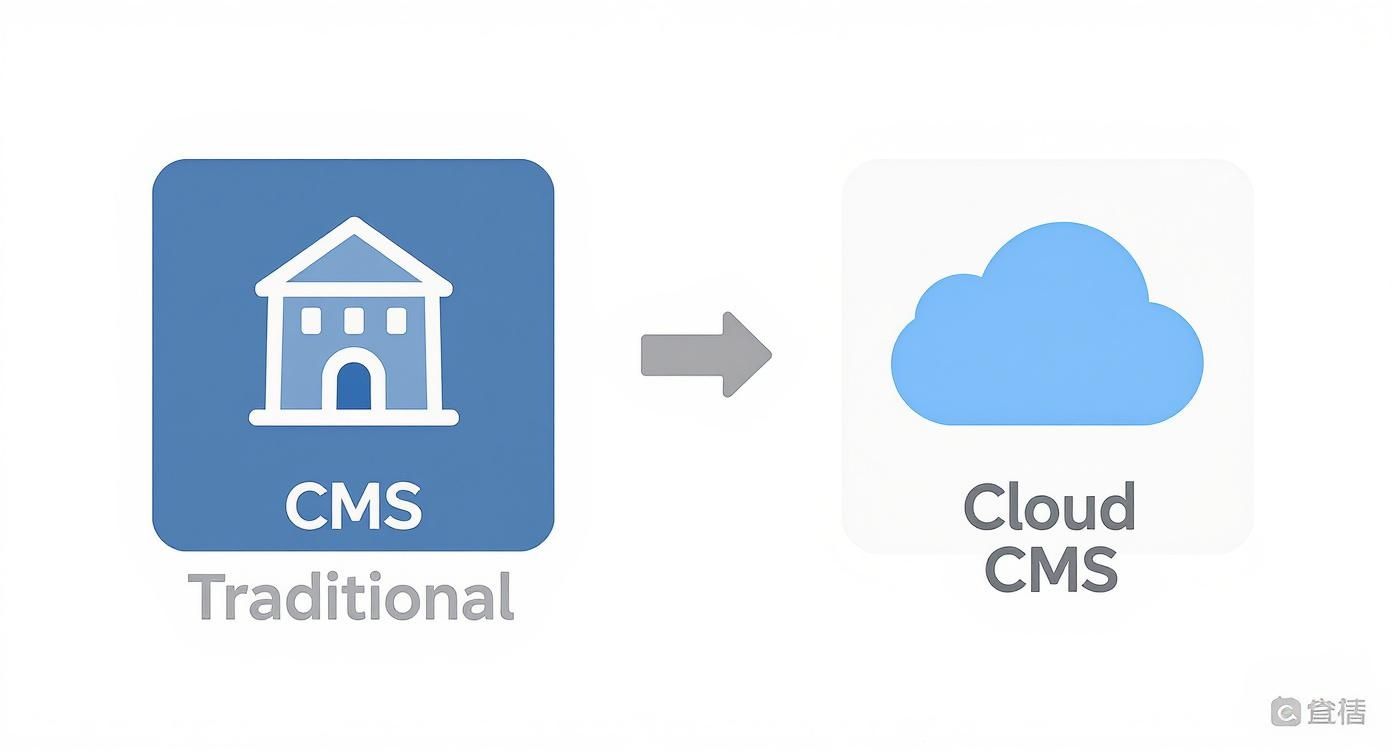
It’s this shift from a centralized, single-point-of-failure system to a resilient, decentralized architecture that gives cloud platforms their power. This superior design is also why the market is growing so fast. Globally, cloud CMS revenues are projected to nearly double from $17.77 billion in 2024 to $34.22 billion by 2030.
The Real-World Benefits of a Cloud CMS
Beyond the technical diagrams and architecture, what does moving to a cloud-based CMS actually do for a business? It's not just about convenience; it’s a strategic shift that changes how you handle everything from costs and security to future growth. These benefits add up to a more nimble and reliable digital presence.
One of the most obvious wins is automatic scalability. Let's say your latest marketing campaign is a runaway success, and your website traffic triples overnight. With an old-school, self-hosted setup, that traffic spike would likely crash your servers, leading to a frantic all-hands-on-deck IT emergency.
A cloud CMS handles this kind of success gracefully. It automatically provisions more resources to manage the load, ensuring your site stays fast and stable for every single visitor without your team lifting a finger.
Financial and Operational Efficiency
The cost structure is another major draw. A cloud CMS gets you out of the business of buying and maintaining expensive server hardware (a capital expense, or CapEx). Instead, you move to a predictable subscription fee (an operating expense, or OpEx), which makes budgeting much easier and frees up cash for what really matters—growing your business.
This shift in operations brings some powerful advantages:
- Managed Security: Top-tier cloud providers spend millions on security infrastructure—far more than most individual companies could ever afford. They take care of firewalls, threat detection, and regular audits for you.
- Seamless Updates: The vendor handles all the software updates and security patches in the background. This not only takes a huge maintenance burden off your team but also guarantees you're always on the latest, most secure version of the platform.
- Better Collaboration: Since the entire system is accessible through a web browser, your team can create, edit, and publish content from literally anywhere. This is a game-changer for businesses with remote employees or global teams, as it dramatically speeds up content workflows.
This clear value proposition is why the market is booming. The global cloud-based CMS market was valued at around $15 billion in 2025 and is expected to hit nearly $35 billion by 2033. You can explore the market research on cloud-based CMS services to see the full forecast.
Faster Time-to-Market
When you add all these benefits together, the result is a much faster time-to-market. By handing off infrastructure management, you let your team focus completely on creating great digital experiences.
New websites, campaign landing pages, and content initiatives can be launched in a fraction of the time because you're no longer stuck waiting on internal IT processes and resource allocation.
A cloud CMS removes the technical friction between an idea and its execution. It empowers marketing and content teams to act independently and rapidly, turning strategic goals into live digital content without long delays.
This agility is a massive competitive advantage, allowing you to respond to market shifts and customer feedback almost instantly. The next step is connecting your CMS with other key business tools. To see how this works, check out our guide on the powerful relationship between CMS and CRM systems, which can give you a unified view of your entire customer journey.
Essential Features of a Modern Cloud CMS
Once you get past the big-picture benefits of moving to the cloud, you need to dig into the specific features that will actually make a difference for your team. These are the capabilities that streamline your daily work, empower your creators, and make sure your digital presence can adapt to whatever comes next.
Think of this as a checklist for what separates a truly modern platform from an old system that's just been moved to a cloud server.
At the very top of that list is a headless or decoupled architecture. This isn't just a buzzword; it's a fundamental shift in how content is managed. A headless CMS effectively separates your content (the "body") from how and where it’s displayed (the "head").
This means your team can create a piece of content once and push it out to a website, a mobile app, a smartwatch, or even a digital sign in a store—all from one place. It’s the engine that powers a true omnichannel strategy.
Integrations and Extensibility
A modern cloud CMS can't be a silo. It needs to be the central hub of your entire tech stack, and that’s where Application Programming Interfaces (APIs) come in. Without strong APIs, you’re just creating another isolated system.
With them, you can connect your CMS to all the other tools your business relies on.
For instance, you can integrate with:
- Customer Relationship Management (CRM): To pull in customer data and personalize the content they see.
- E-commerce Platforms: To manage product descriptions and marketing copy in one place.
- Analytics Tools: To feed performance data right back into your content strategy.
This kind of connectivity turns your stack into a cohesive, intelligent system. For a great example of an open-source headless CMS built for this kind of integration, you can explore the features of Strapi, which is designed around powerful API capabilities.
The true power of a modern cloud CMS is revealed not by what it does on its own, but by how well it connects with the other tools that run your business. APIs are the bridges that make this synergy possible.
Core Tools for Content and Marketing Teams
Beyond the technical architecture, a good cloud CMS has to be practical for the people using it every single day. Built-in SEO tools, for example, are non-negotiable. Your content editors should be able to easily control title tags, meta descriptions, URL slugs, and structured data without having to call a developer.
Another critical feature is granular user permissions. As your team scales, you need precise control over who can do what. This prevents a junior editor from accidentally publishing a sensitive draft or ensures a freelance writer can only access the specific projects they’re assigned. It's about security and peace of mind.
Finally, you can’t ignore the growing role of Artificial Intelligence (AI). Modern platforms are now using AI to handle tedious but important tasks, like automatically generating alt text for images, creating quick summaries, or suggesting SEO tweaks. More advanced systems use AI-powered personalization to analyze user behavior and serve up more relevant content, which can have a huge impact on engagement.
Navigating the Types of Cloud CMS Platforms

Not all cloud based CMS platforms are built the same. The market is full of different architectures designed to solve specific problems, and picking the right one means understanding how they actually work. If you don't match the architecture to your team's skills and your company's digital strategy, you're setting yourself up for friction down the road.
At a high level, you’ll run into three main flavors: Traditional, Headless, and Hybrid.
Let's use a simple analogy to break them down. Think of a Traditional CMS as an old all-in-one television from the 90s. The screen (frontend) and the channel tuner (backend) are fused into a single unit. It’s self-contained and does its one job well, but you can't swap out the screen for a better one.
A Headless CMS is more like a modern, powerful media server. It has no screen of its own; its only job is to organize and serve up your content library. From there, it can stream that content to any screen you can imagine—a smartphone, a smart TV, or even a massive digital billboard.
And the Hybrid CMS? That's your high-end smart TV. It comes with its own fantastic, built-in screen and interface, but it's also powerful enough to stream content to other devices. It's an attempt to give you the best of both worlds.
Traditional Cloud CMS
The traditional CMS, also known as a coupled CMS, is the classic all-in-one package. It bundles the backend (where you manage content) and the frontend (the website your visitors see) into a single, tightly integrated system. Everything you need is right there in one place.
This is often the most straightforward path for teams without a dedicated developer. The platform gives you all the tools to build and display content for a standard website right out of the box. A good example of this unified model in action is the Elementor Cloud Website, which focuses on a cohesive site-building experience. These systems are perfect for blogs and straightforward corporate sites where content and design are deeply intertwined.
Headless Cloud CMS
A headless CMS flips the script entirely by detaching the backend from any specific frontend. Think of it as a pure content repository. It stores and organizes your content and then makes it available through an API for any application or device to pull from.
This separation gives developers incredible freedom. You can use a single source of content to power a website built with React, a native iOS app, and even an IoT device. Your teams get to pick the best presentation technology for each channel, free from the constraints of a built-in templating engine. You can explore a curated list of open-source headless CMS options to get a feel for how these API-first platforms work.
A headless architecture future-proofs your content. By separating what the content is from how it's displayed, your content becomes a portable asset, ready for whatever new device or channel comes next.
Hybrid Cloud CMS
The hybrid CMS tries to strike a balance, combining the user-friendliness of a traditional system with the multi-channel reach of a headless one. It offers pre-built templates and visual editing tools for building a primary website, but it also provides a robust API to send content elsewhere.
This model is a great fit for businesses that have a main website but are also branching out into mobile apps or other digital experiences. It empowers marketing teams with the simple tools they need for the website while giving developers the API access they demand for more complex projects. It’s all about finding that middle ground between ease of use and technical flexibility.
To make the differences even clearer, here's a side-by-side comparison of the three architectures.
Traditional vs Headless vs Hybrid CMS
This table breaks down how each CMS architecture handles frontend control, its overall flexibility, and the scenarios where it typically shines brightest.
| Architecture | Frontend Control | Flexibility | Ideal Use Case |
|---|---|---|---|
| Traditional | Tightly coupled; backend dictates frontend design | Limited; focused on a single website presentation | Simple websites, blogs, portfolios where content and design are one |
| Headless | Fully decoupled; developers have 100% control | High; content can be pushed to any device or channel via API | Multi-channel experiences, mobile apps, complex web applications |
| Hybrid | Loosely coupled; offers both a built-in frontend and an API | Moderate; provides a pre-built website option plus API access | Businesses with a main website that also need to power other apps |
Ultimately, choosing the right model comes down to a clear-eyed assessment of your team's technical capabilities, your budget, and, most importantly, your long-term content strategy.
How to Choose the Right Cloud CMS
Picking a cloud-based CMS isn’t just an IT decision; it's a strategic move that can either supercharge your growth or bog you down with technical headaches. Getting it right means taking a step back and looking at the bigger picture—where you are now and where you want to go.
Start with an honest look in the mirror. How does content actually get made in your organization? Map it out from the first draft to the final "publish." Who's involved? What are the sign-off steps? Getting this down on paper will immediately show you what you can't live without, whether it's sophisticated user permissions or real-time collaboration tools.
Next, be realistic about your team's technical skills. Do you have developers itching to build a custom front-end with a headless CMS? Or do you need a more straightforward, all-in-one platform with ready-to-go templates? There's no right or wrong answer, but choosing a system that’s either too complex or too basic for your team is a recipe for frustration.
Evaluating Key Decision Criteria
Once you have your internal needs sorted, you can start looking at vendors. But don't just glance at the sticker price. Think about the Total Cost of Ownership (TCO). This is the real cost, factoring in everything from data migration and training to essential integrations and any freelance developer help you might need later on.
Drill down into these critical areas during your evaluation:
- Vendor Support: What kind of technical support do they actually offer? Is it a 24/7 lifeline or just a slow-moving email queue? Dig into reviews and customer stories to see how responsive they are when things go wrong. A powerful platform with lousy support is a disaster waiting to happen.
- Security and Compliance: Does the vendor have key security certifications like SOC 2 or adhere to data privacy laws like GDPR? This is non-negotiable if you’re handling any kind of sensitive customer data.
- Product Roadmap: Always ask to see their product roadmap. This is a peek into their crystal ball. It tells you where the platform is heading and helps you see if their vision for the future lines up with your own growth plans.
Matching the Platform to Your Growth Stage
The world of cloud content management is booming, and there's a solution for just about every type of business. In 2025, cloud deployment grabbed a whopping 58.4% of the global CMS market. While large companies with sprawling workflows accounted for 67.3% of users, the real story is the explosive growth among small and medium businesses (SMEs), which are expanding at a remarkable CAGR of 14.2%. This surge is all thanks to the rise of affordable, scalable cloud platforms. Discover more insights about the CMS market growth on snsinsider.com.
Choosing the right CMS means finding a partner for your growth, not just a tool for today. Your evaluation should be weighted just as heavily on the vendor’s future direction as its current feature set.
As you weigh your options, guides that compare platforms for specific business sizes can be incredibly helpful. For instance, smaller teams can get a great starting point by checking out a list of the 12 Best CMS for Small Business. It can highlight platforms built for the kind of agility and simplicity they need.
Ultimately, by asking the right questions and making sure the platform’s capabilities match your long-term vision, you can find a cloud CMS that will be the bedrock of your digital strategy for years to come.