Mastering CMS Web Development
Unlock the secrets of CMS web development. Our guide covers choosing platforms, essential features, and future trends to build powerful, scalable websites.

If you've ever wondered how so many businesses manage to keep their websites fresh and updated without a developer on speed dial, the answer is usually a Content Management System (CMS). Building a website with a CMS is all about separating the "what" (your content) from the "how" (the underlying code and design). This simple but powerful idea is why over 70% of all websites now run on a CMS platform.
What Exactly Is CMS Web Development
Imagine building a house. You could start with a raw plot of land, designing the blueprints, laying the foundation, and framing every wall yourself. That's a lot like traditional coding—incredibly powerful, but also slow and complex.
Now, imagine a different approach: using a high-end prefabricated frame. The structural engineering, plumbing, and electrical systems are already in place. Your job is to focus on what makes it a home—painting the walls, arranging furniture, and choosing the decor.
That second method is a perfect analogy for CMS web development. The CMS is your website's pre-built frame. It handles all the heavy lifting in the background, giving you a solid structure so you can focus entirely on the content your audience will see.
The Two Core Components of a CMS
So, how does a CMS actually work? It's really a tale of two parts working in perfect harmony to give you control while delivering a polished experience to your visitors.
First, there's the Content Management Application (CMA). This is your command center. It’s the user-friendly dashboard you log into to write a blog post, upload photos, or add a new product. No code required—just a simple, intuitive interface for managing your content.
Then, there's the Content Delivery Application (CDA). This is the engine that works behind the scenes. It takes all the content you create in the CMA, plugs it into your chosen design template, and serves it up as a beautiful, fully-functional webpage for the world to see.
A CMS effectively creates a bridge between complex technical infrastructure and simple content creation. It democratizes web publishing, allowing marketers, writers, and business owners to control their digital presence directly.
This separation of content and presentation is the magic of a CMS. Your marketing team can publish a new landing page, and your e-commerce manager can update product pricing—all on their own, without needing to file a ticket with the IT department. This distinction can get a little fuzzy, so if you're curious, our guide on the differences between a website builder and a CMS breaks it down further.
Ultimately, CMS web development is less about pure coding and more about smart strategy. It’s an approach that gives you professional-grade tools, intuitive interfaces, and powerful templates to build and maintain a sophisticated website. It’s what has made platforms like WordPress so dominant that they now power over 43% of the entire internet. This efficiency and accessibility are exactly why it has become the gold standard for creating websites today.
Why a CMS Is a Game-Changer for Your Business
Thinking about a CMS as just a website tool is missing the bigger picture. It's actually a strategic business move that delivers a real, measurable return. At its core, a CMS is all about efficiency. It helps your business move faster, cuts down on operational headaches, and ultimately gives you a much stronger foothold in your market.
Instead of building a website from the ground up—a process that can burn through months and a hefty budget—a CMS uses pre-built frameworks and themes. This means you can get a fully functional, professional-looking site live in a fraction of the time. Getting to market quicker means you start seeing a return on that investment sooner.
This infographic breaks down exactly how a CMS impacts the bottom line, from cost savings and market speed to some serious SEO advantages.
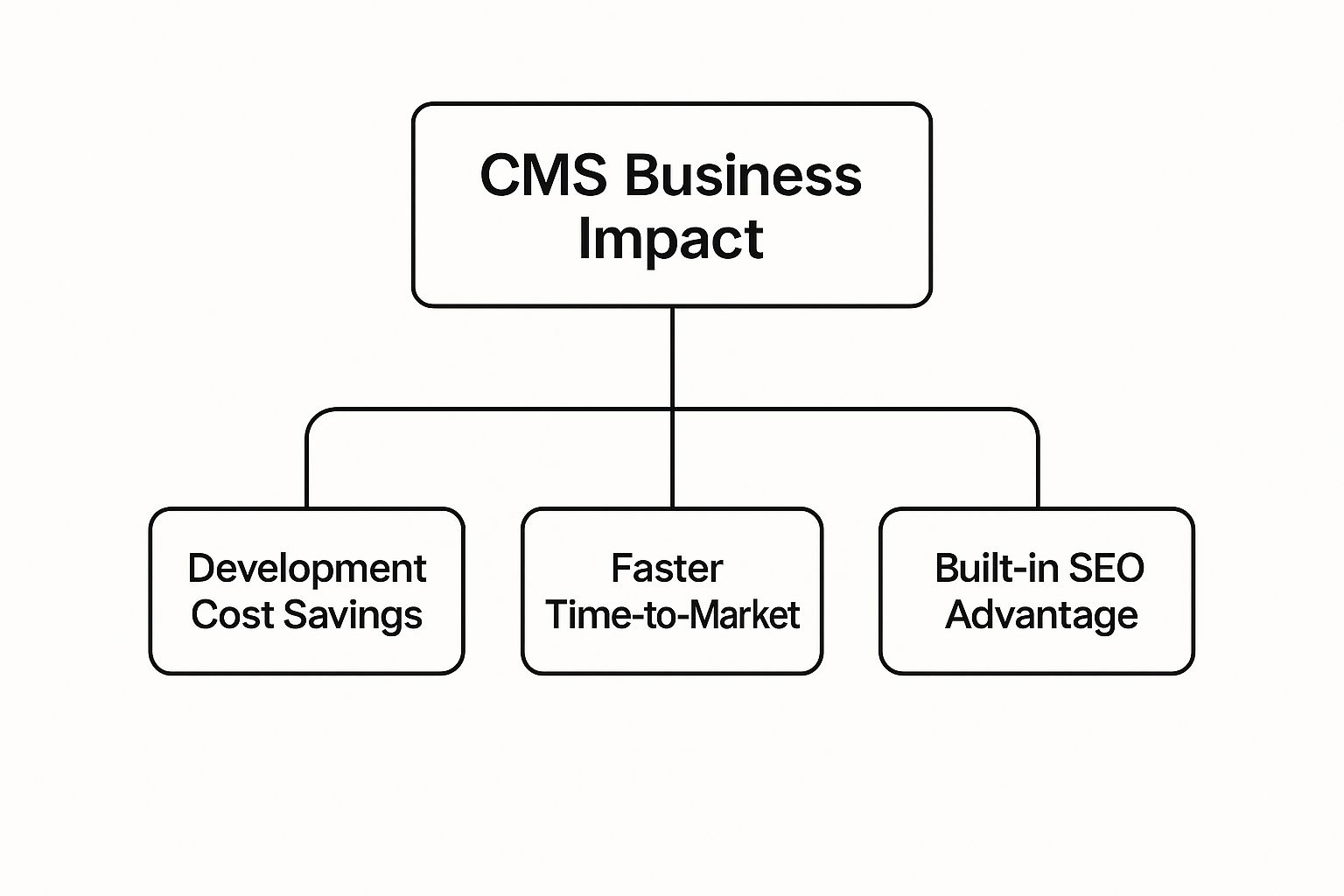
As you can see, the benefits all feed into each other. A faster launch leads to a quicker ROI, and the built-in tools help boost your site's visibility for the long haul.
Accelerate Your Time to Market
Let's play out a common scenario. Your marketing team has a brilliant idea for a flash sale, and they need a landing page up yesterday. On a traditional, hard-coded website, that's a ticket for the dev queue. The process of getting a developer to build the page, add the content, and push it live could take days, maybe even weeks. By then, the opportunity might be gone.
Now, imagine that same scenario with a CMS. The marketing team can just log in, pick a template, drop in the sales copy and product images, and hit "publish." The whole thing is done in a couple of hours, completely on their own. That kind of agility is what lets you jump on market trends and respond to what your customers and competitors are doing, right when it matters most.
Enhance Collaboration and Workflow
A good CMS acts as the central command center for your entire digital presence, tearing down the walls between different teams. It’s a secure space where everyone can contribute at the same time without stepping on each other's toes.
Think about how this works in practice:
- Content Writers are in the driver's seat, drafting, editing, and scheduling posts right inside the platform.
- Designers can tweak layouts or update brand visuals without ever touching the underlying content.
- Marketers can fine-tune pages for search engines and dive into the analytics to see what's working.
This is all managed through user roles and permissions, so you can control who does what. This simple feature is a lifesaver, preventing stray clicks from breaking the site and keeping everything secure. Digging into Content Management System Best Practices is a great way to make sure you're getting the most out of these collaborative features.
A CMS transforms website management from a technical bottleneck into a streamlined, collaborative process. It empowers your team to focus on creating value rather than managing technical debt.
Gain a Competitive SEO Advantage
From day one, most modern CMS platforms are built to play nice with search engines. They come loaded with features that handle a lot of the technical SEO heavy lifting for you, giving your content a fighting chance to rank well right out of the gate. Things like clean URL structures and auto-generated sitemaps are often standard.
Beyond the built-in perks, there’s usually a massive library of plugins that let you easily control things like meta titles, descriptions, and keywords without ever needing to look at a line of code. Plus, the simple fact that you can publish fresh content quickly and consistently is a huge signal to search engines that your site is active and relevant. Of course, once you’ve done the work, you need to know if it's paying off. Our guide on how to measure content performance can show you exactly how to track your results.
Navigating the Different CMS Architectures
Not all content management systems are built on the same foundation. In web development, the underlying architecture of a CMS shapes everything—from how flexible it is to how your content actually reaches your audience. Picking the right one is critical, as it needs to match both your technical team’s skills and your long-term business goals.
Think of it like choosing a kitchen setup. A casual home cook might love an all-in-one appliance that bakes, broils, and microwaves. A professional chef, on the other hand, would demand separate, best-in-class tools for ultimate control and performance. The world of CMS architectures—Traditional, Headless, and Hybrid—works in a very similar way, catering to wildly different needs.
Traditional Monolithic CMS: The All-in-One Solution
First up is the most familiar architecture: the Traditional CMS, often called a monolithic system. Picture it as an all-in-one smart TV. The screen (the front-end) and all the internal software running the apps (the back-end) are fused together into a single, self-contained unit.
Platforms like WordPress, Joomla, and Drupal are the classic examples here. In this model, the CMS manages both the content in the database and how that content looks on a webpage. This tight integration makes them incredibly user-friendly and fast to launch.
They are an almost perfect fit for:
- Small to medium-sized businesses that need a standard website without a ton of custom technical work.
- Blogs and content-heavy sites where the main stage is a desktop or mobile web browser.
- Teams with limited developer resources who just need to get a site up and manage it without a fuss.
The biggest win is simplicity. Everything you need is under one roof. But that unified structure can also be its biggest weakness, making it a real challenge to push content to other channels like native mobile apps or smart displays.
Headless CMS: The Central Content Hub
Next, we have the Headless CMS, an approach that has seriously shaken things up. Imagine this as a central media server in your house. It doesn't have a screen of its own; it just stores all your movies and music. Its job is to use APIs to stream that content to any device that asks for it—your TV, your phone, or even your smart speaker.
A Headless CMS does exactly that. It "decouples" the content back-end (the "body") from the presentation front-end (the "head"). Its sole purpose is to organize and deliver structured content through an API, giving developers total freedom to build the front-end using whatever technology they want.
This API-first approach means content is just pure data, ready to be pulled and formatted for any channel. A single product description can show up on your website, in your mobile app, and on a digital kiosk in a store—all at the same time.
This flexibility is why around 40% of developers are now leaning toward headless architectures for their scalability and adaptability. It’s a powerful model for an omnichannel world.
Hybrid CMS: The Best of Both Worlds
Finally, there’s the Hybrid CMS, which tries to strike a perfect balance. It starts out looking and feeling like a Traditional CMS, with a connected front-end that lets you build and manage a standard website easily. But under the hood, it also has a powerful API, giving you the headless option to send content anywhere else you need it to go.
This model gives you the day-to-day convenience of a monolithic system with the future-ready potential of a headless one. You can run your main website with familiar tools while simultaneously experimenting with new channels. For businesses that want to be ready for what's next without a complete technical overhaul, the hybrid approach is often the smartest path forward.
If this flexible model sounds appealing, our collection of headless CMS options is a great place to start exploring platforms that offer hybrid capabilities.
To make sense of these options, let's break them down side-by-side.
Traditional vs Headless vs Hybrid CMS Comparison
This table highlights the core differences between the three architectures, helping you see where each one shines.
| Feature | Traditional CMS | Headless CMS | Hybrid CMS |
|---|---|---|---|
| Architecture | Monolithic (back-end & front-end coupled) | Decoupled (API-first) | Coupled with optional decoupling (API available) |
| Flexibility | Low; locked into the provided front-end | High; use any front-end technology | High; use the default front-end or a custom one |
| Ease of Use | High for non-technical users | Low; requires developer expertise | Moderate to High; user-friendly for websites, dev-heavy for other channels |
| Content Delivery | Primarily to a single website | Omnichannel (web, apps, IoT, etc.) | Omnichannel; supports both website and API delivery |
| Best For | Standard websites, blogs, SMBs | Complex digital experiences, multi-platform projects | Businesses needing both a standard site and omnichannel reach |
Ultimately, the right architecture depends entirely on your project's scope and ambition. Traditional systems are reliable workhorses, headless systems offer boundless freedom, and hybrid systems provide a practical bridge between the two worlds.
Essential Features Every Powerful CMS Needs
Picking a CMS can feel like wading through an ocean of options. Every platform promises the world, but it’s easy to get bogged down in technical jargon that doesn’t actually help your business grow.
The reality is, only a handful of features truly matter. These are the non-negotiables that make a platform efficient, secure, and ready to scale. Think of it like buying a car—you need a solid engine and reliable brakes long before you worry about the sound system. Let's dig into the core features that deliver real value.
Intuitive Content Creation and Editing
The content editor is the heart of any CMS. It's where your team will spend most of their time, and if it's clunky or confusing, you've created an instant bottleneck.
This is why a What You See Is What You Get (WYSIWYG) editor is non-negotiable. It gives your content creators a visual interface that looks just like the live page, letting them format text, add images, and build layouts without ever touching a line of code. Without it, every tiny change becomes a developer ticket, grinding your content pipeline to a halt.
Granular User Roles and Permissions
As your team expands, you can't give everyone the keys to the kingdom. A junior marketer shouldn't have access to your e-commerce settings, and a guest blogger definitely shouldn't be able to change core site configurations.
This is where user roles and permissions become a lifesaver for site security and workflow management. A great CMS allows you to define specific roles with tailored access levels, ensuring people can only see and edit what's relevant to their job. It's a simple feature that prevents huge headaches down the line.
Typical roles you'll want to see include:
- Administrator: Full access to everything. The master key.
- Editor: Can publish and manage content from all users.
- Author: Can write, edit, and publish their own posts.
- Contributor: Can write content but can't publish it—it needs an editor's approval first.
By assigning clear roles, you create a secure and collaborative space where your team can work efficiently without the constant fear of someone accidentally breaking the site.
Extensibility Through Plugins and Integrations
No single CMS does everything perfectly right out of the box. Your business has unique needs, whether it's for advanced SEO analysis, a link to your sales CRM, or a full-blown e-commerce store. That’s where a healthy ecosystem of plugins, extensions, or modules comes in.
This extensibility is like having an app store for your website. It allows you to add powerful new features without having to code them from scratch. A large plugin marketplace is a sign of a vibrant developer community, ensuring your platform can adapt as your business evolves. For a look at platforms known for their adaptability, a good directory of open-source CMS options can be a great starting point.
Finally, look for robust API support. An API is the bridge that connects your CMS to all the other tools your business relies on, from email marketing platforms to analytics software. It's what turns your website from a standalone brochure into the central hub of your entire digital operation.
Choosing the Right CMS for Your Project
Picking a CMS is a big deal. It’s one of those foundational decisions that will shape your digital presence for years to come. Think of it less like picking the “best” software on the market and more like finding the right partner for your business—one that fits your team’s skills, your budget, and where you plan to go in the future. Get this right, and you'll save yourself from a world of expensive migrations and technical debt.
The whole process starts with a good, hard look in the mirror. Before you dive into comparing flashy feature lists, you need a crystal-clear understanding of your own resources and goals. If you rush this part, you’ll likely end up with a system that’s either too basic for what you need or so complicated your team can’t even use it.
Answering the Critical Questions First
Let's start by defining your project's real needs. This isn't about features just yet; it's about understanding the sandbox you'll be playing in.
- Technical Proficiency: How comfortable is your team with code? Be brutally honest. A CMS that demands constant developer attention is a terrible fit for a marketing team that needs to move fast and publish content on its own.
- Budget Constraints: What’s the all-in cost you can handle? Don't just look at the sticker price. Factor in themes, plugins, hosting, and the potential need for a developer's help. An open-source CMS might be free to download, but the costs to customize and maintain it can catch you by surprise.
- Scalability Needs: What does this website look like in five years? A personal blog has completely different growth needs than an e-commerce store planning to scale to thousands of products.
Choosing a CMS is a strategic commitment. Your goal is to select a partner for your digital growth, not just a piece of software. It should empower your team, not create new obstacles.
Once you have these answers, you can evaluate platforms through a much sharper lens. The fact that Content Management Systems power somewhere between 64% to 68.7% of all websites is a testament to their importance, but it also means there's a dizzying number of options out there. This makes that initial self-assessment absolutely crucial. For more stats, you can dig into the CMS market landscape on Magecomp.com.
Aligning the CMS with Business Goals
Let's see how this plays out in the real world by looking at two very different businesses.
Case Study 1: The Local Bakery
Imagine a local bakery that needs a simple, beautiful website to show off its menu, tell its story, and maybe take online orders for pickup. The team has zero tech skills, and the budget is small.
- Top Priorities: Ease of use, low cost, and a straightforward way to handle online orders.
- Ideal CMS Choice: Something user-friendly and all-in-one, like WordPress or Shopify. These platforms offer beautiful pre-built themes and drag-and-drop editors, letting the owner update the menu or post daily specials without calling a developer. For businesses like this, exploring professional WordPress website design solutions can be a great way to get a polished look without the technical overhead.
Case Study 2: The Fast-Growing Tech Startup
Now, picture a tech startup building a complex web app that needs to connect with a dozen other services. They have a skilled in-house dev team and are already planning to launch a mobile app next year.
- Top Priorities: Flexibility, powerful API integrations, and the ability to send content to multiple channels at once.
- Ideal CMS Choice: A Headless or Hybrid CMS is the clear winner here. This approach lets their developers build the front end with modern tools they love, while using the CMS as a central content hub for both the website and their future mobile app.
These examples make it clear: the "right" CMS is completely dependent on context. For a more detailed breakdown, we’ve put several CMS systems compared in our side-by-side guide. When you match the platform’s strengths to your business's unique needs, you’re setting yourself up for success.
The Future of CMS and Web Development
The world of content management is in the middle of a major shift. The CMS is no longer just a backend tool for publishing blog posts; it's quickly becoming the intelligent hub of a company's entire digital presence. A few key trends are behind this evolution, changing what we expect from a CMS and setting the stage for a much more connected and automated future.
The most visible change is the integration of Artificial Intelligence (AI). This isn't just hype—it's a practical and powerful development. AI is being baked directly into CMS platforms to handle tasks that used to eat up hours of manual work. Think about a system that suggests SEO-friendly headlines while you type, automatically writes alt text for your images, or even studies user behavior to personalize content layouts on the fly.
These smart features are turning content creation from a reactive chore into a proactive strategy, helping teams work faster and produce higher-quality content.
The Rise of API-First and Headless Architectures
As we've touched on, the API-first approach of a Headless CMS is rapidly moving from a niche concept to the go-to standard for serious digital projects. The reason is straightforward: your content doesn't just live on a website anymore. It has to be delivered flawlessly to mobile apps, voice assistants, digital kiosks, and even VR headsets.
A headless architecture makes your content ready for any channel you can imagine, both now and in the future. By decoupling the content backend (the "body") from the presentation layer (the "head"), developers get complete freedom to build unique, high-performance front-end experiences without being stuck inside a rigid template. This kind of flexibility is crucial for building the seamless omnichannel experiences that customers have come to expect.
The future of CMS isn't about managing one website. It's about orchestrating a unified content strategy across a constantly growing universe of digital touchpoints.
Embracing Composable Architecture
Taking the headless concept a step further is the trend toward composable architecture. The best way to think about this is like building with specialized LEGO bricks instead of a pre-built model kit. A composable strategy lets a business assemble a "best-of-breed" tech stack by hand-picking specialized microservices from different vendors and connecting them all with APIs.
This approach brings some massive advantages:
- Agility: You can swap out a single tool—like your e-commerce engine or site search—without having to rip out and rebuild your entire system.
- Future-Proofing: It becomes much easier to adopt new technologies as they appear, so your platform never feels outdated.
- Specialization: You get to use the absolute best tool for every job instead of settling for the decent-but-not-great features bundled into a monolithic platform.
This modular way of thinking is the next logical step for CMS. It's a move away from the one-size-fits-all model and toward a more flexible, powerful, and sustainable method for building digital experiences. By getting a handle on these trends—AI automation, headless delivery, and composable systems—you can make smarter decisions today that will prepare you for the demands of tomorrow.
A Few Lingering Questions About CMS
Even after you've got a good handle on CMS web development, a few common questions always seem to surface. Let's tackle some of the most frequent ones to clear up any confusion about the practical side of choosing and using a content management system.
Can I Switch to a Different CMS Later On?
Yes, you absolutely can, but think of it as moving your entire business to a new building, not just swapping out a piece of software. It’s a major project. You have to carefully export all your content, user data, and media files, then import everything into the new system. On top of that, your site’s design and special features will need to be rebuilt from scratch on the new platform.
The difficulty of a migration really depends on how big your site is and which systems you're moving between. There are tools and professional services that can help, but you'll almost certainly need a developer to make sure no data gets lost and all your old URLs are properly redirected. Get this wrong, and your SEO rankings could take a serious hit. This is exactly why spending the time to pick the right CMS from the start is so important.
What’s the Real Difference Between a CMS and a Website Builder?
It’s like the difference between building a house from a blueprint and renting a furnished apartment.
A website builder (like Wix or Squarespace) is the furnished apartment. It’s a neat, all-in-one package that’s incredibly simple to get started with, but you’re stuck with the landlord’s rules and can’t knock down any walls. Simplicity is its main selling point.
A CMS (like WordPress) is the custom-built house. You buy the plot of land (your hosting), and from there, you have total freedom to design, build, and add extensions however you want. It’s built for flexibility and long-term growth. Builders are fantastic for getting online quickly, but a CMS gives you the power to grow without hitting a ceiling.
The core trade-off is always control versus convenience. Website builders give you maximum convenience for less control. A CMS gives you total control, but it requires more effort upfront.
Do I Really Need to Know How to Code to Use a CMS?
For managing your site day-to-day? Not at all. Modern CMS platforms are built for people who aren’t developers. Their interfaces are designed to be intuitive, letting you create pages, write blog posts, and manage content without ever touching a line of code.
But knowing a little bit of code (like HTML and CSS) is a huge plus. It’s like being a homeowner who knows some basic DIY. You don’t need to be a professional contractor to live in a house, but it’s really helpful if you can fix a leaky faucet or hang a picture frame yourself.
With some coding knowledge, you can:
- Make small, custom tweaks to your site’s design.
- Fix annoying little formatting bugs.
- Unlock the full power of advanced themes and plugins.
So no, coding isn't a prerequisite for using a CMS. But learning the basics empowers you to take more direct control over the finer details of how your site looks and works.