cms systems comparison: Which Platform Is Best for You
cms systems comparison: WordPress, Shopify, Wix - data-driven insights to choose the best platform for your business.

Picking the right Content Management System (CMS) can be the difference between a website that works for you and one that constantly works against you. When you start comparing CMS systems, you'll quickly see that a platform like WordPress gives you incredible flexibility, while something like Shopify offers a ready-made runway for e-commerce. The best choice always comes down to your specific goals, your team's technical comfort level, and your budget.
Why Choosing the Right CMS Is a Critical Business Decision
A CMS is so much more than a website builder—it's the engine driving your entire digital presence. It dictates everything from how easily you can publish a blog post to the security of your customer data. Getting this decision right from the start saves you from the headache and expense of a future migration and ensures your site can actually keep up with your business ambitions.
The ripple effects of this choice are huge. The right CMS empowers your marketing team to move fast and simplifies daily tasks, creating a solid foundation for SEO. The wrong one creates bottlenecks, ties your hands on marketing initiatives, and can quickly become a technical mess that stalls your growth. It's no wonder their adoption is so widespread. By 2025, it's projected that over 64% of all websites will run on a CMS, powering more than 80 million live sites globally. For more context on this, check out these insightful CMS usage statistics at Magecomp.
Key Decision-Making Factors
Before you get lost comparing features, you need a framework for making the decision. There's no single "best" CMS; there's only the best one for you. If you need a refresher on the basics, our guide on what a CMS is and how it works is a great place to start.
Here are the core factors I always tell clients to weigh:
- Ease of Use: How intuitive is the backend for someone who isn't a developer? A system with a steep learning curve can bring your content workflow to a grinding halt.
- Scalability: Will this platform grow with you? You need to think about its ability to handle more traffic, more content, and new features down the road without breaking a sweat.
- Cost of Ownership: Don't just look at the monthly fee. You have to account for hosting, themes, plugins, transaction fees, and the potential need for a developer's help.
- Functionality: Does it do what you need it to do right out of the box? Whether that's running a blog, an e-commerce store, or a membership site, the core features have to be there.
Your CMS is not just a tool; it's a strategic investment in your business's future. The platform you select will directly influence your ability to adapt, innovate, and compete online.
An Overview of the Top CMS Contenders
Before we get into a feature-by-feature breakdown, it’s important to understand where each major CMS fits in the market. Every platform is built with a specific philosophy and a target user in mind, so this initial overview is your first filter in any cms systems comparison. For a broader look at the landscape, this 2025 CMS Comparison: Top Platforms Reviewed is a great starting point.
Think of this as establishing the core identity of each contender. Grasping what makes them tick helps you zero in on the comparisons that actually matter for your project.
The Dominant Market Leaders
The CMS world is crowded, but a couple of names really dominate the conversation. First and foremost is WordPress, the open-source giant famous for its incredible flexibility. Its entire philosophy is built around empowering users with total control and customization, which is why it appeals to everyone from solo bloggers to massive corporations.
On the other side of the spectrum, you have Shopify, which isn't just a CMS—it's a dedicated e-commerce machine. Shopify’s goal is to make selling online as straightforward as possible. As an all-in-one, hosted platform, it’s designed for merchants who value ease of use, security, and powerful sales tools more than infinite customization.
The platform you choose is less about finding the "best" one and more about finding the one that best reflects your business's operational priorities and technical resources. An e-commerce brand's needs are fundamentally different from a content publisher's.
The numbers tell the story. WordPress is the undisputed leader, running an incredible 43.3% of all websites on the internet. That gives it a staggering 63.5% of the total CMS market share as of 2025. Shopify has successfully carved out its own territory, holding about 6.7% of the market by focusing squarely on commerce.
The User-Friendly Website Builders
For anyone who wants to get a site live quickly without wrestling with code, Wix and Squarespace are the go-to options. Both are fully hosted, all-inclusive builders that remove nearly all the technical roadblocks.
- Wix is all about creative freedom. Its drag-and-drop editor is one of the most intuitive out there, making it a favorite for small businesses, artists, and entrepreneurs who want a highly visual site.
- Squarespace leans heavily into design excellence. It’s known for its stunning, award-winning templates perfect for portfolios, blogs, and stylish small shops. Its users are typically people who prioritize a polished, professional look right out of the box.
Finally, there’s Drupal, the enterprise-grade open-source option. Drupal is a heavyweight champion when it comes to security and handling complex data. Its main audience includes governments, universities, and large organizations that need airtight security and intricate user permissions. It’s not the most beginner-friendly platform, but for big, data-intensive projects, its power is hard to beat. You can see how it compares to other open-source CMS options to get a better sense of its place in the ecosystem.
A Nuanced Look at the Top CMS Platforms
Choosing a CMS isn't about finding a one-size-fits-all solution. It’s about digging past the feature lists to find the right tool for your specific job. The "best" platform really depends on your goals, your budget, and how comfortable you are with the technical side of things.
This guide breaks down the big four—WordPress, Shopify, Wix, and Squarespace—across five critical areas. We're moving beyond the marketing hype to give you a clear, practical CMS systems comparison so you can make a decision that fits your business perfectly.
H3: Ease of Use and The Learning Curve
Your first interaction with a CMS often tells you everything you need to know. An intuitive platform empowers your team to move quickly, while a clunky one creates an immediate dependency on developers.
WordPress has its famous "five-minute install," which is simple enough. But the real learning curve is mastering its sprawling ecosystem of themes and plugins. For a newcomer, the dashboard can feel like a cockpit with a thousand switches.
On the other end of the spectrum, Wix and Squarespace are built for speed and simplicity. Their drag-and-drop editors and guided setups are designed to help you launch a professional-looking site in just a few hours. They consciously trade some advanced control for a much smoother, curated experience.
The Key Differentiator: It all comes down to philosophy. WordPress hands you a massive toolbox and expects you to learn how to use every tool. Wix and Squarespace give you a pre-assembled kit with clear instructions, making the build process faster but limiting what you can ultimately create.
Shopify finds a middle ground, but it’s laser-focused on one thing: selling. Its interface is incredibly intuitive for managing products and orders. However, trying to customize pages outside of the core shopping experience can feel more rigid than a visual builder like Wix.
H3: Design Customization and Flexibility
Your website's design is your digital handshake. The CMS you choose determines just how much creative control you have over that first impression.
With WordPress, the design possibilities are practically infinite. Between thousands of themes and powerful page builders like Elementor or Divi, you can build just about anything you can imagine. The catch is that this freedom often requires a good eye for design—and sometimes a bit of code—to get it just right.
Wix and Squarespace offer two different takes on user-friendly design. Wix uses a free-form, unstructured editor, letting you drag and drop elements anywhere on the page. Squarespace uses a more structured, grid-based approach. It restricts your freedom slightly but, in doing so, ensures the final product is always clean, responsive, and professional. It’s a great way to prevent common design mistakes.
Shopify's customization is tied directly to its themes. While the theme store has plenty of beautiful, conversion-focused designs, making significant changes often means editing Shopify’s proprietary code, Liquid. That’s a much steeper hurdle than the visual editors on Wix or Squarespace.
- WordPress Scenario: An agency building unique, highly branded websites for a diverse client base. The unmatched flexibility of WordPress is the only real option.
- Squarespace Scenario: A photographer who needs a polished, modern portfolio but doesn't want to spend weeks fiddling with design settings. A Squarespace template gets them 95% of the way there, instantly.
- Wix Scenario: A local restaurant owner who needs to build a visually engaging site with menus and booking forms—and wants to do it themselves over a weekend.
H3: Unpacking SEO Capabilities and Performance
In today's market, SEO isn't optional. While every modern CMS covers the basics, their underlying architecture and toolsets create very different ceilings for how high you can rank.
WordPress is widely considered an SEO beast, mainly because of its plugins. Tools like Yoast SEO or Rank Math give you granular control over every on-page element, from meta descriptions to complex schema markup. Because it's open-source, a skilled developer can optimize literally everything.
Shopify has strong SEO fundamentals baked right in, like clean code and automatic SSL certificates. However, it locks down certain things, like the URL structure for products (/products/) and collections (/collections/), which can be a point of frustration for advanced SEOs who want total control.
Wix and Squarespace have come a long way with their SEO tools. Both let you handle the essentials like meta tags, custom URLs, and alt text. They are perfectly adequate for most small businesses, but they just don't offer the deep customization or the massive library of specialized SEO plugins you get with WordPress.
For businesses where organic search is the primary growth engine, the ability to control every technical detail gives WordPress a clear edge. But for those who just need solid, out-of-the-box SEO without the headache, Shopify and Squarespace are strong contenders.
To help you see how these platforms stack up at a glance, we've put together a quick comparison of their core features.
Core Feature Comparison Across Leading CMS Platforms
This table provides a side-by-side analysis of the most critical features offered by the top four CMS platforms, helping you quickly assess which one aligns best with your needs.
| Feature | WordPress | Shopify | Wix | Squarespace |
|---|---|---|---|---|
| Primary Use Case | Blogs, content sites, business websites, highly custom projects | E-commerce stores of all sizes, from startups to large enterprises | Small business websites, portfolios, restaurants, visually-driven sites | Portfolios, blogs, creative professionals, small to medium businesses |
| Ease of Use | Moderate learning curve; requires management of plugins and themes | Very easy for e-commerce; structured interface for content management | Very easy; intuitive drag-and-drop visual editor | Very easy; structured, section-based editor ensures clean design |
| Design Flexibility | Nearly limitless with themes and page builders | High, but often requires coding (Liquid) for deep customizations | High visual freedom, but templates cannot be changed after starting | Moderate; templates are interchangeable, but design is grid-based |
| E-commerce | Powerful and flexible via the WooCommerce plugin, but requires self-management | Best-in-class, purpose-built for selling online with a huge app ecosystem | Good for small to medium stores; built-in functionality | Good for simple stores; focuses on aesthetics and ease of use |
| SEO Control | Excellent; granular control through powerful plugins like Yoast | Very good out-of-the-box, but with some URL structure limitations | Good; all essential SEO features are now included | Good; provides all the necessary tools for most users |
| Pricing Model | Free software, but requires paid hosting, themes, and premium plugins | Monthly subscription with transaction fees (unless using Shopify Payments) | All-in-one monthly subscription; tiered plans based on features and storage | All-in-one monthly subscription; tiered plans for different needs |
| Maintenance | User is responsible for all updates, security, and backups | Fully managed and hosted by Shopify; no technical maintenance required | Fully managed and hosted by Wix | Fully managed and hosted by Squarespace |
This overview shows the fundamental trade-offs: WordPress offers ultimate power at the cost of complexity, while the others provide a more streamlined, all-in-one experience.
H3: Analyzing E-commerce Functionality
For any business that sells products online, the e-commerce engine is the heart of the operation. This is where a dedicated platform like Shopify really shines.
Shopify was built from the ground up for one purpose: commerce. Every single feature—from inventory tracking and abandoned cart recovery to its seamless integrations for selling on Instagram and Facebook—is optimized to help you sell more. Its app store is a treasure trove of tools designed to boost conversions.
WordPress becomes a formidable online store with the WooCommerce plugin. This duo gives you absolute freedom to sell anything, any way you want. The downside? You are entirely responsible for security, payment processing, and keeping everything running smoothly.
Wix and Squarespace both offer solid, integrated e-commerce plans that work great for businesses with smaller inventories. They bundle everything you need into one package, but their features aren't as deep as what you'll find on Shopify or WooCommerce, especially when it comes to things like complex shipping rules or high-volume order management.
Market data shows a clear trend toward these specialized commerce solutions. Shopify's market share has exploded from just 0.3% in 2014 to a projected 6.7% in 2025, while Wix has seen a staggering 1,633% growth over the past decade.
H3: Assessing Scalability and Future-Proofing
The CMS you pick today needs to grow with you tomorrow. Scalability is all about a platform's ability to handle more traffic, more content, and more features without falling over.
WordPress's ability to scale is tied directly to your web hosting. With a powerful server, it can run some of the biggest sites on the internet. But as your site grows, the responsibility of managing performance, security, and updates falls squarely on your shoulders.
Shopify, on the other hand, is built to scale from day one. As a fully hosted platform, it manages all the technical headaches for you. You never have to worry about a traffic spike from a Black Friday sale crashing your site—that reliability is a core part of what you're paying for.
Wix and Squarespace are fantastic for small and medium-sized businesses, but they can hit a ceiling at the enterprise level. They can handle plenty of traffic, but they don't offer the deep backend customization or API integrations that a large, complex business might need. For organizations that foresee needing that level of technical flexibility, exploring the best headless CMS options is a smart, forward-thinking move.
Ultimately, the choice comes down to a simple trade-off. Do you want the managed, hands-off scalability of a platform like Shopify, or the infinite—but self-managed—potential of WordPress? Your answer will point you to the right platform for the long haul.
Understanding the True Cost of Your CMS
The advertised monthly price of a CMS is just the tip of the iceberg. Any serious cms systems comparison has to dig deeper than the sticker price and focus on the Total Cost of Ownership (TCO). This figure accounts for every single expense, from the day you start building to the ongoing costs of keeping it running, giving you a much more realistic financial picture.
An all-in-one platform like Wix or Shopify conveniently bundles hosting and support into a predictable monthly fee. On the other hand, a "free" open-source platform like WordPress requires you to buy everything else separately—hosting, themes, and often a handful of premium plugins. If you ignore these associated costs, you're setting yourself up for some nasty budget surprises down the road.
The biggest financial mistake I see people make is confusing "free software" with a "free website." The real investment isn't the code itself, but the entire ecosystem of services you need to make it functional, secure, and actually effective for your business.
Deconstructing the Costs: Open-Source vs. All-in-One
Let's break down the financial reality of these two very different models. This side-by-side look shows just how costs can pile up in completely different ways.
Scenario 1: The "Free" WordPress Website
Yes, the core WordPress software is free. But building a professional site that you'd actually want to show customers involves a list of expenses that add up fast.
- Web Hosting: This isn't optional. Shared hosting might start cheap at around $5-$25 per month, but as your site grows, you'll need something more powerful. Managed hosting can easily run from $30-$150+ per month.
- Domain Name: Expect to pay $10-$20 per year.
- Premium Theme: Free themes are out there, but for a professional look and reliable support, you're looking at a $50-$100 one-time purchase.
- Essential Premium Plugins: Key features for security, speed (caching), and backups almost always require paid plugins. This can add another $100-$300 annually.
- Developer Support: Need a custom feature or run into a problem you can't fix? Developer rates typically range from $50-$150 per hour.
Scenario 2: The All-in-One Shopify Store
Shopify’s model is built on subscription tiers that roll most of the essentials into a single, predictable payment.
- Monthly Subscription: Their plans usually range from $29 to $299 per month. This covers your hosting, security, and the core CMS software.
- Transaction Fees: This is a big one. If you don't use Shopify Payments, you’ll pay an extra 0.5% to 2% on every single sale. For a high-volume store, that can become a massive expense.
- Premium Apps: Just like WordPress plugins, extending Shopify with apps for things like marketing or shipping often comes with extra monthly fees, typically $10-$50 per app.
Forecasting Your Realistic Budget
To get this right, you have to categorize your expenses. Start by listing all potential one-time setup costs (like that premium theme or initial developer help) and then map out your recurring monthly and annual fees.
Be brutally honest about your own technical skills. If you're not comfortable managing security updates and backups yourself, you absolutely must budget for either a managed hosting plan or a maintenance service, which can tack on another $50-$200 per month. Understanding how different platforms handle their infrastructure is a big part of this; our guide to cloud content management systems is a great place to learn more.
This kind of detailed financial breakdown is what takes you beyond a simple price comparison. It gives you the context you need to judge each platform's real, long-term value, making sure your final choice works for your budget just as well as it works for your business.
Which CMS Is Right for Your Business Case?
After breaking down the features and costs, the real question becomes: which of these platforms actually fits your business? The theoretical pros and cons are just noise until you apply them to a real-world goal. A system that’s perfect for a blogger could be a nightmare for an e-commerce entrepreneur.
Let's move from abstract analysis to practical recommendations. I'll walk through four common business types and match them with the best CMS, explaining exactly why each choice makes sense. You should be able to see your own situation reflected in one of these scenarios, making your final decision a lot clearer.
The Content-Driven Blogger or Publisher
For this business, one thing matters above all else: creating, managing, and distributing great content as efficiently as possible. SEO isn't just a feature; it's the lifeblood of the business. The whole model probably hinges on ad revenue, affiliate marketing, or digital products, meaning you need a platform that plays well with other tools.
For this job, WordPress.org is the undisputed king. Its entire DNA is built for content. From the intuitive block editor to its powerful tagging and categorization systems, everything is geared toward publishing.
- Unmatched SEO Potential: With a plugin like Yoast SEO or Rank Math, you get an incredible amount of control over your on-page optimization. For a content-first business, this is non-negotiable.
- Monetization Flexibility: WordPress doesn't care how you make money. You can integrate any ad network, affiliate link, or membership plugin you want without the platform taking a slice of your revenue.
- Limitless Customization: You have total freedom to change your design and add new features as you grow. The platform will never be the thing that holds your business back.
When your business is built on the power of words and Google rankings, WordPress provides the most solid and scalable foundation you can ask for. Its open-source nature means you truly own it and can pivot your strategy anytime.
The Visual Portfolio Creator or Creative Professional
Photographers, designers, and artists need a website that gets out of the way and lets their work shine. The main priority here is stunning aesthetics and a dead-simple user experience—no coding required. The website is a digital gallery, and the design itself is the handshake.
In this scenario, Squarespace is the clear winner. It's famous for its award-winning, visually-driven templates that look fantastic on mobile right out of the box.
Squarespace’s secret is its structured, grid-based editor. While it might feel less "free" than a builder like Wix, that's actually a good thing. The constraints it imposes ensure the final product always looks polished and professional. It’s almost impossible to build an ugly website on Squarespace, which is a huge plus for creatives who aren't also web designers.
The Scalable E-commerce Store
When your business is all about selling products, your CMS needs to be a well-oiled conversion machine. The core requirements are rock-solid payment processing, inventory management that doesn't make you pull your hair out, and marketing tools built to drive sales. Above all, you need reliability, especially during high-traffic sales events.
This is Shopify’s turf, and it dominates for good reason. It’s a purpose-built e-commerce engine that takes care of all the technical headaches of running an online store.
Shopify’s biggest strength is its fully managed environment. You're not worrying about hosting, security updates, or your site crashing during a Black Friday sale. With its own payment gateway, a massive app store for marketing and logistics, and built-in tools for selling across different channels, it gives a growing store everything it needs to succeed. For anyone serious about this path, exploring the best website builders for online stores can offer even more tailored insights.
The Ambitious Project Requiring Full Control
Sometimes, an off-the-shelf solution just won't cut it. You might be building a complex web application, a highly specific membership site, or a platform that needs to integrate deeply with your company's internal software. In these cases, you need absolute control over the code, the database, and the hosting.
For these unique situations, a fully custom solution is often the only realistic path. While platforms like WordPress and Drupal can be heavily modified, you can sometimes reach a point where starting from scratch is simply more efficient. If this sounds like you, understanding the process of developing custom CMS software is a crucial first step. This approach gives you unmatched flexibility, letting you build a system that is a perfect mirror of your business logic and operational needs.
Common Questions About Choosing a CMS
Even after a detailed cms systems comparison, a few key questions can still linger. Getting these final details sorted is what helps you make a confident decision—one that aligns with your actual business goals and day-to-day realities.
This is where we tackle the tricky, nuanced topics that pop up right before you commit, from who really owns your data to the real story on switching platforms down the line.
Who Truly Owns My Website Data?
This is a bigger deal than most people realize, and the answer isn't always straightforward. It really boils down to the type of CMS you choose.
If you go with a self-hosted, open-source platform like WordPress or Drupal, you have 100% ownership of your data. Period. You control the hosting and the software, so all your content, user data, and files live on your server. You're in complete command.
With hosted platforms like Shopify or Wix, it's a bit different. You absolutely own your content—the text, images, and product details—but the platform owns the infrastructure and the design framework it all sits on. This can make picking up your entire site and moving it elsewhere a real headache.
Key Insight: Before you sign up, dig into the platform's terms of service on data portability. Your ability to easily export all your content in a usable format is your safety net, preventing you from being locked into one system forever.
This infographic is a great starting point for matching business needs to the right kind of platform.
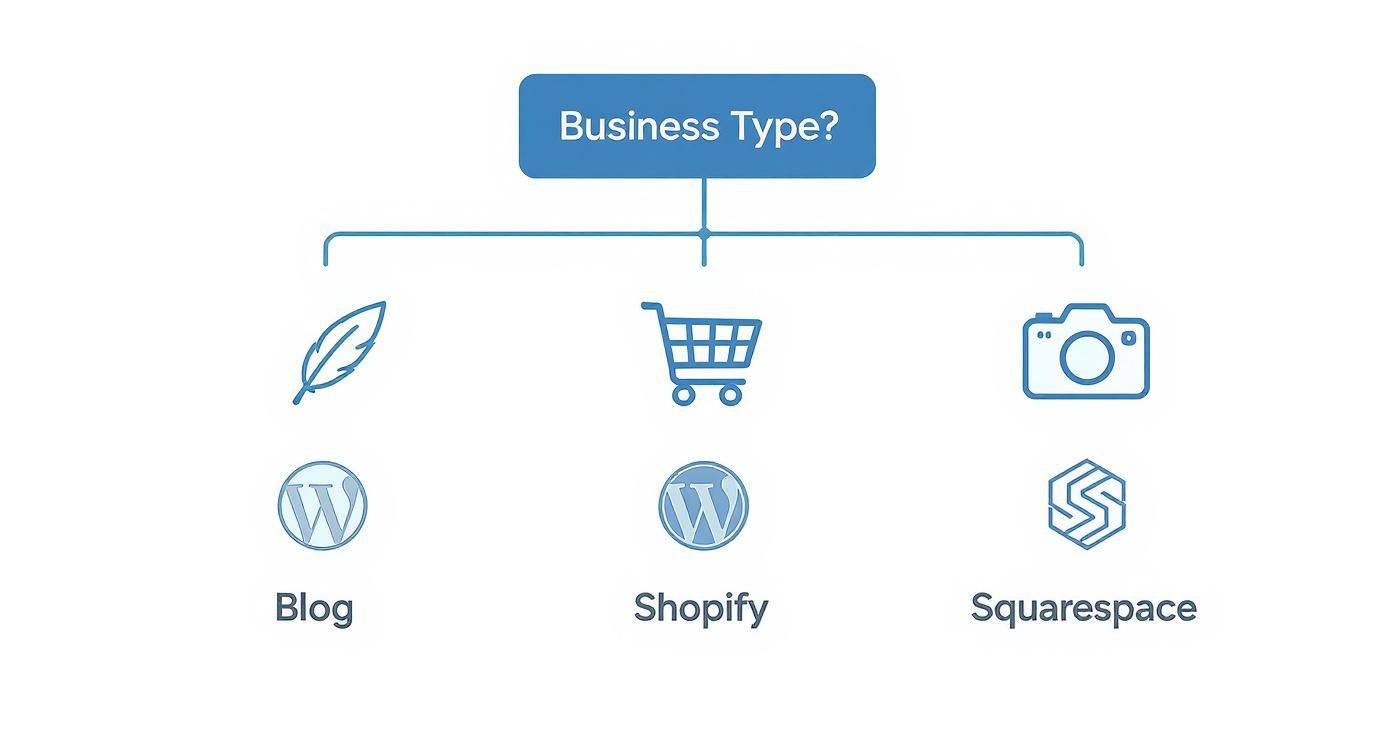
As you can see, it makes it clear why content-focused sites often gravitate toward WordPress, while e-commerce businesses find a natural fit with a purpose-built solution like Shopify.
How Difficult Is It to Migrate to a Different CMS?
Let's be blunt: moving from one CMS to another is a major project, and the difficulty can range from manageable to incredibly complex. It all depends on where you're coming from, where you're going, and how much content you need to move.
- Hosted to Self-Hosted: Moving from a closed system like Squarespace to WordPress is rarely a clean, one-click affair. It usually involves third-party migration tools or a lot of manual labor to export content and then rebuild your site’s design and structure from the ground up.
- Self-Hosted to Self-Hosted: Migrating between two open-source platforms—say, from Joomla to WordPress—is typically less painful. You can often find specialized plugins or scripts built specifically to automate the data transfer.
What Are My Security Responsibilities?
Knowing where your security duties begin and end is non-negotiable. This is another area where your choice of CMS completely changes your workload and potential risks.
With a self-hosted platform like WordPress, security is squarely on your shoulders. You’re responsible for everything: running core software updates, patching plugins and themes, and setting up your own firewalls and malware scanners.
On the flip side, an all-in-one platform like Shopify handles almost all of it for you. The company manages server security, applies patches, and ensures PCI compliance for payments. This is a huge weight off your shoulders and a core reason why many businesses choose hosted solutions.