A Guide to Cloud Content Management Systems
Discover how cloud content management systems streamline workflows, boost collaboration, and secure your digital assets. Learn how to choose the right platform.

A cloud content management system (CMS) is, at its heart, a platform that lets you store, manage, and publish all your digital content using the internet. It frees your content from being stuck on a physical server tucked away in your office.
Think of a traditional, on-premise CMS like a physical library in your town. It’s a great resource, but you have to go there to use it, and its capacity is limited by the building's four walls. A cloud CMS, on the other hand, is like the entire internet's library—accessible from anywhere, with virtually limitless space.
What Are Cloud Content Management Systems

Essentially, a cloud CMS takes all your digital assets—the text, images, videos, and documents that make up your online presence—and moves them off of local hardware. Instead of living on a single server your IT team has to constantly babysit, your content is distributed across a secure network of remote servers. This one change completely redefines how a business manages its digital footprint.
The most immediate benefit is access. As long as you have an internet connection, your team can create, edit, and publish content from literally anywhere on the globe. For today's remote and hybrid workforces, this isn't just a convenience; it's a necessity that removes all geographical friction from collaboration.
Moving Beyond On-Premise Limitations
For years, the only option was a traditional, on-premise CMS. This approach meant a hefty upfront investment in servers, software licenses, and the skilled IT staff needed to keep everything running. These systems were also notoriously inflexible. Scaling up for a big marketing campaign or down during a slow season was a slow, difficult, and expensive process.
The shift to the cloud flips this entire model on its head.
The core value of a cloud CMS is its ability to transform content management from a capital-intensive IT headache into a flexible, operational expense. You stop worrying about owning and maintaining infrastructure and start focusing on using a powerful service.
This service-based model, often called Software-as-a-Service (SaaS), comes with a few game-changing advantages that completely reshape how content operations work:
- Scalability on Demand: Cloud platforms automatically adjust their resources to handle traffic spikes, ensuring your site stays fast and responsive without anyone on your team lifting a finger.
- Reduced IT Overhead: The cloud provider takes care of all the server maintenance, security updates, and software patches. This frees up your technical experts to focus on work that actually grows the business.
- Seamless Collaboration: With a single, centralized hub for all content, everyone is always working from the latest version. No more confusion over duplicate files or outdated drafts.
The numbers tell the story of this widespread adoption. The global market for cloud content management systems is expected to climb from an estimated US$453 million in 2025 to US$631 million by 2031, a surge driven by the business world's demand for more agile and efficient workflows. Gaining a solid grasp on what a CMS is helps put this massive technological shift into perspective.
On-Premise CMS vs Cloud CMS A Quick Comparison
To really understand the difference, a side-by-side comparison can be helpful. The table below breaks down how these two approaches stack up against each other across several critical areas for any business.
| Feature | On-Premise CMS | Cloud Content Management System |
|---|---|---|
| Initial Cost | High upfront investment in hardware, software licenses, and IT staff. | Low upfront cost, typically a predictable monthly or annual subscription (SaaS). |
| Maintenance | Your internal IT team is responsible for all updates, security, and hardware upkeep. | The provider handles all maintenance, security patches, and infrastructure management. |
| Scalability | Difficult and expensive. Requires purchasing and configuring new hardware. | Easy and often automatic. Resources scale up or down based on traffic demands. |
| Accessibility | Limited to the office network or requires complex VPN setup for remote access. | Accessible from anywhere with an internet connection, ideal for remote and distributed teams. |
| Implementation Time | Long. Can take weeks or months to set up servers and install software. | Fast. Can often be up and running in a matter of hours or days. |
| Security | Responsibility falls entirely on your in-house team to secure the infrastructure. | Managed by the provider, who typically employs expert security teams and advanced measures. |
As you can see, the cloud model fundamentally changes the equation. It shifts the burden of cost, maintenance, and security from your team to a specialized provider, allowing you to focus purely on creating great content and engaging your audience.
Why Moving Your Content to the Cloud Makes Sense

If you're still relying on an old-school, on-premise system, you're likely running into some fundamental business challenges that a cloud CMS is built to solve. This isn't just about hopping on a trend; it's a strategic move that delivers real-world operational agility, predictable costs, and far better security.
For starters, a cloud platform is a game-changer for remote and hybrid teams. The nightmare of version control—who has the latest draft?—simply vanishes. Everyone, no matter where they are, works from a single source of truth, which puts an end to outdated files and duplicated effort.
It’s no surprise that having a secure scalable infrastructure for a distributed workforce is a massive advantage. This setup isn’t just a nice-to-have; it's essential for keeping a modern business productive and resilient.
Financial and Operational Gains
The financial argument for the cloud is pretty straightforward. You're essentially swapping large, one-time capital expenses (CapEx) for predictable, subscription-based operational expenses (OpEx). Instead of buying and maintaining your own expensive servers, you're just paying a recurring fee for a service.
This OpEx model gives you incredible financial flexibility. It lowers the barrier to entry, so you don't need a huge upfront investment to get access to powerful, enterprise-grade technology.
This also directly benefits your IT department. When the cloud provider is handling all the server maintenance, security patching, and software updates, your tech team is free. They can stop firefighting and start focusing their expertise on projects that actually grow the business.
Unlocking Scalability and Security
Beyond the day-to-day wins, cloud content management systems offer technical capabilities that are tough to replicate on your own.
- Effortless Scalability: Picture this: your latest marketing campaign goes viral. A cloud CMS automatically scales up its resources to handle the massive traffic spike, keeping your site fast and online without anyone on your team lifting a finger. It also scales back down when things quiet down, so you're only paying for what you use.
- Enhanced Security: Cloud providers have entire teams of security experts working around the clock to protect their infrastructure. They offer a level of protection, including advanced threat detection and compliance certifications, that most companies simply can't afford to build in-house.
- Automated Maintenance: All the platform updates and security patches are handled for you, by the provider. This means your system is always on the latest and most secure version, with no downtime or effort required from your team.
This powerful combination of flexibility and security is exactly why the industry is moving in this direction. In fact, cloud-based CMS solutions are on track to capture a 58.4% share of the market by 2025—a clear sign of where the smart money is going. While a CMS is perfect for your web content, don't forget about your media files. You'll want to pair it with one of the best digital asset management tools to manage your entire content stack effectively.
What to Look for in a Modern Cloud CMS
This look inside the Contentful platform gives you a feel for what a modern cloud content management system should offer. The interface is clean and structured, designed so that anyone on the team can create and manage content without needing a developer's help. A great user experience like this isn't just a nice-to-have; it's a core feature that helps your team move faster and get more done.
Headless Architecture for Omnichannel Delivery
The real game-changer in modern cloud CMS platforms is the move to a headless (or decoupled) architecture.
Imagine a traditional CMS is like a pre-packaged model kit—the body and the paint job (the "head," like a website template) are bundled together. You can't easily separate them. A headless CMS, on the other hand, decouples the content "body" from the presentation "head."
This separation is incredibly powerful. You create your content just once, and then you can use APIs to deliver it to any screen or device imaginable. That means the same product information can show up on your main website, a mobile app, an in-store display, or even a voice assistant. This “create once, publish everywhere” model is the bedrock of any serious omnichannel strategy. You can dig deeper into the specifics of how a headless CMS for open-source projects functions.
Robust APIs and Seamless Integrations
A cloud CMS can't be an island. It needs to be the central hub of your entire digital ecosystem, and that's where Application Programming Interfaces (APIs) come in. APIs are what allow different software tools to talk to each other.
An API-first design philosophy means the CMS is built from the ground up to connect with other tools. It transforms a messy collection of marketing software into a single, well-oiled machine where data flows freely.
This connectivity opens up all sorts of possibilities. For instance, you can integrate your CMS with:
- Customer Relationship Management (CRM) software to tailor content to individual users.
- E-commerce platforms to automatically pull product details into blog posts or landing pages.
- Analytics tools to see how your content is performing and adjust your strategy on the fly.
AI-Powered Personalization and Optimization
Artificial intelligence has moved from a buzzword to a practical tool inside the best cloud CMS platforms. AI engines can analyze user behavior in real-time to deliver unique, personalized experiences.
This means one visitor might see a homepage focused on one product, while another sees a completely different version based on their browsing history. AI also helps the content team by suggesting SEO tweaks, automatically generating summaries, or tagging images and videos. This is a huge leap from just managing content to actively optimizing it with data.
Built-in Digital Asset Management
Finally, any cloud CMS worth its salt will have Digital Asset Management (DAM) built right in. Without a proper DAM, your media library quickly becomes a disaster of duplicate files, outdated logos, and off-brand images.
An integrated DAM acts as the single source of truth for every image, video, PDF, and audio file you own. It gives your team a central place to search for, edit, and use assets, all while maintaining version control and ensuring your brand looks consistent everywhere.
A Look at the Top Cloud CMS Platforms
Diving into the world of cloud content management systems can feel a bit like walking into a massive, professional kitchen. You see countless specialized tools, and while they all help cook, you wouldn't use a cleaver to whisk an egg. The key isn't finding the single "best" platform—it's about matching the right tool to your team's skills, project goals, and unique business recipe.
The market for these solutions is not just big; it's booming. The Cloud Enterprise Content Management (ECM) space is expected to jump from USD 40.84 billion in 2025 to an incredible USD 87.01 billion by 2030. You can see the full research on the cloud enterprise content market to grasp the scale. This massive growth isn't happening by accident; it's fueled by platforms that serve very different needs, from global corporations to agile startups.
For Enterprise-Grade Governance and Scale
Big companies don't just need a place to park their content. They need a fortress with predictable performance, Fort Knox-level security, and the ability to manage intricate workflows across dozens of teams. Platforms in this league are built for that kind of pressure.
Contentful is a titan in the enterprise headless CMS space. Its real strength is in delivering highly structured content to an endless list of digital destinations—websites, mobile apps, in-store kiosks, you name it.
It’s built around powerful APIs, a vast ecosystem of integrations, and strict governance features. This allows large organizations to enforce brand consistency and control who can do what, which is absolutely critical when you have multiple teams working on different digital properties. For them, stability and control are non-negotiable.
For Developer Flexibility and Customization
On the other end of the spectrum, some teams want a CMS that behaves more like a set of high-quality ingredients than a pre-made meal. They want the freedom to build something entirely custom, and that’s where developer-centric platforms come in.
Open-source solutions are often the star players here. They provide a solid foundation that developers can bend, shape, and extend to meet exact project requirements. This is the perfect fit for tech teams who demand full control over their backend and how it talks to their custom-built applications.
- Strapi is a frontrunner in the open-source headless world, giving developers the keys to the kingdom. You can host it yourself for total data ownership and environmental control. Its customizable API and plugin architecture mean it can be wired into just about any tech stack imaginable. We cover this in more detail in our in-depth guide on Strapi.
- Sanity.io takes a fascinating approach, treating content as structured data. With its real-time collaborative editor and powerful query language (GROQ), it empowers developers to create incredibly fast and dynamic experiences from the ground up.
For Speed and Ease of Use
For small businesses, marketing teams, and startups, the game is all about speed. They need a tool that lets non-technical users get content out the door fast, without having to file a ticket with the engineering team for every little change.
These platforms prioritize intuitive interfaces, ready-to-go templates, and simple, clear workflows. The entire focus is on efficiency, making them ideal for agile teams who need to publish, test, and iterate on their digital presence without getting stuck in technical weeds.
Cloud CMS Platform Feature Snapshot
To help you visualize where these platforms fit, here’s a quick comparison of some of the leading options. This isn't an exhaustive list, but it highlights how different tools are designed for different kinds of users and goals.
| Platform | Primary Use Case | Key Feature | Ideal For |
|---|---|---|---|
| Contentful | Enterprise-scale omnichannel content delivery | Structured content modeling & governance | Large organizations with complex digital ecosystems. |
| Strapi | Customizable backend for developers | Open-source, self-hostable, 100% JavaScript | Dev teams wanting full control and customization. |
| Sanity.io | Real-time collaborative content creation | Content as data & the GROQ query language | Developers building bespoke, high-performance apps. |
| Contentstack | Composable DXP for large enterprises | Agile workflows and strong integrations | Marketing and IT teams in large companies. |
| Storyblok | Visual editing for headless CMS | Real-time visual editor component-based | Marketers and developers who need visual control. |
Ultimately, the best choice depends entirely on your context. A platform that feels empowering to a marketing team might feel restrictive to a developer, and vice-versa. Understanding these core differences is the first step to making a smart decision.
How to Choose the Right Cloud CMS for Your Business
Picking the right cloud CMS isn't about finding the one "best" platform out there. It’s about finding the best fit for your team, your goals, and your existing tech setup. To do that, you need a smart, structured approach that looks past the marketing hype and focuses on what your business actually needs to grow.The first step is a really honest look at how you handle content right now. Where are the hang-ups? What’s working, and what’s causing headaches? Map out your entire content process, from the first draft to hitting publish and eventually archiving old stuff. This will shine a light on the real bottlenecks.
Are your marketers always bugging developers just to change a line of text? Is keeping track of different document versions a constant struggle for your team? Pinpointing these frustrations gives you a concrete list of problems that your new cloud CMS absolutely has to solve.
Assess Your Technical and Team Requirements
Once you have a handle on your workflow needs, it’s time to look at the technical side of things. A cloud CMS has to play nice with the other tools you already use. It doesn't live on an island.
Make a list of the integrations you can't live without—your CRM, analytics tools, e-commerce platform, you name it. A system with a powerful, well-documented API is a must for creating a truly connected digital operation.
Just as crucial is making sure the platform’s interface matches your team's comfort level. An API-first, developer-focused system could be a dream for a team that loves to code and build custom solutions. But if your main users are content creators and marketers, you’ll want to prioritize an intuitive interface with drag-and-drop or visual editing tools. If you're weighing a completely unique solution, it's worth understanding the trade-offs of building custom CMS software from scratch.
This decision tree infographic is a great way to see how different business needs can lead you toward specific kinds of cloud content management systems.
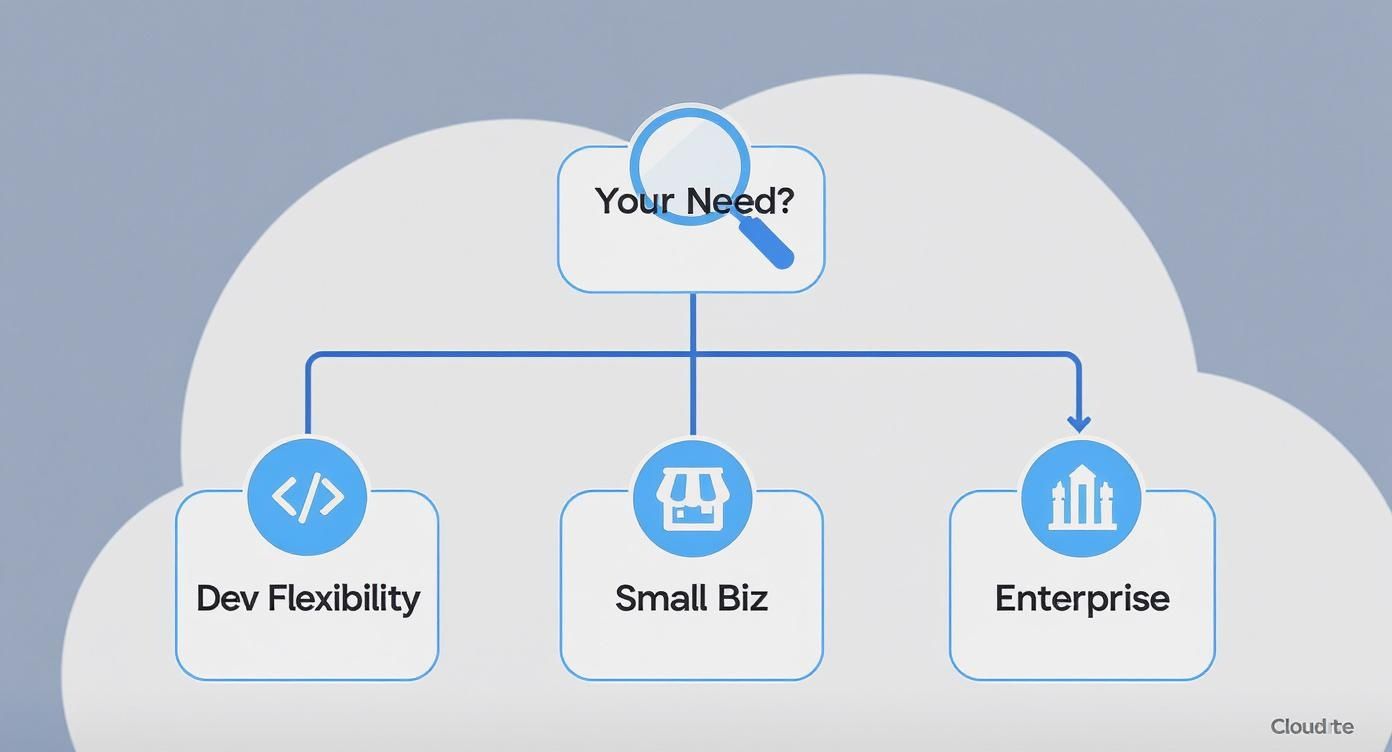
As you can see, there’s no silver bullet. The right choice lines up directly with what drives your business, whether that’s flexibility for developers or massive scale for an enterprise.
Evaluate Vendors as Strategic Partners
Remember, you're not just buying a piece of software; you're entering into a long-term relationship. Your evaluation has to go beyond the feature list and dig into the vendor's support, security practices, and overall stability.
This is especially true for businesses handling sensitive customer data. You have to be confident in their security and privacy measures. Using a detailed SOC 2 compliance checklist is a great way to guide this part of your due diligence.
Before you even think about signing a contract, get a list of sharp questions ready for any potential vendor.
- Security and Compliance: What certifications do you hold? How do you manage data privacy, and what's your plan if a security incident occurs?
- Support Model: What are your standard support hours and guaranteed response times? What do premium support options look like?
- Product Roadmap: What new features or key integrations are you planning to release in the next 12-18 months? How do you take customer feedback into account for future development?
- Total Cost of Ownership: What exactly does the subscription fee cover? Ask about potential extra costs for things like data storage, API calls, or adding more users down the road.
By zeroing in on your specific needs, your technical environment, and the vendor’s viability as a partner, you can make a choice that goes far beyond a simple feature-for-feature comparison. You’ll end up with a cloud CMS that truly becomes a strategic asset for your business.
Frequently Asked Questions About Cloud CMS
Even after seeing all the benefits on paper, moving to a cloud content management system naturally brings up some practical, "what if" questions. Let's tackle a few of the most common ones I hear from businesses trying to make the right choice.
Is My Data Really More Secure in the Cloud?
This is easily the biggest question, and it's a fair one. It feels counterintuitive, right? How can your data be safer on a server you can't even see than on one humming away in your own office?
But here’s a way to think about it: your on-premise server is like a high-quality safe you keep in your office. A top-tier cloud CMS provider, on the other hand, is like a commercial bank vault. Your safe is solid, but the bank vault has 24/7 armed guards, reinforced concrete walls, and teams of experts whose only job is to anticipate and stop break-ins.
Top cloud vendors pour millions into security measures, including constant monitoring, regular third-party audits, and achieving strict compliance certifications like SOC 2 and ISO 27001. That’s a level of specialized security that’s simply out of reach for most companies to build and maintain themselves.
What Is Involved in a Content Migration?
Getting your content from an old system into a new cloud CMS is a major step, and it’s much more than a simple copy-and-paste job. A smooth migration hinges on careful planning and usually breaks down into a few distinct phases.
- Content Audit: The first step is taking stock of everything you have. You’ll need to decide what’s coming with you, what needs a refresh, and what can finally be retired. It's the perfect excuse for a digital spring clean.
- Mapping and Transformation: No two systems organize content in exactly the same way. This is the technical part where you "map" the fields from your old setup to the new one. Often, this means running scripts to reformat the data so it fits perfectly into the new cloud CMS.
- The Migration: This is the actual move. Using automated tools and scripts, your content—sometimes thousands of pages, images, and files—is transferred over. This can happen all at once or in carefully managed stages.
- Testing and Validation: Once the data is moved, you have to kick the tires. Your team will need to hunt for any broken links, weird formatting, or missing pieces to make sure everything is flawless before you flip the switch.
It’s definitely a project, but getting the migration right is what sets you up to truly take advantage of your new, more powerful platform.
SaaS vs. PaaS: What Is the Practical Difference?
Getting the service model right is crucial. For cloud CMS, you'll most often run into two options: Software-as-a-Service (SaaS) and Platform-as-a-Service (PaaS).
SaaS (Software-as-a-Service): This is the "hands-off" approach. You’re essentially renting a finished product that's ready to go right out of the box. The provider takes care of all the technical headaches—servers, maintenance, security, and updates. It’s perfect for teams that want to focus 100% on creating and managing content.
PaaS (Platform-as-a-Service): This model gives your developers more room to build. The vendor manages the core infrastructure (the hardware, network, and servers), but you get to deploy and manage your own applications on top of it. This is the way to go if you have a development team and need to create custom functionality or complex integrations that a standard SaaS solution just can't handle.