CMS Software Comparison Choosing the Right Platform
Our expert CMS software comparison analyzes WordPress, Shopify, and Wix on usability, cost, and scalability to help you find the best fit for your website.

Picking the right Content Management System (CMS) really boils down to a fundamental choice: do you want total control or total convenience? It's the classic trade-off. On one side, you have open-source powerhouses like WordPress that give you the keys to the kingdom—endless flexibility and customization. On the other, you have all-in-one SaaS platforms like Shopify or Wix that handle all the messy technical bits for you.
Your decision ultimately rests on your team's technical comfort level, your budget, and where you see your business heading in the next few years.
Choosing Your Digital Foundation
This isn't just a technical decision; it’s a strategic one that will define your entire digital operation. We're going to move past the typical feature-for-feature lists and get into a more nuanced analysis of the big players. I want to show you the real-world, practical implications of choosing one system over another, because the right platform can act as a growth engine, while the wrong one can become a frustrating bottleneck.
The CMS market is massive, projected to hit $54 billion by 2025. What's telling is that cloud-based solutions now make up a dominant 58.4% of that market. That signals a major shift in the industry—businesses are increasingly voting for platforms that take technical management off their plate.
Understanding the Core Trade-Offs
At its heart, the debate between something like WordPress and Shopify is a tug-of-war between control and simplicity. Open-source systems put you firmly in the driver's seat. You get complete freedom over your site's design, its features, and, crucially, your data. But that freedom comes with responsibility; you're on the hook for hosting, security, and maintenance.
SaaS platforms flip that script. They manage all the backend headaches, letting you focus entirely on your content and your business. The trade-off? You lose a significant degree of customization and often have to contend with transaction fees or other platform-specific costs. If you need a refresher on the basics, our guide on what a CMS is is a great place to start.
The best CMS isn't the one with the longest feature list. It's the one that fits your team's workflow, your available resources, and your business goals like a glove.
To kick things off, let's start with a high-level look at the platforms we'll be dissecting. The table below is a quick snapshot to help frame your thinking, clarifying what each system is built for and who it's built for.
Quick CMS Platform Snapshot
This table provides a high-level overview comparing the core focus and ideal user for each major CMS platform discussed in this guide.
| CMS Platform | Primary Focus | Ideal User Profile | Hosting Model |
|---|---|---|---|
| WordPress | Ultimate flexibility, content publishing | Bloggers, businesses needing customization | Self-Hosted |
| Shopify | E-commerce, online retail | Online store owners, from startups to large brands | SaaS (Hosted) |
| Wix | Visual design, ease of use for simple sites | Small businesses, artists, photographers | SaaS (Hosted) |
| Squarespace | Aesthetically driven design, portfolios | Creatives, service-based businesses, bloggers | SaaS (Hosted) |
This quick breakdown clearly shows the different lanes these platforms operate in. Think of WordPress as the versatile builder's toolkit, Shopify as a finely-tuned retail machine, and both Wix and Squarespace as the go-to solutions for visually-driven projects where simplicity is key. Now, let's dive deeper and unpack what these differences really mean for you.
Comparing Usability and Core Features
A platform's real worth isn't in its marketing claims; it's in the day-to-day grind. How a CMS feels and functions directly impacts your team's efficiency, the quality of your content, and your ability to pivot when needed. This practical CMS software comparison is all about the real-world user experience of today's leading platforms.
We're going to break down the fundamental tug-of-war between deep customization and out-of-the-box simplicity. The core question is always this: do you need granular control over every single element, or do you prefer a guided, streamlined experience that gets you to the finish line faster? Your answer is the key to finding the right foundation.
The Content Creation Experience
The content editor is the heart and soul of any CMS. It’s where your team spends most of their time, so its design is absolutely critical. WordPress and Wix offer two completely different philosophies here.
WordPress champions the Gutenberg block editor, a system that treats every piece of content—a paragraph, an image gallery, a video embed—as an individual, customizable block. This approach gives you incredible flexibility for building complex, structured layouts. But let's be honest, for someone new to the concept, it can feel a bit abstract and comes with a steeper learning curve.
Wix, on the other hand, is all about its pure drag-and-drop interface. You click on an element, you move it, and it stays exactly where you put it, down to the pixel. This visual-first approach is incredibly intuitive for beginners and makes mocking up designs a breeze. The trade-off? This level of freedom can easily lead to inconsistent designs or mobile responsiveness headaches if you're not careful.
The choice between a block editor and a drag-and-drop system isn't about which is "better." It's about which one fits your content strategy. Structured, long-form content shines in a block editor, while highly visual, design-forward sites benefit from the immediacy of drag-and-drop.
Ecosystems and Extensibility
No CMS does everything perfectly right out of the box. Its real power often comes from its ecosystem of apps or plugins, which let you add everything from contact forms and SEO tools to a complete e-commerce store.
This is where WordPress's open-source DNA gives it a massive lead. Its official plugin repository boasts over 59,000 free plugins, not to mention thousands of premium ones. If you can think of a feature, there’s a plugin for it. The challenge, of course, is navigating this massive library; quality control is up to you, and a poorly coded plugin can introduce security risks or slow your site down.
Shopify takes the opposite route with its curated App Store. The selection is much smaller, but every app is vetted to meet strict performance and support standards. This "walled garden" creates a more secure and stable environment, which is crucial for e-commerce. The catch is that many of these apps carry their own monthly subscription fees, which can quickly add to your total cost.
Structuring and Managing Content
Great content management is more than just hitting "publish." It’s about organizing your information logically so that it makes sense to users and search engines alike. A solid site structure is non-negotiable for scalability and user experience. To dig deeper, it’s worth exploring the principles of what is information architecture for websites.
Platforms like Drupal are built for this, offering powerful tools for creating custom post types and complex taxonomies. This makes it a natural fit for large, data-heavy sites—think university portals or government websites that need to manage diverse content with specific relationships between pieces.
Then you have platforms like Squarespace, which simplify this entire process. They provide predefined content types (like blog posts, events, or portfolio projects) that are easy to manage but don't offer much room for unique structural needs. It's a perfect setup for portfolios or small business sites where the content categories are straightforward. Each platform's approach to content structure is a dead giveaway of who its target user is and the scale it's designed to handle.
A Deep Dive into Open-Source Titans: WordPress, Drupal, and Joomla
When you step into the world of open-source, self-hosted platforms, you’re choosing one thing above all: absolute control. You become the architect, managing every single detail from hosting and security to maintenance and performance. This part of our CMS software comparison digs into the three platforms that essentially built the open-source community: WordPress, Drupal, and Joomla.
Each of these systems was born from a completely different mindset, and getting to grips with their core philosophies is the key to making the right choice. They offer a sliding scale of flexibility, complexity, and community backing that will ultimately define your project's path and its real-world cost over time.
Architectural Philosophy and Who They're For
WordPress started its journey as a simple blogging tool, and that legacy of straightforwardness remains its biggest asset. Its entire architecture is built around ease of use, letting people without a technical background publish content without a fuss. It's an approach that has obviously paid off.
Drupal, on the other hand, was conceived from day one as a robust framework for developers. Its real power is in managing highly complex, custom data types and enforcing strict, enterprise-level security. This makes it the go-to for government agencies, universities, and large corporations that have very specific needs for data organization and user permissions.
Joomla lands somewhere in the middle. It offers more out-of-the-box functionality than a vanilla WordPress install but doesn't have the steep learning curve of Drupal. It gives you a more structured way to manage content, making it a solid fit for more ambitious sites like social networks or community portals that need more than a blog but less than a fully custom enterprise system.
The Real Deciding Factor: Ecosystem and Community
Technical specifications matter, but what truly separates these three is the size and energy of their ecosystems. WordPress's market dominance isn't just about its core code; it's about the incredible community that surrounds it. This has resulted in a staggering library of over 59,000 free plugins and a seemingly endless supply of themes.
This massive ecosystem means that for almost any feature you can dream up, a ready-made solution probably already exists. For businesses that go the WordPress route, professional WordPress website design services can readily customize the platform to fit precise requirements. For most projects, this dramatically cuts down development costs and project timelines.
The sheer scale of the WordPress ecosystem creates a powerful network effect. More users attract more developers to build plugins, which in turn attracts even more users. It’s a self-perpetuating cycle that Drupal and Joomla have found difficult to challenge.
Drupal’s community, while smaller, is incredibly specialized and developer-focused. You'll find top-tier expertise for thorny technical problems, but the number of affordable, available developers is much more limited. Joomla's community is still active but has seen some decline, which can make it tougher to find modern extensions and reliable support. Our resource collection for https://www.contenttoolkit.co/collections/open-source-cms provides more tools for exploring what these communities have to offer.
Market Realities and Long-Term Viability
The numbers don't lie. As of April 2025, WordPress commands an unbelievable 61.3% of the CMS market. In stark contrast, Drupal and Joomla have seen their market shares drop to 1.2% and 2.2% respectively. This isn't just a trend; it's a major consolidation in the open-source world.
This market shift has tangible consequences. A bigger market share translates to more investment, better integrations with third-party tools, and a much larger talent pool to hire from. While Drupal is still a powerhouse for its specific niche and Joomla serves its users well, WordPress has become the de facto standard for good reason. Its mix of accessibility, flexibility, and an ecosystem that can't be beaten makes it the most practical and future-proof option for the vast majority of web projects today.
Evaluating SaaS Platforms: Shopify, Wix, And Squarespace
When you move away from the total control of open-source systems, you step into the world of Software-as-a-Service (SaaS) platforms. The big promise here is convenience. These solutions handle all the messy technical stuff—hosting, security, updates—so you can just focus on running your business. In this part of our CMS comparison, we’re looking at the three heavyweights in this space: Shopify, Wix, and Squarespace.
While they all offer an all-in-one package, their core philosophies couldn't be more different. Shopify is a pure-bred e-commerce engine, built from the ground up to sell products. On the other hand, Wix and Squarespace are masters of visual presentation, built for a broader audience that needs great design and ease of use for things like portfolios, blogs, and service-based business websites.
Shopify: The Uncontested E-commerce Leader
Let's be clear: Shopify isn't just a website builder. It's a full-blown retail operating system. Its entire feature set is laser-focused on a single goal: helping you sell products, whether online or in-person. Everything from inventory management and payment processing to integrated shipping and marketing tools is optimized for commerce.
This intense specialization is its greatest strength. If you're a small retailer launching your first online store, Shopify gives you the most direct path to market with the fewest technical headaches. Everything you need is included, and its well-curated App Store lets you add powerful features without the security roulette of open-source plugins.
The platform's singular focus on selling has fueled its incredible rise. Shopify's market share jumped from a tiny 0.3% in 2014 to a projected 6.7% by 2025, making it the second most popular CMS in the world. This growth highlights a major shift in the market toward managed, specialized solutions for online retail. You can dive deeper into these trends by checking out recent CMS statistics on meetanshi.com.
Just look at Shopify's dashboard—it puts key sales metrics front and center.
This clean interface shows how every feature, from orders to marketing, is designed to support the sales funnel. For merchants, it just makes sense.
Wix And Squarespace: The Visual Powerhouses
Where Shopify is all about the transaction, Wix and Squarespace are all about the presentation. They are built for creatives, service providers, and small businesses who need a stunning website without touching a line of code. Their main advantage is their powerful and intuitive site editors.
- Wix: Gives you almost total creative freedom with its pixel-perfect, drag-and-drop editor. You can place any element anywhere you want. This is great for custom layouts, but it can sometimes lead to design headaches or mobile responsiveness issues if you're not careful.
- Squarespace: Takes a more guided, structured approach. Its editor is section-based, offering professionally designed layouts that are always responsive and polished right out of the box. You trade a bit of creative freedom for guaranteed design quality, which is why it's a favorite among photographers, designers, and artists.
The core difference is simple: Shopify is built for merchants. Wix and Squarespace are built for creators and communicators. Your choice really comes down to whether your main goal is to sell products or to showcase a brand, portfolio, or message.
To help you decide, we've broken down how these platforms stack up against each other on some key features.
SaaS CMS Platform Feature Breakdown
Here’s a detailed comparison of the top SaaS CMS platforms across key business and technical criteria.
| Feature | Shopify | Wix | Squarespace |
|---|---|---|---|
| Primary Use Case | E-commerce (from small shops to large enterprises) | General-purpose websites (portfolios, blogs, small businesses) | Visually-driven sites (portfolios, blogs, creative businesses) |
| Ease of Use | Very high for e-commerce tasks; the rest of the site is straightforward. | Extremely high, with a true drag-and-drop editor. Can have a slight learning curve due to its flexibility. | High, with a structured, section-based editor that ensures good design. |
| Design Flexibility | Moderate. Based on themes, with customization available through Shopify Liquid. | Very high. Almost total control over element placement, which can be both a pro and a con. | Moderate to high. Less freeform than Wix, but templates are beautifully designed and customizable. |
| E-commerce Power | Best-in-class. Built-in inventory, payments (Shopify Payments), shipping, and POS integration. | Good. Offers e-commerce functionality, but not as deep or scalable as Shopify's native tools. | Good. Solid e-commerce features for smaller catalogs, but lacks advanced inventory or shipping tools. |
| App Ecosystem | Excellent. A massive, well-vetted App Store for extending functionality. | Good. The Wix App Market has many integrations, though not as commerce-focused as Shopify's. | Fair. A smaller selection of extensions, focused more on marketing and design than on operations. |
| Pricing | Starts at $29/month for the Basic plan, with transaction fees unless using Shopify Payments. | Starts with a free (ad-supported) plan; e-commerce plans begin around $27/month. | Starts at $16/month (billed annually); e-commerce plans begin at $27/month. |
This table makes it clear that while all three are capable, their strengths are tailored for very different kinds of users and business objectives.
Real-World Scenarios And Recommendations
Let's put this CMS comparison into practice with a few real-world examples to show where each platform truly shines.
Scenario: A Local Boutique Going Online
For a boutique with physical inventory that needs to start selling online fast, Shopify is the undisputed winner. Its integrated POS system, multi-channel inventory tracking, and built-in sales channels (like Instagram and Facebook) are absolute game-changers. The entire setup is streamlined for selling.Scenario: A Freelance Photographer's Portfolio
A photographer needs to showcase high-resolution images in stunning, elegant galleries. Squarespace is the ideal choice here. Its award-winning templates are designed to be visual-first and look incredible on any device, letting the work speak for itself without the user needing to fuss over technical design details.Scenario: A Restaurant Needing a Simple Website
A local restaurant needs a site with its menu, contact info, an embedded map, and maybe a simple booking form. Wix excels in this situation. Its flexible editor makes it easy to create a custom-branded, visually appealing one-page site. The Wix App Market also has plenty of simple integrations for reservations and contact forms.
If you're looking to explore a wider variety of these kinds of tools, our collection of website builder CMS options offers more platforms tailored to different business needs.
Ultimately, picking from these SaaS leaders isn't about which one is "best" overall. It's about figuring out which one is best aligned with what you're trying to achieve.
How To Choose The Right CMS For Your Business
Staring down the results of a detailed cms software comparison can feel like information overload. The real goal isn't to crown one platform as the "best" but to find the one that fits your specific business model, technical know-how, and future plans. It all boils down to a classic trade-off: do you need absolute flexibility or simplified convenience?
Instead of giving you a one-size-fits-all answer, let's break this down into a practical framework. Your decision should really be driven by your main business objective. Once you clarify that, the right platform usually becomes pretty obvious.
Matching The Platform To The Business Goal
The right CMS should accelerate your business, not become another technical hurdle. To get there, you need to be honest about your core requirements and your team's capabilities.
For Content-Driven Businesses: If your world revolves around publishing killer content, building an audience, and climbing the SEO ladder, WordPress is almost always the right call. It gives you granular control over technical SEO and has a plugin for literally everything. It’s built for sophisticated content marketing from the ground up.
For E-commerce Ventures: Is your primary business selling products online? Then Shopify was made for you. It handles everything from inventory and secure payments to multi-channel selling, creating a powerful retail machine. The focus here is on getting you selling fast, not on deep content customization.
For Visually-Focused Brands: Creatives, photographers, and service-based businesses that rely on a stunning visual presentation should look closely at Squarespace or Wix. They offer gorgeous templates and drag-and-drop editors that deliver a polished, professional look without a single line of code.
This infographic lays out the decision-making process based on what you're trying to achieve.
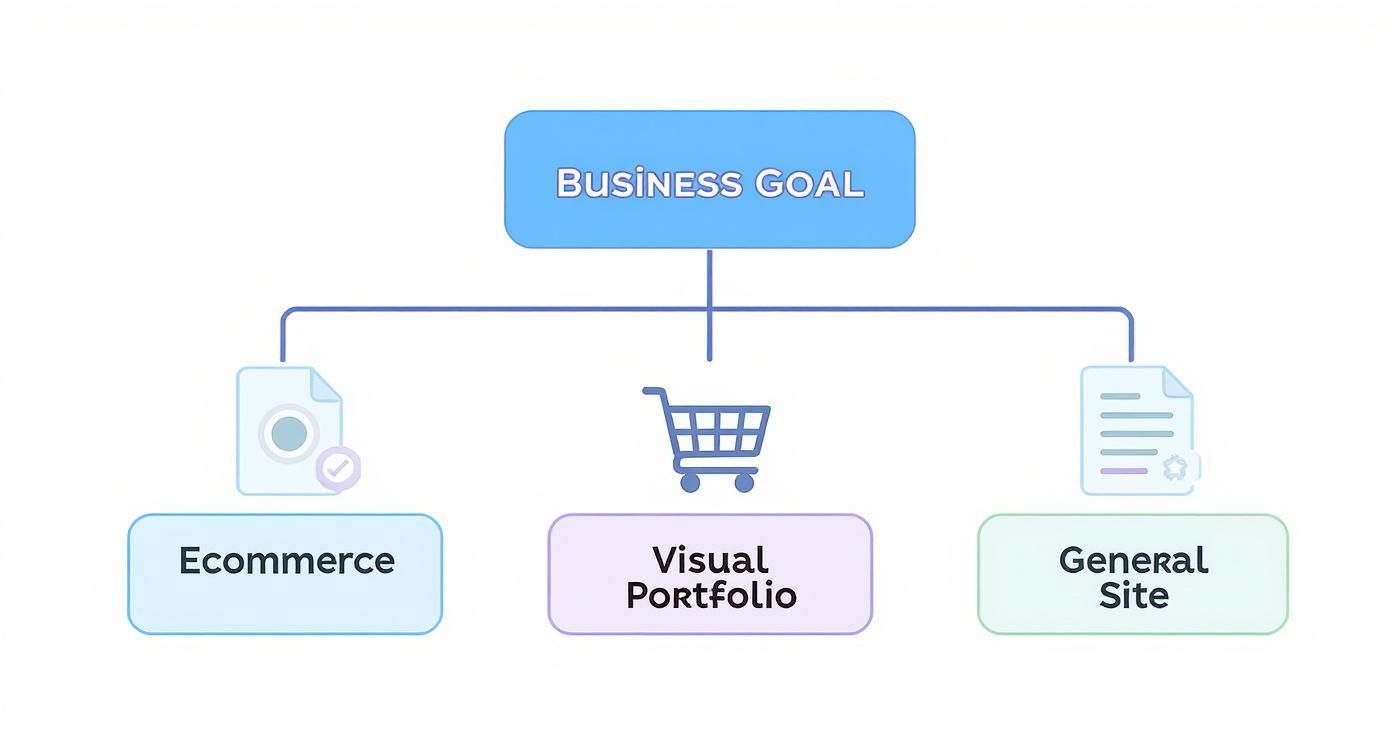
As the chart shows, if you start with your end goal in mind, you can quickly narrow down the options to a platform that's already optimized for that exact purpose.
Making A Future-Proof Decision
The CMS you pick today will define your team's agility for years to come. Think beyond your immediate needs and consider where you're headed. Are complex integrations on the horizon? Understanding how different systems talk to each other is crucial. For instance, exploring the integration of CMS and CRM systems can show you how these platforms work in tandem to fuel growth.
Diving into direct comparisons, like this WordPress vs. Wix vs. Squarespace UK Website Builder Guide, helps cut through the marketing noise. It allows you to see which foundation truly aligns with how your business operates.
Ultimately, the right CMS empowers you to execute your business strategy with the least amount of friction. It should feel like a natural extension of your team, whether that means providing limitless customization for developers or a simple, intuitive interface for marketers.
By framing your decision around your specific business goals—both now and in the future—you can choose a platform that won't just solve today's problems but will also grow with you.
Common Questions About CMS Platforms
Choosing a CMS is a big decision, and it’s natural to have a few lingering questions. Let's tackle some of the most common ones that come up when people are trying to nail down the right platform for their needs. Getting these details straight is key, as your CMS choice will impact everything from your daily workflow to your budget for years to come.
What Is The Main Difference Between Self-Hosted And SaaS Platforms?
This is probably the most fundamental question, and it really comes down to a trade-off: control versus convenience.
Think of a self-hosted platform like WordPress.org. You download the software for free, but you're on the hook for everything else. You have to find and pay for your own web hosting, install the software, and handle all the security updates, patches, and backups yourself. The payoff for all that work is maximum control and flexibility. It's your code, your data, your rules—you can customize anything.
On the other hand, a SaaS (Software-as-a-Service) platform like Shopify or Wix is the all-inclusive resort of the CMS world. Your monthly subscription covers hosting, security, and maintenance. You give up some of that deep-level control, but what you get back is simplicity. The technical backend is someone else's problem.
Can I Switch My CMS Later If My Business Needs Change?
Yes, you can absolutely migrate from one CMS to another, but don't underestimate the task. The complexity and cost can swing wildly depending on what you're moving from and to, especially if you have a large site packed with content.
Moving a site to or from WordPress, for instance, is a well-trodden path. Because it's open-source, there's a whole cottage industry of plugins and professional services built to make the process as painless as possible.
It gets much trickier when you try to move between two closed-source SaaS platforms, say from Squarespace to Wix. These systems aren't always built to let your data go easily. Export tools can be limited, which can mean you're stuck manually copying and pasting content—a tedious and error-prone job.
It’s always best to pick a CMS with your future growth in mind. While you can migrate later, choosing a platform that can scale with you from the start will save you a world of time, money, and headaches.
How Does My Choice Of CMS Impact SEO?
The truth is, nearly every modern CMS gives you the tools for a solid SEO foundation. The "best" platform for SEO is often just the one your team finds easiest to use consistently. Your strategy, not just the software, is what really drives results.
WordPress has a stellar reputation for SEO, mostly thanks to its incredible ecosystem of plugins. Tools like Yoast SEO and Rank Math give you fine-grained control over just about every on-page and technical SEO element you can think of, from meta tags to XML sitemaps.
But SaaS platforms like Shopify and Squarespace have really upped their game. They now have strong built-in SEO features that handle the essentials—custom URLs, title tags, image alt text—right out of the box. They might not offer the same surgical precision as a specialized WordPress plugin, but for most businesses, they are more than capable.
At the end of the day, even the best tools can't make up for a poor strategy. High-quality content and consistent optimization efforts will always be the most important factors for ranking well.
Are Free CMS Platforms Like WordPress Truly Free?
This is a classic "yes, but" situation. The core software from WordPress.org is genuinely free—free to download, free to use, and free to modify. The cost comes from everything else you need to actually run a professional website with it. "Free" refers to the license, not the total cost of ownership.
To get a self-hosted WordPress site up and running, you'll need to open your wallet for a few things:
- Domain Name: Your site's address (like
yourbusiness.com), which requires an annual registration fee. - Web Hosting: You need to rent server space to store your site's files and make them available online. This is a recurring monthly or yearly cost.
- Premium Themes and Plugins: While there are thousands of free options, many businesses pay for premium themes for better design and plugins for specific functionality like e-commerce or memberships.
So, when you see "free" CMS, remember to budget for these associated costs to get a realistic picture of your total investment.