Unlocking Growth with CMS and CRM
Discover how integrating CMS and CRM platforms can transform your business. This guide explains how to connect content with customer data for powerful results.

It's easy to get tangled in the alphabet soup of business software, but the difference between a CMS and CRM is actually quite simple. It all comes down to focus: a CMS manages the content your audience sees, while a CRM manages the relationships you build with that audience.
Think of it like this: your CMS is your digital storefront—the website, the blog posts, the product pages. It’s what you present to the world. Your CRM, on the other hand, is the detailed customer logbook and sales tracker you keep in the back office.
Unpacking The Core Functions Of CMS and CRM

Running a successful online operation really boils down to two key jobs: showing your brand to the world and managing your interactions with the people who engage with it. This is where the specialized roles of a Content Management System (CMS) and a Customer Relationship Management (CRM) platform come into sharp focus. They aren't interchangeable; they're two sides of the same customer-focused coin.
A CMS is your public-facing engine. It's the software that lets you build, manage, and publish everything your audience interacts with, from blog posts and landing pages to case studies and company news. The main job of a CMS is to make content creation and publication straightforward, putting the power in the hands of marketing teams and writers.
Meanwhile, a CRM works behind the curtain as your private customer intelligence hub. It’s designed to capture, sort, and analyze data for every single lead, prospect, and existing customer. The goal here is to give your sales, marketing, and support teams a 360-degree view of every interaction, which in turn leads to more personal communication and a smoother customer journey.
A Tale Of Two Systems
Let’s walk through a common scenario. A visitor lands on your blog—expertly managed by your CMS—and reads a fantastic article. They're so impressed that they fill out a form to download your latest ebook.
Right there, a handoff happens.
The CMS did its part perfectly by presenting great content and capturing a lead. Now, the CRM steps in. It automatically saves the new contact's details, logs their activity on your site, and might even assign them to a sales rep for a follow-up call. One system sets the stage, and the other manages the relationship with the audience. To dig deeper, you can learn more about what a CMS is and its foundational role in any digital strategy.
A useful analogy is to view your business as a theater. The CMS is the script, the stage design, and the lighting—everything the audience experiences. The CRM is the box office and the director's notes, tracking who attended, their ticket history, and their feedback to make sure they come back for the next show.
This clear separation of duties is what makes each system so powerful. To put these differences into even sharper relief, let's compare their core functions, users, and goals side-by-side.
CMS vs CRM A Quick Comparison
The following table breaks down the essential distinctions between a Content Management System and a Customer Relationship Management system. While they often work together, their primary purposes are fundamentally different.
| Aspect | CMS (Content Management System) | CRM (Customer Relationship Management) |
|---|---|---|
| Primary Goal | To create, manage, and publish digital content for an audience. | To track, manage, and nurture relationships with leads and customers. |
| Main Users | Marketing teams, content creators, editors, and web developers. | Sales representatives, customer service agents, and marketing managers. |
| Core Data | Website pages, blog posts, images, videos, and design templates. | Contact details, communication history, sales pipelines, and support tickets. |
| Key Focus | Public-facing content and user experience on the website. | Internal-facing customer data and relationship-building activities. |
As you can see, one is built for broadcasting a message (CMS), while the other is built for managing the conversation that follows (CRM). Understanding this distinction is the first step toward building a tech stack that truly supports your growth.
If a CRM is your business's central nervous system for customer data, then a Content Management System (CMS) is the powerful engine that runs your entire public-facing website. Think of it as the platform that takes your website from a static digital brochure and turns it into a living, breathing asset for your brand.
At its core, a CMS is all about making content creation accessible to everyone. It means your marketing team can publish a new blog post, your sales team can update a product page, and your HR team can post a job opening—all without ever writing a line of code or waiting on a developer. This freedom is what enables modern marketing teams to be agile, react to market shifts, and get content out the door fast.
Must-Have Features of a Modern CMS
Of course, not all content management systems are built the same. The difference between a clunky, frustrating platform and a great one usually comes down to a few key features that streamline your workflow and amplify your content's impact.
Here are the capabilities that really matter:
- Intuitive "What You See Is What You Get" (WYSIWYG) Editors: These are essential. They let your team format text, drop in images, and build out pages using an interface that feels as simple as a word processor.
- Version Control: This is a lifesaver for any team that collaborates on content. It saves previous versions of every page and post, so you can easily track changes or roll back to an earlier draft if something goes wrong.
- Built-in SEO Modules: A good CMS should give you direct control over the fundamentals of search engine optimization—things like meta descriptions, title tags, URL slugs, and image alt text.
- Flexible Design Templates: Templates are the secret to maintaining brand consistency. They provide a pre-approved framework for different page types, giving creators the structure they need without having to start from a blank slate every time.
You can think of a CMS like a professional kitchen. The templates are your pre-set stations (grill, prep, pastry), the editor is your set of knives and tools, and version control is the head chef's ability to approve or revise a dish before it goes out. It brings order to the chaos and helps ensure every plate that leaves the kitchen is perfect.
WordPress as a Prime Example
There's no better example of a dominant CMS than WordPress. It's the platform behind an incredible 43% of all websites on the internet, and for good reason. It strikes a unique balance, offering a framework that’s simple enough for total beginners but also endlessly customizable for developers and large teams.
Here’s a quick look at the WordPress dashboard—the command center where all the content creation and site management takes place.
This clean interface gives users immediate access to posts, pages, media libraries, and design settings, which is a huge part of why it has become the world's go-to CMS. For larger organizations with more complex needs, it's also worth exploring the world of enterprise content management solutions.
Ultimately, the right CMS removes technical roadblocks and turns your website into a powerful marketing tool. It empowers your team to create and share valuable content that truly connects with your audience. And if you're looking into more modern, scalable options, our guide on cloud content management systems is a great place to see what's next.
The CRM: Your Customer Intelligence Hub
If a CMS is your company's public-facing voice, a Customer Relationship Management (CRM) platform is its brain and central nervous system. It's so much more than a glorified digital address book. Think of it as a living, breathing diary of every single interaction someone has with your brand—from the very first ad they clicked to the support ticket they submitted yesterday.
This isn't just data for data's sake. A CRM takes anonymous website visitors and turns them into real people with discernible interests and needs. Every downloaded whitepaper, every visit to your pricing page, every opened email—each action adds another layer of detail to their profile, creating the foundation for a business that truly puts its customers first.
The explosive growth of the CRM market tells the story. What was once a niche sales tool has become an indispensable business platform. Global CRM revenue shot up from around $14 billion in 2010 to $69 billion by 2020—a jump of nearly 400%. That's not just a trend; it's a fundamental shift in how businesses operate. EmailVendorSelection offers more insights into this incredible market expansion.
Core Capabilities of a Modern CRM
A powerful CRM gives every customer-facing team the tools they need to shine. It wrangles all that complex data into something clear and actionable, paving the way for smarter, more coordinated work across the company.
Here’s a look at what a modern CRM brings to the table:
- Pipeline Management: This gives you a bird's-eye view of your entire sales process. You can see where every single deal is, from the first "hello" to the final handshake, which helps sales managers forecast revenue with far greater confidence.
- Lead Scoring: The system automatically ranks leads by assigning points based on who they are and what they do. This simple but powerful feature helps your sales team focus their energy on the prospects most likely to convert.
- Marketing Automation: With a CRM, you can set up automated email sequences, slice your contact lists into hyper-targeted segments, and directly trace the impact of your marketing campaigns back to actual sales.
- Service Analytics: For your support crew, a CRM is a godsend. It logs every customer issue, tracks how quickly problems are solved, and measures overall satisfaction. This creates a tight feedback loop for constantly improving your service.
At its core, a CRM serves as the single source of truth for your organization. When marketing, sales, and support are all looking at the same customer profile, the walls between departments crumble. The result is a seamless and genuinely personal customer experience, no matter who they talk to.
The 360-Degree Customer View in Action
Platforms like Salesforce are masters at creating this unified perspective. The dashboard pulls together data from every corner of the business into one clean, easy-to-digest profile.
This screenshot from Salesforce is a perfect example, consolidating contact details, activity history, and sales opportunities all in one place.
Imagine the power of this. A sales rep can glance at a profile and see that a prospect just read three blog posts about a specific feature and also submitted a support ticket. Armed with that context, the conversation becomes immediately more relevant and helpful. The rep can solve an immediate problem while also understanding the prospect's deeper interests.
Having a central system also makes managing documentation much simpler; for instance, you can learn more about structuring customer-facing information with a knowledge base CMS. This seamless flow between data and content is where a well-tuned CMS and CRM strategy truly proves its worth, paving the way for stronger, more profitable relationships.
Why Integrating Your CMS and CRM Is a Game Changer
Your CMS and CRM are powerful on their own, managing completely different parts of your business. But when you get them talking to each other, something special happens. Think of your website (the CMS) as the public-facing stage, and your customer database (the CRM) as the operational backstage. Integration builds a direct, intelligent bridge between them.
This connection is more than just a nice-to-have technical perk. It creates a powerful feedback loop. Anonymous website clicks suddenly turn into rich customer profiles, and in turn, that customer data helps you build smarter, more relevant experiences on your site. It’s the engine that drives a more responsive and intelligent customer journey.
From Anonymous Data to Actionable Insights
Without an integration, your CMS knows what content people are looking at, but your CRM knows who those people are. Connecting them bridges that critical gap. Once a known contact from your CRM lands on your site, their activity is no longer just an anonymous page view.
This flow of information enriches your customer profiles in real time. Imagine a sales rep getting an alert that a high-value prospect just spent ten minutes on the pricing page or downloaded a specific case study. That's the perfect cue to start a timely, relevant conversation—dramatically boosting the odds of a good outcome.
This flow of intelligence is what empowers your teams, as the infographic below shows.
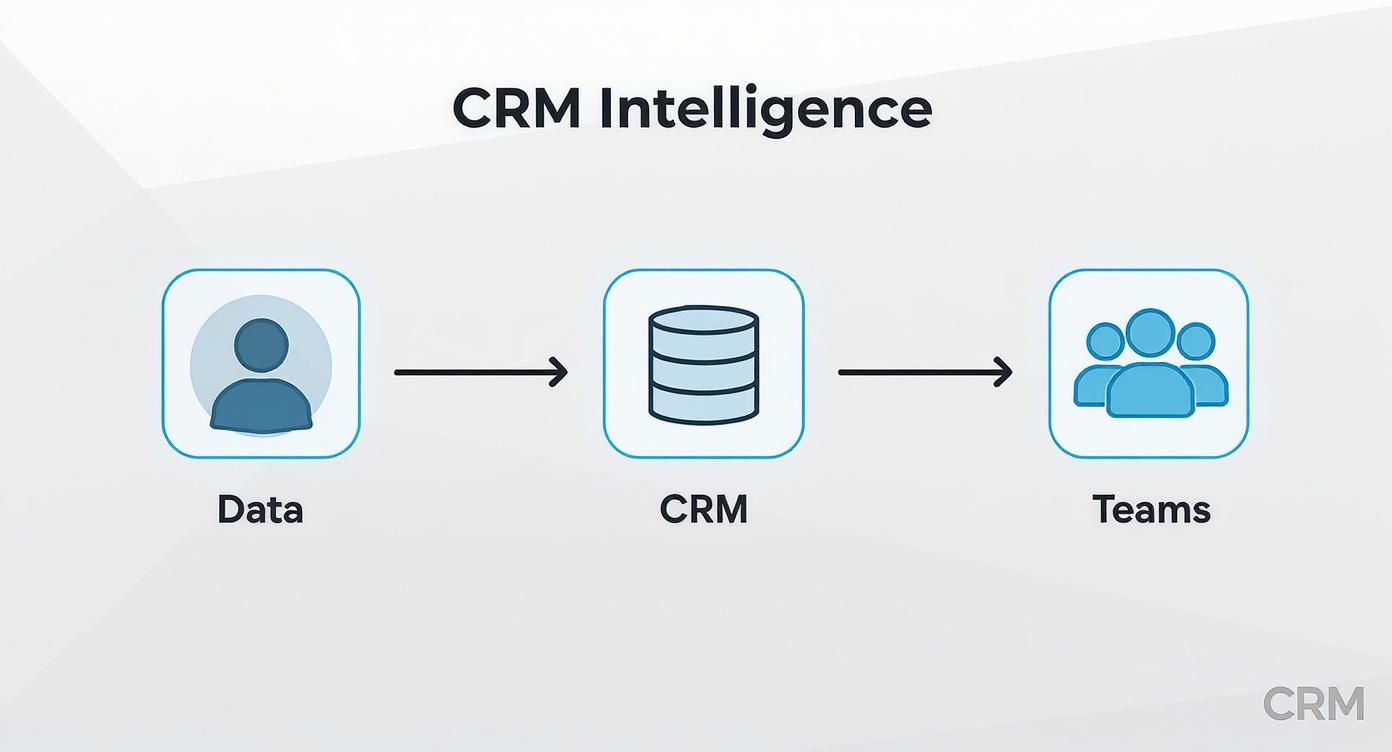
As you can see, a user's activity on the site feeds directly into the CRM. This creates a much richer profile that sales and marketing can immediately put to good use.
The Tangible Benefits of a Unified System
Connecting your CMS and CRM delivers practical advantages that hit your bottom line. You shift from being reactive to proactive, starting to anticipate what your customers need instead of just responding to their requests.
Here are a few key benefits you'll see:
- Dynamic Content Personalization: You can automatically tailor what a visitor sees based on their CRM data. A returning customer might see an upsell offer, while a brand-new prospect gets an introductory video.
- Streamlined Lead Routing: When someone fills out a form, the integration can instantly send that lead to the right sales rep based on their territory, industry, or stated interest. No more manual data entry or delays.
- Accurate Revenue Attribution: By tracking a lead’s entire journey—from the first blog post they read to the final purchase—you can finally attribute revenue to the specific content that sealed the deal. This helps you prove marketing ROI and double down on what works.
- Enhanced Marketing Automation: An integrated system enables far more sophisticated automation. A visit to a specific product page could trigger a targeted email campaign, delivering exactly the right information at the perfect moment.
The ultimate goal of integrating your CMS and CRM is to create a single, unified view of the customer. When marketing and sales teams are working from the same playbook, the customer experiences a consistent, helpful, and personalized journey from start to finish.
This cohesive approach is especially impactful for smaller companies trying to get the most out of their resources. For many, marketing automation for small businesses is the secret weapon, and it's almost always powered by this kind of integrated system. You stop guessing what customers want and start making data-driven decisions that build loyalty and fuel real growth.
Practical Strategies for Integrating CMS and CRM

Understanding the power of a connected CMS and CRM is one thing; actually making it happen is another. The good news is, you don’t need a massive development team to start building the bridge between your content and your customer data. The path you choose really comes down to your team's skills, budget, and what you hope to achieve long-term.
There are three main ways to tackle this, each with its own trade-offs. Choosing the right one means taking a hard look at your business needs and weighing them against the technical lift and cost. Let’s break down these methods to make the process a lot less intimidating.
Method 1: Native Connectors
The most straightforward route is using a native connector. Many popular CMS and CRM platforms are designed to play nicely together right out of the box. Think of these as pre-built bridges, engineered by the software developers themselves to ensure a perfect fit.
For example, a CRM like HubSpot has its own powerful CMS, creating a seamless, built-in connection. In the same vein, countless WordPress plugins are made specifically to sync form data directly with major CRMs like Salesforce or Zoho.
- Best For: Businesses already using popular platforms that offer official, out-of-the-box integrations.
- Pros: Usually the easiest and fastest way to get set up, often just needing a few clicks and an API key. Since they’re officially supported, you can count on them to be reliable.
- Cons: You're limited by the developer's vision. The functionality can be basic, and you can’t easily customize the data flows beyond what's already offered.
Method 2: Third-Party Middleware
But what if your tools don't talk to each other directly? That’s where third-party middleware platforms like Zapier, Make, or Tray.io become incredibly useful. These services act like universal translators, connecting thousands of different apps that weren't built to work together.
You create simple, automated "workflows" (or "Zaps") that trigger an action in one system based on an event in another. A classic setup is: "When a new form is submitted on my WordPress site (CMS), automatically create a new lead in my CRM."
This approach is like hiring a skilled interpreter. Your CMS and CRM don't speak the same language, but the middleware flawlessly translates messages between them, making sure nothing gets lost in translation.
This method hits a sweet spot between ease of use and flexibility, making it a favorite for many small to mid-sized businesses. It allows for a robust CMS and CRM connection without writing a single line of code. If you're currently weighing your options, our CMS systems comparison can help you find platforms known for their integration-friendliness.
Method 3: Custom API Development
For organizations with very specific, complex needs, nothing beats a custom solution built using Application Programming Interfaces (APIs). An API is essentially a set of rules that lets different software applications communicate directly with each other.
This path definitely requires developer resources, but it gives you almost unlimited control. You could build a two-way sync that not only sends lead data from the CMS to the CRM but also pulls CRM data back to personalize website content in real time. Imagine showing custom offers on your homepage based on a visitor's purchase history, all pulled directly from the CRM.
- Best For: Larger businesses with unique data requirements and access to in-house or outsourced development talent.
- Pros: Complete control and deep customization. You can sync any data point and build complex, two-way workflows tailored precisely to your business processes.
- Cons: This is the most expensive and time-consuming route. It also requires ongoing maintenance to handle API updates and keep the connection stable as software evolves.
Choosing Your CMS and CRM Integration Method
Picking the right method isn't just a technical decision; it's a strategic one. You need to balance immediate needs with future scalability. The table below lays out the key considerations to help you find the best fit for your business.
| Integration Method | Best For | Pros | Cons |
|---|---|---|---|
| Native Connectors | Teams needing a quick, simple, and reliable setup with popular, mainstream platforms. | Easy and fast to implement, officially supported, low maintenance. | Limited functionality, no room for custom workflows, locks you into specific ecosystems. |
| Third-Party Middleware | Small to mid-sized businesses needing flexibility without a development team. | Connects thousands of apps, highly flexible workflows, no-code setup. | Can get expensive with high volume, potential for slight data delays, dependent on a third-party service. |
| Custom API Development | Large enterprises with unique processes and dedicated developer resources. | Unlimited customization, real-time data sync, complete control over data flows. | Highest cost and time investment, requires ongoing maintenance and technical expertise. |
Ultimately, the goal is to create a seamless flow of information that empowers both your marketing and sales efforts. Whether you start with a simple plugin or build a custom solution, the key is to choose the path that aligns with your resources and long-term vision.
As you plan, it's also worth noting how technology is evolving. AI is rapidly becoming a key player in this space. Projections show that by 2025, about 65% of businesses will be using generative AI within their CRM strategies. What's more, companies that already use AI-enhanced CRM tools are 83% more likely to exceed their sales targets. These trends underscore the growing importance of a deeply integrated and intelligent customer data platform.
The Future of Integrated Customer Experiences
The lines between a CMS and CRM are not just blurring—they're being erased by artificial intelligence. We're rapidly moving away from having separate tools for content and customers. Instead, the future is a single, intelligent system that can anticipate what a customer needs and deliver the right experience at the right time.
This isn't just a theory; it's already happening. In a modern CMS, AI is the engine behind real-time personalization. It can show a returning visitor a detailed case study while a new prospect sees an introductory product demo, all based on their past behavior. Over in the CRM, AI-driven lead scoring is helping sales teams spot the hottest leads, ensuring they invest their energy where it will make the biggest impact.
The Rise of Autonomous Systems
The next big leap is toward systems that think for themselves. An autonomous CRM, for instance, doesn't just store data; it acts on it. It can automatically schedule follow-up emails or update contact records, freeing up your team to focus on strategy and building relationships. Even better, it offers proactive insights, like flagging an account at risk of churning or highlighting a new opportunity based on a prospect’s recent website activity.
On the content front, generative AI is quickly becoming a non-negotiable feature in today's CMS platforms. It's like having a digital assistant that helps marketers:
- Draft blog post outlines from a simple keyword.
- Suggest compelling headlines to A/B test.
- Write unique product descriptions for different customer segments.
This doesn't make human creativity obsolete. It amplifies it, drastically cutting down the time it takes to get quality content to market. As companies build out these sophisticated digital experiences, choosing the best headless CMS becomes a critical first step.
The future of the integrated CMS and CRM isn't just about connecting two databases. It’s about creating a predictive, self-optimizing engine that anticipates customer needs and crafts the perfect response—whether that's a piece of content or a sales outreach—before the customer even has to ask.
An AI-Powered Economic Engine
This shift isn't just happening in a tech bubble; it's a massive economic movement. The CRM System Providers industry in the United States alone is on track to become a $313.3 billion market by 2025. Industry giants like Salesforce and Microsoft are pouring resources into embedding AI deep into their platforms, making predictive analytics and automated workflows standard features. To get a complete picture, you can discover more insights about the CRM market from IBISWorld.
What this all points to is a future where the distinction between a CMS and a CRM feels almost irrelevant. Businesses will run on a unified customer experience platform that uses AI to understand behavior, generate content, and guide interactions from start to finish. This isn't just about making things more efficient; it's about building a fundamentally smarter, more responsive relationship with every customer.
Got Questions About CMS vs. CRM? We've Got Answers.
Diving into business software can feel like navigating a sea of acronyms. When it comes to foundational tools like a CMS and CRM, a lot of questions come up. Let's clear up some of the most common points of confusion so you can make the right call for your business.
Can a CRM Act as a CMS?
In short, not really. A true CRM is built from the ground up to manage relationships—think sales pipelines, customer support tickets, and contact histories. It's a master at organizing data about people, but it's not designed to build, design, and publish an entire website.
Now, some platforms are blurring the lines. A tool like HubSpot, for example, offers both a powerful CRM and a robust CMS that are seamlessly integrated. But if you're looking at a pure-play CRM like Salesforce, trying to make it manage your website content is like asking a master chef to build a house. You're using a highly specialized tool for the wrong job, and the results will be clunky and limited.
Should a New Business Get a CMS or a CRM First?
For almost every new business, the answer is a CMS. Think about it: you need a place to exist online before you can start managing relationships. Your website is your digital storefront, your blog is your voice, and without it, you have no way to attract an audience or capture leads in the first place.
Getting started with a platform like WordPress or Squarespace lets you build that online home quickly. Once your site is up and running, and you have a steady stream of traffic and contact form submissions, then it’s time to bring in a CRM. The CRM ensures those hard-won leads don't get lost in a spreadsheet and helps you nurture those new relationships effectively.
It's a simple sequence: first, you build the stage (your CMS) to attract an audience. Once people start showing up, you bring in the system (your CRM) to manage your connection with every single one of them.
What Are the First Signs I Need to Integrate My Systems?
The tipping point usually arrives when manual work starts creating obvious bottlenecks. If your team is spending its days copying contact info from website forms and pasting it into the CRM, that's your first major clue. You're wasting time and inviting errors.
Other big red flags include:
- A Fractured View of the Customer: Marketing knows someone read three blog posts, but the sales team has no idea. They're flying blind without that context.
- A Lack of Personalization: You want to greet a returning customer with a special offer on your homepage, but your website and CRM don't talk to each other, so your site can't recognize them.
- Slow Lead Follow-Up: A hot lead fills out a "Contact Us" form, but it takes hours for that information to be manually entered and assigned to a sales rep. By then, the lead has already moved on.
When you start feeling these friction points, it’s a clear signal that it's time to connect your CMS and CRM and get data flowing automatically.
Is an All-in-One Platform Better Than Best-in-Class Tools?
This really comes down to your company's size, goals, and technical comfort level. There's no one-size-fits-all answer here; each path has its own trade-offs.
All-in-one platforms are often a fantastic choice for small to mid-sized businesses. They value simplicity and efficiency above all else. The integration is already handled, giving you a single source of truth for your marketing and sales data without the technical headache. It just works.
On the other hand, integrating best-in-class tools—say, pairing WordPress with Salesforce—gives you unmatched power and flexibility. This approach is usually favored by larger companies that have very specific needs and the in-house or agency talent to manage the custom connections. It lets your marketing team use the absolute best tool for content while your sales team uses the best tool for pipeline management, with no compromises.