How to Start a Blog A Complete Beginner's Guide
Thinking about how to start a blog? This guide provides a clear path from choosing your niche and platform to publishing your first piece of content.


At its heart, starting a blog really boils down to four key moves: figuring out your niche, choosing a platform (like WordPress), snagging a domain name, and finally, publishing that very first post. Honestly, you can get the whole thing off the ground in just a few hours, and it costs a lot less than you'd think to do it right from the start.
Building Your Blog's Foundation
Before you even think about writing a single word or picking a color palette, remember this: your blog's success is built on the strategic foundation you lay right now. It’s a lot like drawing up the blueprints for a house. You wouldn't just start nailing boards together without knowing the layout or purpose of the building, right? The same logic applies here. A truly great blog starts with a crystal-clear vision of its niche, its audience, and its purpose.
This initial planning phase is, without a doubt, the most critical part of the entire process. I’ve seen so many aspiring bloggers skip this step, only to abandon their sites a few months down the line. They fall into common traps, like picking a topic that’s way too broad ("lifestyle," for instance) or one that's so narrow they run out of ideas by week three.
Defining Your Niche And Audience
Your blog’s niche is its core focus—the specific territory where you'll become the go-to expert. The sweet spot is always at the intersection of what you're passionate about, what you genuinely know, and what an audience is actively looking for. Passion is a great engine, but it won't get you far without readers.
To nail down your niche, ask yourself a few honest questions:
- What topics could I talk about for hours without getting bored? That genuine enthusiasm is what will carry you through the early days when growth feels slow.
- What unique skills or experiences do I have? Instead of a generic travel blog, what about "budget travel for solo female hikers"? That specificity is powerful.
- Is anyone actually looking for this? Use tools like Google Trends or just browse forums like Reddit. Are people having conversations about your potential topic?
Once your niche is set, picture your ideal reader. Are they a total beginner needing hand-holding guides, or an expert looking for deep-dive analysis? Knowing who you're talking to will shape everything from your writing voice to the complexity of your content.
Key Takeaway: A successful blog sits at the crossroads of your passion, your expertise, and your audience's needs. Don't just blog about what you love; blog about what you love that other people are searching for.
Understanding The Competitive Landscape
Let's be real: with over 600 million blogs out there and millions of new posts going live every single day, you have to find a way to stand out. The global content marketing industry, which blogging is a huge part of, is projected to hit an incredible $2 trillion by 2032. This explosive growth means there's more competition, but it also signals massive opportunity.
To carve out your space, you need to offer a unique angle or simply provide better, more in-depth content than what's already available.
Here's a look at the WordPress.org homepage. It’s the platform that powers a huge chunk of the web, and for good reason—it gives you the flexibility and power you need to build a solid foundation.
The sheer number of sites running on WordPress is a testament to its reliability and capability. It’s an open-source powerhouse that puts professional-grade tools in the hands of creators.
Assembling Your Technical Toolkit
Finally, building your foundation means getting the technical nuts and bolts in order. Don't let that intimidate you; it's much simpler than it sounds. For a self-hosted blog, you really only need two things to get started:
- A Domain Name: This is your blog's address on the web (like
yourblogname.com). It needs to be memorable, easy to type, and connected to your niche. - Web Hosting: This is the service that stores all your blog's files and makes them available to the world. Think of it as the piece of land where your digital home will be built.
Making smart choices here will save you a ton of headaches down the road. This foundational work also includes mapping out your first few pieces of content and figuring out how you'll even know if they're working. In fact, learning https://www.contenttoolkit.co/blog/how-to-measure-content-performance from day one is a skill that separates the pros from the hobbyists. This kind of strategic thinking, done before you hit publish, is what ultimately paves the way for long-term success.
Choosing Your Platform and Domain Name
Once you’ve locked in your niche, it's time to build the foundation for your blog. This comes down to two critical decisions: picking your blogging platform and securing a domain name. Think of the platform as the engine that runs your site, and the domain as its unique street address. Getting these right from the start is crucial for your blog's future growth, flexibility, and earning potential.
There are a ton of options out there. In 2025, the web is home to over 700 million blogs running on everything from Tumblr to Wix and Medium. But one platform towers over the rest: WordPress. It powers a staggering 43% of all websites on the internet, and that kind of market dominance isn't an accident—it's a testament to its power and reliability.
Self-Hosted WordPress: The Professional Standard
When people in the know talk about WordPress, they're usually referring to the self-hosted version from WordPress.org, not the more limited WordPress.com. For anyone serious about blogging, self-hosted WordPress.org is the undisputed gold standard.
What does "self-hosted" mean? It simply means you buy your own web hosting and install the free WordPress software on it. This approach gives you total ownership and absolute freedom. You can install any theme, add any plugin you want, run ads without restriction, and tweak every corner of your site. To do this, you'll need to find a solid hosting provider. It's worth researching the top website hosting services to ensure you get the speed and reliability your new blog deserves.
What About Hosted Builders Like Wix and Squarespace?
On the other side of the fence, you have all-in-one website builders like Wix and Squarespace. Their main draw is simplicity. They're famous for their user-friendly, drag-and-drop editors that let you build a site visually. For one monthly fee, you get your hosting, domain, and the builder all bundled together.
Here’s a look at the Wix editor, which shows just how visual and hands-on the experience can be.
That visual, what-you-see-is-what-you-get interface is their biggest selling point. It offers a very direct path to getting a good-looking site online quickly.
But that convenience comes at a price. You're essentially renting space in a closed-off ecosystem, which severely limits your ability to customize and control your own data. Monetization options are often restricted, and if you ever decide to leave, moving your site to another platform is a nightmare—if it's even possible. For a deeper dive, check out our complete guide on choosing between a website builder and a CMS.
My Takeaway: Hosted builders are easy to start with, but self-hosted WordPress gives you the freedom, power, and ownership you'll need to grow your blog into a real business. The initial learning curve with WordPress is small, but the long-term benefits are massive.
Brainstorming Your Perfect Domain Name
Your domain name isn't just a web address; it's your brand. It's what people will type in, say out loud, and remember you by. A strong domain name is a genuine asset, so it pays to spend a little time getting it right.
Here are a few tried-and-true tips I always follow:
- Keep it short and memorable. Long, clunky names are easy to forget and even easier to mistype. Think catchy and concise.
- Make it easy to spell and say. Avoid hyphens, numbers, or clever-but-confusing spellings. If you have to spell it out for someone over the phone, it’s too complicated.
- Stick with .com if you can. While other extensions like
.netor.blogare available, .com still holds the most authority and trust in people's minds. It should always be your first choice. - Hint at your niche. The name should give people a clue about your content. A name like
MinimalistBaker.comis brilliant because it instantly tells you what the blog is about.
Once you have a shortlist of ideas, use a domain checker to see what's available. The good news is that most hosting companies will give you a free domain for your first year when you sign up. This not only saves you a bit of cash but also streamlines the entire setup process, connecting your domain and hosting automatically.
Getting Your New WordPress Site Dialed In
So, you've got WordPress installed. Congratulations! You now have the keys to your new digital space, but it's still an empty room. Before you start decorating (that's the fun design part), we need to get the technical foundation right.
This initial setup isn't about aesthetics; it’s about building a solid, SEO-friendly framework that will save you from massive headaches down the road. Getting these core settings correct from the jump is one of the most important things you can do.
Nailing Your Site's Core Identity
First things first, let's head into your WordPress dashboard and find the "General Settings." This is where you tell the world—and search engines—who you are. You’ll see two critical fields here: Site Title and Tagline.
Your Site Title is simply the name of your blog. The Tagline, however, is your elevator pitch—a short, punchy phrase that instantly communicates what your blog is all about. If your blog is "The Weekend Gardener," a great tagline might be "Simple Gardening Tips for Busy People."
Don't rush this. This info shows up in browser tabs and search results, making it the first impression for many of your future visitors.
The Most Important SEO Setting: Permalinks
Next up is arguably the single most important technical SEO tweak you can make on a new site: fixing your permalinks. A permalink is just the permanent URL for each post and page you create. By default, WordPress often uses a clumsy, number-based format like yourblog.com/?p=123.
That's a terrible look for both humans and search engines. It tells them absolutely nothing about the content.
Let's fix it right now. Go to Settings > Permalinks in your dashboard. You’ll be presented with a few options. The one you want—the one nearly every successful blog uses—is "Post name."
Selecting this option will transform your URLs into a clean, keyword-rich format that makes perfect sense, like yourblog.com/how-to-start-a-blog/.
This simple click is a non-negotiable best practice for SEO. Switching from the default to the "Post name" structure ensures every piece of content you publish has a clean, descriptive URL that helps your search rankings from day one.
The infographic below gives a great visual overview of these foundational first steps.
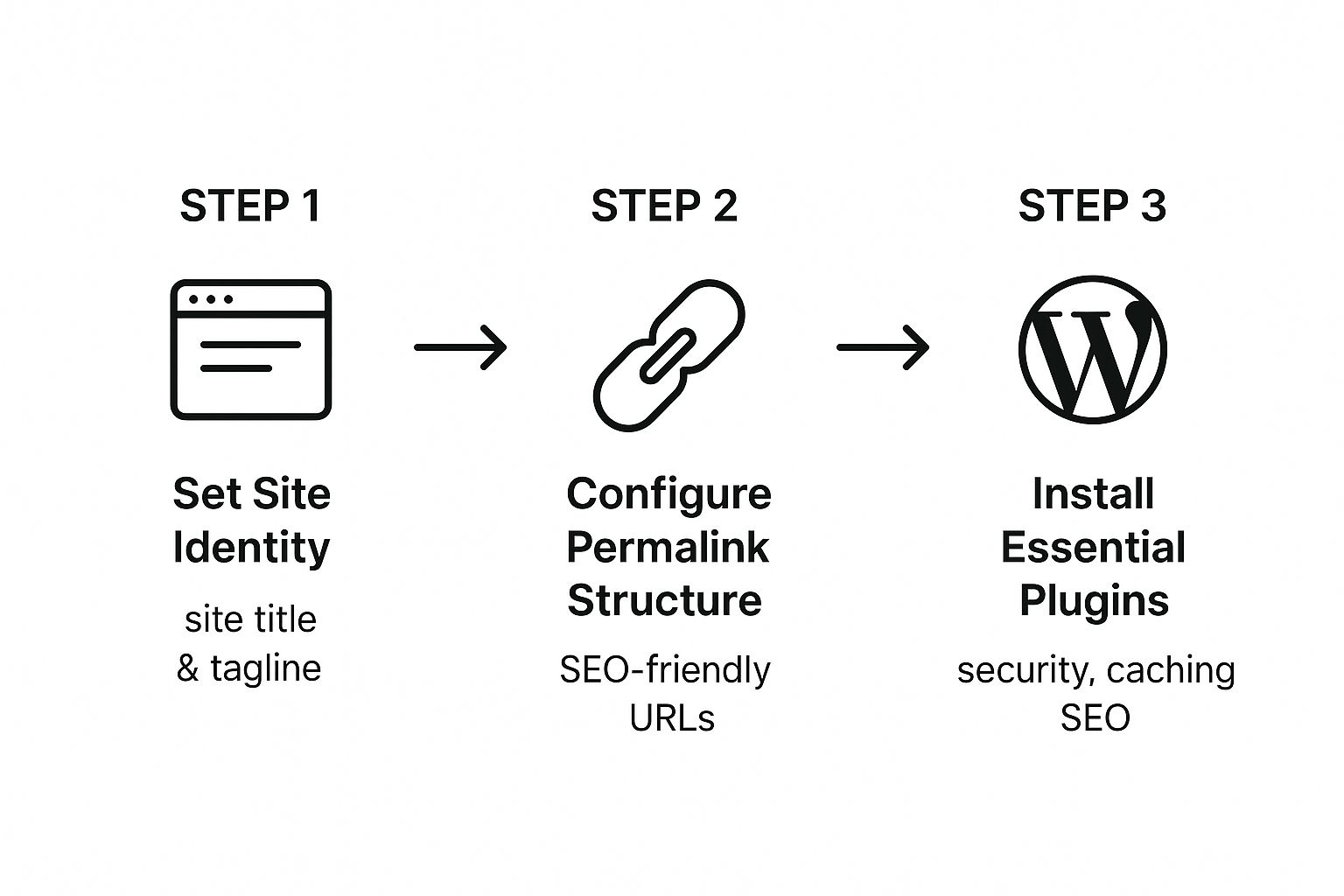
As you can see, getting your identity, permalinks, and core plugins in order creates the launchpad for everything that follows.
Installing Your Core Toolkit: Essential Plugins
Think of plugins as apps for your website. They add crucial functionality that WordPress doesn't include out of the box. With a library of over 59,000 options, it’s easy to get lost. But for now, we just need to focus on the absolute essentials.
These first few plugins are your site’s 24/7 security guard, performance mechanic, and SEO consultant all rolled into one. You can find and manage them from the "Plugins" section of your dashboard.
To start, you need to cover four key areas:
- SEO: You need a guide to help you optimize your content for Google.
- Security: Your site needs a bouncer to keep out the bad guys.
- Speed: A fast site is a must for both visitors and search rankings.
- Backups: You need an insurance policy in case anything ever goes wrong.
The right plugins handle all of this for you. If you're looking for recommendations beyond the basics, this curated list of WordPress tools and plugins is a fantastic resource.
Here’s a quick checklist of the types of plugins you should install immediately.
Essential WordPress Plugin Checklist
Installing a few key plugins right away sets your blog up for success. This table breaks down the non-negotiable categories and gives examples of popular, trusted options that will protect your site, boost its speed, and help you rank better in search engines.
| Plugin Category | Example Plugin | Primary Function |
|---|---|---|
| SEO | Rank Math or Yoast SEO | Guides your on-page optimization efforts and builds your XML sitemap for search engines. |
| Security | Wordfence Security | Acts as a firewall and malware scanner, protecting your site from brute-force attacks. |
| Performance | WP Rocket or W3TC | Caches your pages to dramatically improve loading speeds, a key factor for SEO and user experience. |
| Backups | UpdraftPlus | Automates site backups to a remote location (like Google Drive), giving you a restore point. |
| Analytics | MonsterInsights | Easily connects your site to Google Analytics so you can see visitor data right in WordPress. |
These five pillars form the technical backbone of a healthy blog.
Installing them is simple: just navigate to Plugins > Add New, search for the plugin's name, and click "Install Now," followed by "Activate." Most of them have a setup wizard that will walk you through the basic configuration.
With this foundation laid, you're officially ready to move on to the more creative side of building your blog.
Designing a Blog That Builds Trust
With the technical nuts and bolts sorted, it's time for the fun part: shaping how your blog actually looks and feels to a visitor. Your blog’s design is your digital first impression, and it happens in the blink of an eye. A clean, professional design builds instant credibility and makes people want to stick around. On the other hand, a cluttered or confusing layout can send them running before they’ve even read a single word.
Thankfully, you don't need to be a designer or a coder to create a beautiful website anymore. WordPress handles all the heavy lifting with themes—pre-built design templates that control your blog’s layout, fonts, and color scheme. Think of a great theme as the perfect frame for your content; it makes everything you write look better.
Free Themes vs. Premium Themes
One of the first forks in the road is deciding between a free theme and a paid (premium) one. The official WordPress directory has thousands of fantastic free options, and honestly, they're more than enough for most people just starting out.
But as your blog grows, investing in a premium theme can be a game-changer. They typically come packed with more powerful features, dedicated customer support (a lifesaver when you're stuck), and deeper customization options that don't require you to touch a line of code.
| Aspect | Free Themes | Premium Themes |
|---|---|---|
| Cost | Completely free to install and use. | Usually a one-time fee ($40-$80). |
| Support | Limited to community forums. | Direct access to dedicated support teams. |
| Features | Basic customization options. | Advanced features like page builders. |
| Updates | Reliant on the goodwill of the developer. | Guaranteed updates for security and features. |
For most new bloggers, I highly recommend starting with a top-tier free theme like Astra, Kadence, or GeneratePress. They are known for being incredibly fast, lightweight, and flexible enough to get a professional look right out of the box.
How to Choose the Right WordPress Theme
Jumping into the theme library can feel like diving into an ocean of options. It's easy to get distracted by flashy demo sites. My advice? Ignore the pretty pictures and focus on the fundamentals. A great theme has to be more than just a pretty face.
Here’s a quick checklist I run through when evaluating any theme:
- Lightweight and Fast: Site speed isn’t just a nice-to-have; it's a huge factor for Google rankings and keeping readers from bouncing. A bloated theme is a lead weight on your blog.
- Mobile-Responsive: Well over 60% of web traffic is now on mobile. If your blog looks broken on a smartphone, you’re losing a massive chunk of your audience.
- Highly Rated and Recently Updated: Always check the reviews and the "Last Updated" date. You want a theme that’s actively maintained, which is crucial for security and compatibility.
- Well-Documented: Good developers provide clear documentation or tutorials. This will save you countless hours of frustration trying to figure out how a specific feature works.
Ever come across a site with a design you absolutely love? You can often figure out what theme they're using. Tools like this handy WordPress theme detector are great for a little "under the hood" research and can give you some amazing inspiration.
Customizing Your Theme's Appearance
Once you've installed and activated your theme, it’s time to make it yours. You’ll do this in the WordPress Customizer, which you can find by navigating to Appearance > Customize in your dashboard.
The best part about the Customizer is that it gives you a live preview of your changes as you make them. You can experiment with colors, fonts, and layouts without any fear of breaking your live site. It’s all point-and-click.
Pro Tip: Don't try to customize everything at once. Nail down these three things first: your logo, your brand colors, and your main navigation menu. Getting these right provides the biggest and most immediate visual impact.
Start by uploading your logo in the "Site Identity" section. From there, head to the "Colors" options to dial in your brand's palette. Finally, use the "Menus" panel to build out your primary navigation—think "About," "Contact," and your key blog categories. These simple tweaks are what begin to transform a generic template into a blog that is unmistakably yours.
Publishing Your First Foundational Posts

With the technical setup and design handled, we’ve arrived at the very heart of your blog: creating the content. This is the engine that drives traffic, builds your audience, and ultimately, defines what your brand is all about. It’s time to publish the first foundational articles that will anchor your entire site.
Your initial goal isn't just to get something on the page. The real objective is to create pillar content. These are the comprehensive, in-depth articles that solve a major problem for your audience. Think of them as the definitive guides on your topic—the kind of content people will bookmark, share, and link back to for years. They are your blog’s most valuable assets.
Planning Your Pillar Content
Before you even type a single word, you need a plan. Getting a firm grip on keyword research best practices is non-negotiable for finding your audience. Your first step is to identify the core topics and questions your ideal reader is searching for.
Try brainstorming 5-10 core problems your audience faces. If you run a blog on home gardening for beginners, these might be:
- "Choosing the right soil for container plants"
- "A complete beginner's guide to composting"
- "How often should I water my indoor plants?"
These topics are perfect candidates for pillar posts. They are "evergreen," meaning they'll stay relevant for a long time and have the potential to attract a steady stream of traffic from search engines.
To keep all these ideas from getting chaotic, I find a solid organizational system is a lifesaver. You can see how we use Notion for content planning to build a powerful workflow for tracking ideas, outlines, and publication schedules. It ensures you never run out of great topics.
Writing and Structuring Your First Post
Once you've landed on a topic, it’s time to jump into the WordPress block editor. If you're new to it, think of it as a set of digital Legos. The intuitive, drag-and-drop interface lets you build articles piece by piece using different "blocks" for paragraphs, headings, images, and lists.
The secret to a readable and SEO-friendly post is structure. Use headings to break up your content into logical, scannable sections.
- H1 (Title): Your main post title. You only get one of these per post, so make it count.
- H2 (Major Sections): Use these for the main sub-topics of your article.
- H3 (Sub-points): These are great for breaking down H2 sections into more specific details.
This hierarchy doesn't just help readers navigate your content; it gives search engines clear signals about what your article covers, which is a massive factor for ranking well.
A well-structured post with clear headings, short paragraphs, and plenty of white space is essential. People rarely read online; they scan. If you make your content easy to scan, you'll keep them on the page longer.
Creating Essential Static Pages
Beyond your articles, every blog needs a few key static pages to build trust and provide basic information. Before you officially "launch," make sure these three are published:
- About Page: This is your chance to tell your story. Who are you? Why did you start the blog? What can readers expect? Make it personal and relatable.
- Contact Page: Give readers, potential partners, and brands a clear way to get in touch. A simple contact form or a dedicated email address is all you need.
- Privacy Policy: In many parts of the world, this is a legal requirement. It tells visitors what data you collect and how you use it. You can find free online tools or WordPress plugins to generate a basic policy.
With your first pillar post published and these core pages in place, your blog is officially ready to be shared. You’ve laid the foundation and created the first pieces of high-value content that will start your journey toward building a dedicated audience.
Answering the Big Questions About Starting a Blog
Jumping into blogging for the first time can feel a little intimidating. You're bound to have a few big questions swirling around as you get your bearings. Think of this as your cheat sheet—I'm going to tackle the most common ones I hear from new bloggers, giving you the straightforward answers you need to move forward.
What’s the Real Cost to Get a Blog Off the Ground?
There's a persistent myth that launching a professional blog will set you back a small fortune. The truth? You can get a self-hosted WordPress blog up and running for about $3 to $5 per month. That's it.
That small monthly fee usually covers your web hosting and, more often than not, they’ll even throw in a free domain name for the first year. It's an incredible deal.
Sure, there are free platforms out there, but investing this tiny amount is one of the smartest moves you can make. Self-hosting means you own your site, you control your content, and you open up every possible way to make money later on. It just looks more professional from day one. You can always spend more on premium themes or fancy plugins down the road, but those are completely optional when you're just starting out.
My Take: The financial barrier to entry is almost non-existent. For less than the price of a fancy coffee each month, you're building a genuine digital asset that belongs entirely to you.
How Do New Bloggers Actually Earn an Income?
This is the million-dollar question, isn't it? Very few successful bloggers rely on just one thing. The real strategy is to build several different income streams over time.
Here are the most reliable ways people make it work:
- Display Ads: This is the classic model. You place ads on your site using networks like Google AdSense and get paid when people see or click them.
- Affiliate Marketing: You recommend products or services you actually believe in, and when someone makes a purchase through your unique link, you get a commission.
- Digital Products: This is where you create and sell your own stuff—think ebooks, short online courses, printable templates, or even workshops.
- Offering Services: You can directly sell your expertise. This could be anything from coaching and consulting to freelance writing in your niche.
Smart, full-time bloggers almost always use a mix of these. It creates a much more stable and reliable income that isn't dependent on a single source.
How Long Does It Take to Start Getting Traffic?
If there's one skill every new blogger needs, it's patience. Building a consistent flow of visitors, especially from search engines, doesn't happen overnight. It's a marathon, not a sprint.
Realistically, you should expect it to take anywhere from 3 to 6 months of consistent work before you start seeing any meaningful, predictable traffic from a search engine like Google.
In those early months, your entire focus should be on one thing: creating and publishing genuinely helpful, high-quality content that's optimized for search. You can get some early wins by sharing your work on social media, but the long-term, sustainable traffic—the kind that grows your blog while you sleep—comes from search. You just have to put in the work upfront.