How to Choose Website Hosting Your Ultimate Guide
Learn how to choose website hosting with confidence. This guide breaks down hosting types, performance metrics, and pricing to help you find the perfect host.


Picking the right website hosting really boils down to three things: first, you have to get real about what your site actually needs; second, you'll compare the big players like shared, VPS, and cloud hosting; and third, you'll size up providers on what matters—performance, support, and what it’s really going to cost you long-term.
Nailing this foundation is the single most important thing you can do for your site's speed and reliability.
Matching Your Website to the Right Hosting

Before you even think about looking at a hosting company's pricing page, you need a solid blueprint of your website's demands. This isn't about gazing into a crystal ball; it's about making a realistic, informed assessment of what you need now and where you might be in a year.
Think of it like buying a car. You wouldn't get a two-seater sports car to haul construction gear.
In the same way, the hosting that keeps a simple personal blog online is worlds apart from what an interactive e-commerce store needs. Your website's entire purpose dictates its technical requirements. This initial homework is what keeps you from overpaying for power you'll never use or, even worse, picking a plan your site will outgrow in a few short months.
Analyze Your Website's Purpose and Functionality
First things first, what does your website do? Is it there to inform, sell, or entertain? The answer directly impacts how a server’s resources will be used.
Let's walk through a couple of common scenarios.
Imagine a freelance photographer building a portfolio. Their site is all about high-resolution images, which means large files. Their biggest needs are fast storage and high bandwidth. Every time someone loads a gallery, the server has to deliver that data, and fast. For them, a hosting plan with generous SSD (Solid State Drive) storage and unmetered bandwidth isn't a luxury—it's essential.
Now, contrast that with a small business running a WooCommerce store. Their world revolves around CPU power and RAM. Every single transaction, from adding an item to the cart to checking out, is a process the server has to handle. If you have dozens of people shopping at once, a cheap plan will just crumble under the pressure, leading to sluggish checkout pages and lost sales. That site needs a robust setup that can handle a lot of database activity.
Key Takeaway: Stop shopping for hosting based on generic labels like "business plan." Instead, match your website's core functions—like processing payments, streaming video, or displaying huge image files—to specific server resources like CPU, RAM, and storage type.
Project Your Traffic and Content Volume
Estimating traffic can feel like guesswork, but you can make an educated stab at it. If you’re launching a brand-new blog from scratch, your traffic will be close to zero for a while. A basic shared hosting plan is almost always the right call.
But if you're moving a site that already gets 50,000 monthly visitors, you have a huge advantage. You have data. Your analytics can tell you when your peak traffic hours are and what your resource usage looks like, giving you hard numbers to take to your search.
Content volume is the other big piece of the puzzle. A simple five-page "brochure" site for a local plumber has tiny storage needs. But a content-heavy site, like a news portal or a platform full of video tutorials, is going to grow constantly. Think about the kind of content you'll have:
- Static Websites: These are incredibly lightweight sites built with fixed content. They're super fast and secure because they don't rely on a traditional database. For this route, you can find some great options among the best static site CMS platforms available today.
- Dynamic Websites: This is your typical WordPress site, using a database to pull in content for every visitor. They require more server resources to run smoothly.
- Media-Heavy Websites: If your site is all about video, audio, or high-res photos, your storage and bandwidth needs are going to be way above average.
By putting together a simple profile of your site—its purpose, its features, and its likely traffic—you create a data-backed blueprint. This little bit of prep work transforms the confusing maze of hosting marketing into a straightforward task of matching your needs to the right solution.
Comparing Shared, VPS, Dedicated, and Cloud Hosting
Stepping into the world of web hosting can feel like learning a new language. You're immediately hit with terms like Shared, VPS, Dedicated, and Cloud. Getting a handle on these isn't just about memorizing definitions; it’s about understanding how each one directly affects your website's performance, security, and, of course, your budget.
Making the right choice from the start saves you the massive headache of a slow website or a painful, costly migration down the line. Each of these hosting types serves a very different purpose, from powering a small personal blog to handling the intense demands of a major online store.
Let's break down what these options actually mean in practical, real-world terms.
Shared Hosting: The Entry-Level Option
Shared hosting is where most people start, and for good reason. Imagine it like living in an apartment building. You and many other tenants (websites) live in the same building (a single server) and share its resources—the elevator (CPU), water supply (RAM), and electricity (bandwidth).
This setup makes it incredibly affordable, which is its biggest draw. The catch? If one tenant decides to throw a massive party (meaning a neighboring website gets a huge traffic spike), it can slow down the elevator for everyone else. Performance can be a bit unpredictable since you're directly affected by what your "neighbors" are doing.
My Takeaway: Shared hosting is perfect for brand-new blogs, simple brochure sites for small businesses, and personal portfolios. It’s a low-risk, low-cost way to get online, but just know that you'll need to upgrade as soon as your traffic starts to grow.
Despite newer, more powerful options, shared hosting is still a major player. It holds around 34-37.64% of the market share and remains a vital entry point for millions of small businesses. You can explore more about these web hosting market trends and statistics to get a sense of how the industry is shifting.
VPS Hosting: The Smart Upgrade
A Virtual Private Server (VPS) is the logical next step up. Think of this as owning a condo in that same apartment building. While you still share the building's main infrastructure, your unit is completely partitioned off. You have your own dedicated kitchen, bathroom, and living space.
This means you get a guaranteed slice of the server's resources—CPU, RAM, and storage—that no one else can touch. This isolation dramatically improves both performance and security. A neighbor's traffic surge won't slow you down.
- More Control: VPS hosting almost always gives you root access, which is the freedom to install custom software and configure the server environment to your exact needs.
- Better Performance: With dedicated resources, your site can handle more traffic and run complex scripts much faster than it ever could on a shared plan.
VPS is the sweet spot for websites that have outgrown shared hosting but don't quite need the immense power (and cost) of a dedicated server.
Dedicated Hosting: The Ultimate Powerhouse
A dedicated server is like owning the entire apartment building yourself. You get exclusive access to every single resource on that machine. There are no neighbors, no shared utilities—it's all yours. This setup delivers the absolute highest level of performance, security, and control possible.
This is the solution for websites with serious demands. We're talking about large-scale e-commerce stores processing thousands of transactions, high-traffic news outlets, or businesses running complex web applications. Of course, this level of exclusivity comes with a premium price tag.
Managing an entire server also requires significant technical know-how. While managed dedicated hosting is an option, it's a solution best reserved for established, resource-intensive projects.
Cloud Hosting: The Flexible Scaler
Cloud hosting is the most modern approach and works very differently. Instead of relying on a single physical server, your website is hosted on a network of interconnected virtual servers that work in tandem. If one server goes down, another one instantly picks up the slack, making it incredibly reliable.
The real magic of cloud hosting, though, is its scalability. Imagine your website gets featured on a major news site, and your traffic suddenly explodes. With traditional hosting, your site would likely crash. With cloud hosting, you can instantly scale up your resources to handle the surge and then scale back down when things quiet down. You only pay for what you use, much like a utility bill.
This on-the-fly flexibility makes it ideal for businesses with fluctuating traffic, fast-growing startups, and any project where uptime and scalability are non-negotiable.
Here is a visual representation of how bandwidth needs can influence your hosting decision, comparing small, medium, and large websites.
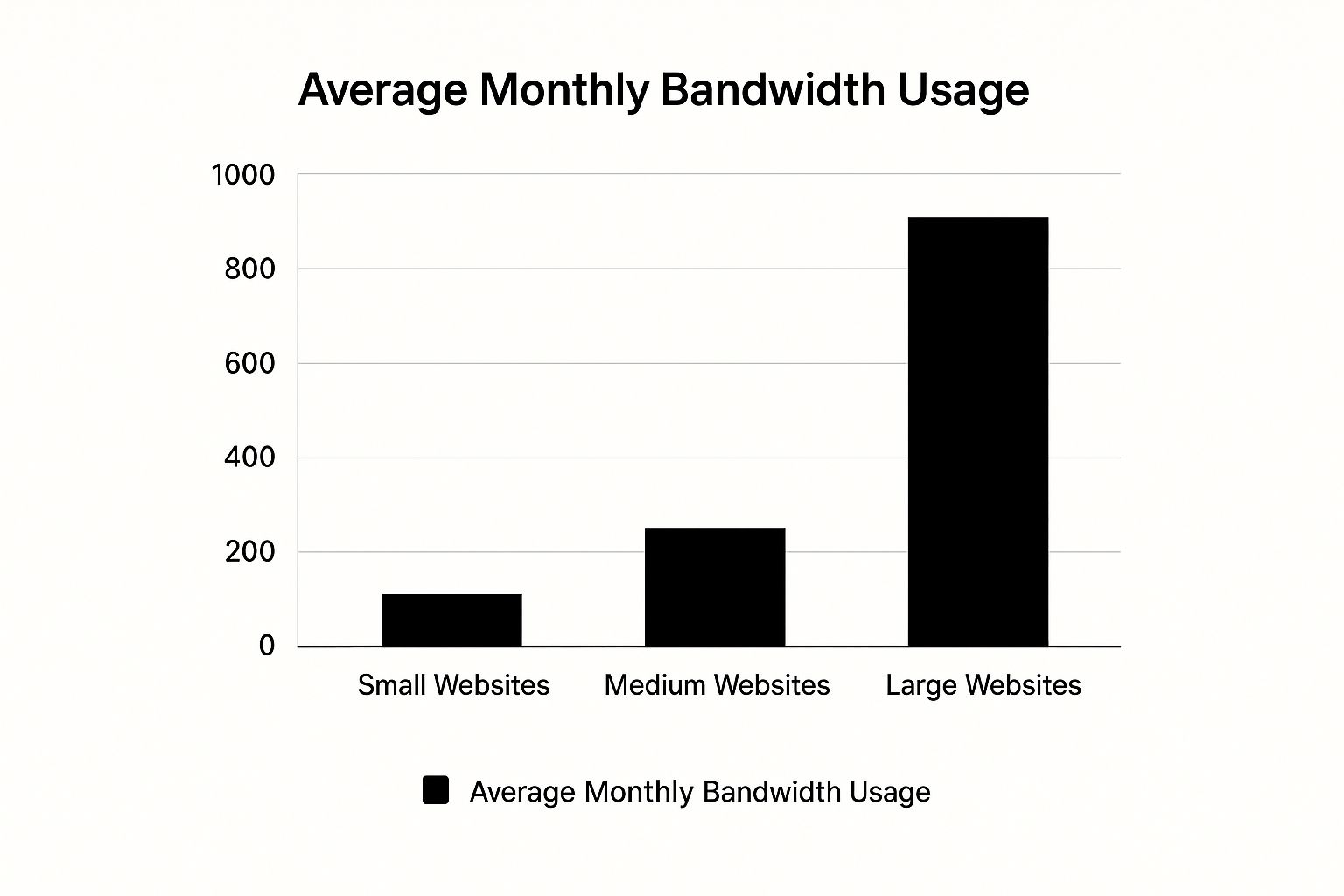
This chart clearly shows the exponential jump in data transfer needs as a site grows, highlighting why scalable hosting becomes so critical.
To put it all together, here’s a quick comparison to help you see the key differences at a glance.
Hosting Types At A Glance
| Feature | Shared Hosting | VPS Hosting | Dedicated Server | Cloud Hosting |
|---|---|---|---|---|
| Best For | New sites, blogs, portfolios | Growing sites, small businesses | High-traffic sites, large e-com | Startups, apps, variable traffic |
| Performance | Basic, affected by neighbors | Good, dedicated resources | Excellent, all resources are yours | Excellent, highly reliable |
| Scalability | Low, requires plan upgrade | Moderate, can add resources | Limited to server hardware | High, on-demand scaling |
| Control/Customization | Very limited | High, often includes root access | Full control over hardware/software | High, full server configuration |
| Cost | $ (Lowest) | $$ (Mid-range) | $$$$ (Highest) | $$$ (Pay-as-you-go) |
| Technical Skill | Beginner | Intermediate | Advanced | Intermediate to Advanced |
Ultimately, the right choice comes down to your specific needs. An e-commerce business has vastly different requirements than a personal blog, and understanding these fundamental differences is the key to picking a plan that will support your goals, not hold you back. For online stores specifically, you can get a better sense of what platforms work best with different hosting types by reviewing our collection of top e-commerce CMS options.
Evaluating Hosting Performance and Essential Features

Alright, so you've got a handle on the type of hosting you need. Now comes the real work: digging into the providers themselves. This is where you have to look past the flashy marketing claims and get into the technical nitty-gritty that actually determines how well your site will run.
It’s about more than just finding a plan that works on launch day. You're building a foundation. Getting these details right from the start saves you from massive headaches and costly migrations down the road.
Decoding Uptime Guarantees
Every host loves to plaster a big "99.9% uptime" guarantee on their homepage. It looks great, but what does it actually mean? The tiny difference between 99.9% and 99.99% can translate into hours of your site being offline.
Let's put those numbers into perspective for a full year:
- 99% Uptime: Sounds decent, right? Wrong. That's nearly 3 days and 15 hours of downtime. For an online store, that's catastrophic.
- 99.9% Uptime: This is the bare minimum industry standard. It still allows for about 8 hours and 45 minutes of downtime per year.
- 99.99% Uptime: Now we're talking. This brings potential downtime to just under 53 minutes for the entire year.
- 99.999% Uptime: Often called "five-nines," this is the gold standard, giving you a buffer of only 5 minutes of downtime annually.
A word of caution: Always read the Service Level Agreement (SLA). I've seen hosts that don't count "scheduled maintenance" against their uptime guarantee. And if they fail? You might only get a small hosting credit, which is little comfort for lost sales or trust.
Consistent downtime doesn't just annoy visitors; it signals unreliability to search engines, which can hurt your rankings. A solid, verifiable uptime guarantee is your first checkpoint.
The Critical Role of Storage Speed
The storage technology a host uses is one of the single biggest factors in your site's speed. For a long time, traditional Hard Disk Drives (HDDs) were all we had. They work with spinning platters and a physical read/write arm, which makes them inherently slow.
Today, Solid-State Drives (SSDs) are the only way to go. Because they use flash memory with no moving parts, they can access data almost instantly. We're not talking about a minor bump in performance—a site on an SSD can serve files and process database requests up to 20 times faster than one on an old-school HDD.
This speed is non-negotiable. With 47% of users expecting a page to load in two seconds or less, slow storage will actively drive people away. It's a foundational piece of the puzzle when you're figuring out how to choose website hosting.
Must-Have Security Features
A few years ago, things like SSL certificates and daily backups were often pricey extras. Anymore, they're absolute table stakes. A security breach can destroy your reputation overnight, so any host worth your money must include these essentials for free.
Here’s what I consider non-negotiable:
- Free SSL Certificate: An SSL certificate encrypts data between your site and your visitors (that's the "https" in your URL). It's crucial for protecting logins and payment info, and it's a known Google ranking signal. There's no excuse for a host not to provide this.
- Automated Backups: Things will break. A bad plugin update, a simple mistake, or a hack can take your site down. Automated daily backups are your safety net. Look for a host that makes it incredibly simple to restore a clean version with just a click.
- Malware Scanning and Firewalls: The best defense is a proactive one. A good host will have server-level firewalls to block malicious attacks before they even get to your site. Many also provide regular malware scanning to find and isolate any threats.
Thinking about these features is also about ensuring your site can handle what you want to build. For example, if you plan to explore top WordPress chat plugins to engage with users, you need a hosting environment that is both fast and secure enough to run them without a hitch. This is especially true for those who rely heavily on that ecosystem; knowing the best tools for WordPress users helps you understand the demands you'll place on your server.
A hosting provider’s spec sheet is only half the story. The slick marketing and promises of 99.9% uptime don't mean a thing when your site goes down and you can't get a real person to help you.
Let’s be honest, the real test of any web host happens at 2 a.m. on a Saturday when your e-commerce site suddenly throws a 500 error during a holiday sale. Every minute offline costs you money and customer trust. In that moment of panic, what matters isn't the gigabytes of storage you have; it's getting a competent technician on live chat who can actually fix the problem.
This is where reputation and support quality shift from being "nice-to-haves" to the absolute bedrock of a good hosting decision.
Digging into Real User Reviews
First things first, you need to get past the glowing testimonials on a host’s homepage and find some unfiltered feedback. I always head straight for platforms like G2 or Trustpilot, but you have to know how to read them critically.
Don't just glance at the overall star rating. You need to hunt for patterns. Are different people, months apart, all complaining about the same issues? That’s a signal.
- Look for consistency: A few bad reviews are inevitable. A constant drumbeat of complaints about slow ticket responses, surprise billing, or unresolved technical problems? That's a massive red flag.
- Filter for specifics: Ignore the vague "they're great!" comments. Zero in on reviews that describe a specific scenario. How did the support team handle a botched site migration, a billing dispute, or a suspected malware attack? The details tell the real story.
- Evaluate problem-solving: Look for signs of first-contact resolution. Did the agent solve the problem right away, or did the user get bounced between three different departments over two days? The best support teams empower their frontline agents to fix things, period.
The Non-Negotiable Support Channels
When things go sideways, you need help now, not tomorrow morning. This is why 24/7 multi-channel support is non-negotiable. At a bare minimum, a provider must offer live chat, phone support, and a reliable email/ticketing system.
I find live chat is perfect for quick, simple fixes. But for a complex, urgent disaster, nothing beats getting a human on the phone who can talk you through it. Be very skeptical of any host that makes you hunt for their contact info or only offers support during limited business hours. That’s a sign they don’t prioritize it.
A great hosting provider doesn't just offer support as a feature; they build their entire service around it. Their reputation hinges on being reliable and responsive because they know their success is completely tied to your website's performance.
Assessing Infrastructure and Data Center Location
Where your host’s servers are physically located has a direct impact on your website's speed, especially for your visitors. The physical distance data has to travel matters.
If your customers are primarily in North America, it makes sense to choose a host with data centers in the US and Canada. If you have a global audience, you’ll want a provider with a worldwide network of data centers or one that seamlessly integrates with a Content Delivery Network (CDN). A CDN caches your site at various locations around the globe, ensuring your content is served from a server that's geographically close to each visitor, which dramatically cuts down on load times.
This has never been more critical. The market is incredibly crowded, with estimates of around 330,000 web hosting companies out there. This fierce competition, as detailed in this analysis of growth and trends in the web hosting industry, is pushing providers to bundle more features. But at the end of the day, it's the core infrastructure and support that separate the good from the great. For those on all-in-one platforms, our in-depth website builder reviews also dig into the quality of their built-in hosting and customer support.
Avoiding Hidden Fees and Understanding Long-Term Costs

The web hosting industry has perfected the art of the irresistible lure: impossibly low introductory prices. You’ve seen the ads, promising to get your website online for less than a cup of coffee. It's a carefully crafted marketing strategy designed to get you in the door.
The catch, of course, is hidden in the fine print. That promotional price almost always requires a long-term commitment—two, three, or even four years. Once that period is up, the renewal rate can jump by 300% or more. Suddenly, your "budget-friendly" plan becomes a significant recurring expense.
This isn't a bait-and-switch; it's just standard practice in a fiercely competitive market. The global web hosting market ballooned from $94.64 billion in 2022 to $124.80 billion in 2023, with projections hitting $159.9 billion by 2025. These web hosting market share statistics show just how much pressure providers are under. Your job is to look past the initial offer and calculate the true long-term cost.
Exposing the Common Pricing Traps
When you're first figuring out how to choose website hosting, focusing only on that shiny monthly fee is a classic rookie mistake. A much smarter approach is to calculate the Total Cost of Ownership (TCO) over at least three years. This means digging into what happens after the honeymoon period ends.
A cheap starter plan might also conveniently omit features you later realize are essential, nudging you into a costly upgrade. For instance, I've seen hosts offer free automatic backups on their introductory plans, only to quietly shift that feature to a premium add-on at renewal. A critical function you took for granted now costs you extra every month.
Key Takeaway: The renewal rate is the real price of your hosting plan. Always compare providers based on their standard, non-promotional pricing to get an accurate picture of your long-term budget commitment.
A Checklist of Potential Hidden Costs
Financial surprises are the last thing you want when you're focused on running your website. Before you ever enter your credit card details, you need to scrutinize the terms for these common upsells and hidden charges. They can add up fast and completely negate the savings from that initial deal.
Here are the most frequent costs that catch people off guard:
- Domain Renewal Fees: A "free" domain for the first year is a great perk, but the renewal fee in year two can be drastically higher than the market rate.
- Backup and Restore Fees: Even if backups are included, some providers will charge you a hefty one-time fee to actually restore your site from that backup. Always check.
- SSL Certificate Renewals: A free SSL is standard now, but you need to confirm it’s free for the life of your hosting plan, not just a one-year teaser.
- Email Hosting Charges: Don’t assume professional email (like [email protected]) is included. It’s often a separate, paid add-on.
- Plan Upgrade Costs: As your site grows, you'll inevitably need more resources. Find out the price difference between your current plan and the next tier up before you need it.
- "Recommended" Add-ons: Watch the checkout process closely. Hosts often pre-select paid add-ons like enhanced security or SEO tools. Uncheck anything you don't explicitly need.
Thinking about these costs is part of a bigger strategy, just like choosing the right platform to build your site. For a small business, getting the full financial picture is critical, which is why we've also put together a guide on finding the best website builder for small business that balances powerful features with long-term value. By being vigilant and planning ahead, you can ensure your hosting choice fits your budget today and for years to come.
Finalizing Your Hosting Decision
You've done the heavy lifting. You've audited your site's needs, weighed the different hosting types, and narrowed down the list of providers. Now comes the moment of truth: making the final call. This isn't about starting over; it's about a final, confident check to ensure you haven't missed a critical detail.
Think of it like the final walkthrough before buying a house. Committing to a hosting plan, especially a multi-year one, is a big deal. A quick once-over on the most important factors will confirm your new hosting environment is ready for today and prepared for your future growth.
https://www.youtube.com/embed/5v4v-MPoEOs
Your Pre-Launch Quality Check
Before you pull out your credit card, pause for a moment. This isn't about second-guessing all your hard work, but about validating it. A few minutes now can save you from major headaches and a painful migration down the road.
Run through these points one last time:
- Server Location and Performance: Did you confirm the provider has data centers close to your primary audience? If your customers are in the UK, a server in London will always be faster than one in Dallas. It's a simple check that has a huge impact on user experience.
- Support Quality Confirmation: Go back and read the most recent user reviews. What are people really saying about support? Look for specifics on response times and whether the agents actually solve problems. Is their 24/7 support a real, helpful human or just a bot that creates a ticket?
- Long-Term Cost Calculation: That amazing introductory price is designed to get you in the door. What’s the actual renewal rate? Do the math for the total cost over two or three years. You don't want a nasty surprise when that first-year discount disappears.
This final gut check solidifies your decision, ensuring it's grounded in a complete picture, not just a flashy sales page.
Understanding Guarantees and Migrations
Two of the most overlooked details are the money-back guarantee and the migration policy. Don't skip these—they are your safety nets.
Most good hosts will offer some kind of money-back guarantee, usually between 30 and 90 days. But you have to read the fine print. Is it a true, no-questions-asked refund? Or do they subtract the cost of your "free" domain name or other setup fees? This policy gives you a risk-free period to kick the tires and make sure their service lives up to the hype.
A provider's money-back guarantee is more than just a refund policy; it's a statement of confidence in their own service. A lengthy and straightforward guarantee suggests they are betting you'll be happy enough to stay.
If you’re moving a site that’s already live, the migration process is a huge factor. Many of the best hosts offer a free site migration to win your business. This service is worth its weight in gold, saving you the technical nightmare of moving databases and files yourself.
But you need to confirm what "free migration" actually means. Do their experts handle everything for you, or do they just hand you a plugin and a link to a support doc? A fully managed, hands-off migration is what you want. It lets you focus on your business while the pros handle the move, ensuring a seamless switch with zero downtime.
Once you’ve ticked these last few boxes, you can sign up with confidence, knowing your website is being built on a solid, well-researched foundation.
Common Questions About Choosing a Web Host
Diving into web hosting often brings up a few key questions that can make or break your decision. Getting clear answers is essential—it's the difference between a smooth launch and a future filled with performance bottlenecks and frustrating migrations.
Let's tackle some of the most common uncertainties people face when figuring out how to choose website hosting.
Is Free Hosting Ever a Good Idea?
Honestly, for any serious project, the answer is a hard no. The allure of "free" is strong, but it comes with strings attached that can seriously undermine your website's credibility and performance.
Free hosts typically plaster their own ads on your site, give you barely enough resources (which means painfully slow load times), and offer virtually no customer support when things go wrong. Think of these plans as temporary sandboxes—perfect for learning to code or testing a concept, but not for a real business, portfolio, or a blog you want people to actually read.
For anything you're serious about, a paid plan isn't a cost; it's a foundational investment in your site's reliability.
What's the Real Difference Between Managed and Unmanaged Hosting?
It all comes down to a single, critical question: who is responsible for managing the server?
- Unmanaged Hosting: You're handed the keys to a server, and that's it. You're on the hook for everything—installing software, running security patches, and troubleshooting every glitch. It offers total control, but you'd better have the technical chops to handle it.
- Managed Hosting: The provider takes care of all the backend grunt work. They handle security monitoring, software updates, performance tweaks, and technical support.
For the vast majority of website owners, managed hosting is the only way to go. It lets you focus your energy on what actually matters—building your business and creating great content—instead of becoming an accidental server administrator.
Our Recommendation: Unless you're a seasoned developer or have an IT team on standby, always choose managed hosting. The slightly higher price is more than worth the time you'll save and the headaches you'll avoid.
How Do I Know When It's Time to Upgrade My Hosting Plan?
Your website will start sending you some pretty clear warning signs when it's straining at the seams of its current plan. The most obvious signal? A noticeable drop in speed, especially when you get a surge of visitors.
If your site feels sluggish or you start seeing frequent downtime (like those dreaded 503 errors), that’s a clear indication that you're maxing out your server's resources. Another tell-tale sign is bumping up against your plan's limits, like running out of storage space or hitting your monthly bandwidth cap.
It's always better to upgrade before these problems become critical. A proactive move keeps your visitors happy and protects your site’s reputation. This is a big reason why many people stick with established providers; they offer clear upgrade paths and infrastructure they can trust. It’s no surprise that the top 10 hosting companies command over 33.6% of the global market. You can dig deeper into these web hosting statistics and user preferences to understand why market leaders often provide a more reliable growth runway.